Customers don’t stop asking questions when your office closes.
A potential customer may enquire about your product at 11 PM. A patient may want to book an appointment early in the morning. A loan applicant may want to know which documents are required on a Sunday.
But keeping a complete sales or customer-support team available 24×7 can be expensive and difficult to manage.
This is where AI Agents can help.
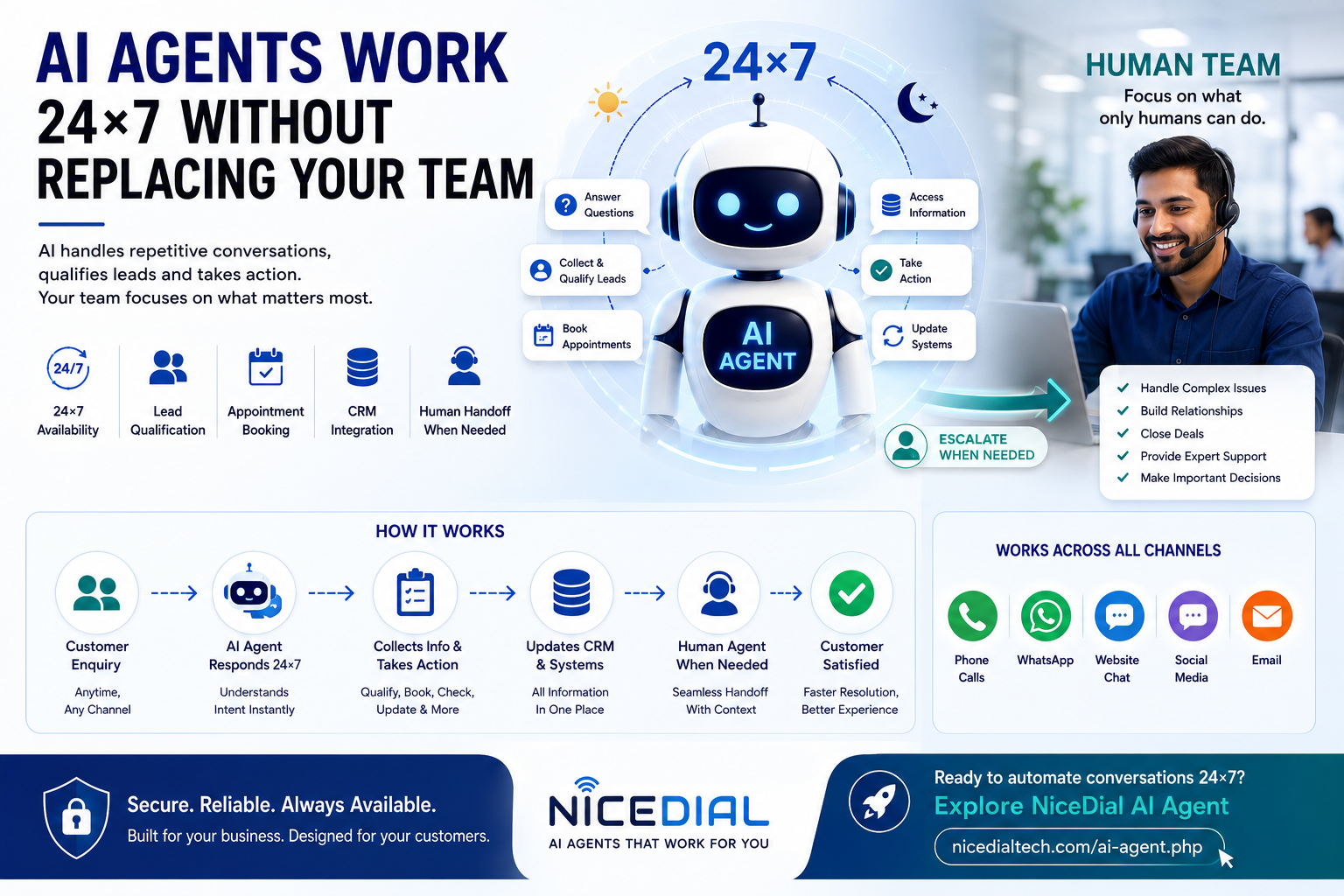
An AI Agent can act as the first layer of customer engagement—answering routine questions, understanding customer requirements, collecting information, qualifying leads, booking appointments, and performing supported business actions.
And when a conversation requires human expertise?
The AI Agent can transfer it to your team.
The objective isn’t:
AI instead of employees.
A more practical model is:
AI Agent + Human Team
Let’s understand how this works.
What Is a 24×7 AI Agent?
A 24×7 AI Agent is an AI-powered system designed to handle supported customer interactions automatically, even when employees are unavailable.
Depending on how it is configured and integrated, an AI Agent can communicate through channels such as:
- Phone calls
- Website chat
- Messaging channels
- Customer-support systems
Instead of simply displaying predefined answers, an AI Agent can understand what a customer is trying to accomplish and guide the conversation toward an appropriate outcome.
For example:
Customer:
“I’d like to book a product demo tomorrow afternoon.”
The AI Agent can understand:
Intent: Book Demo
Preferred Day: Tomorrow
Preferred Time: Afternoon
If connected to an appropriate scheduling system, it can check availability and continue the booking process.
That interaction can happen even when your sales team isn’t online.
Why Do Businesses Need 24×7 Customer Engagement?
Customer behaviour has changed.
People don’t necessarily research products, compare services, or submit enquiries during normal office hours.
Imagine a prospect visiting your website at 10:30 PM.
They are interested in your service and have several questions.
Without automation:
Customer Enquiry → Wait Until Morning → Salesperson Responds
By then, the customer may already have contacted another provider.
With an AI Agent:
Customer Enquiry → Immediate AI Response → Requirement Captured → Lead Qualified → Sales Follow-Up
Your employees can start the next working day with useful information already available.
AI Agents Don’t Need to Replace Your Employees
One common concern about AI automation is:
“Will AI replace my customer-support or sales team?”
That doesn’t have to be the objective.
In many businesses, the better use of AI is to automate repetitive work while allowing employees to focus on conversations where human expertise creates greater value.
Consider how much time employees spend repeatedly answering questions such as:
- What are your charges?
- What documents are required?
- What time are you open?
- Can I book an appointment?
- Do you provide this service?
- Can someone call me tomorrow?
- Where is your office?
- What is my application status?
- Can I reschedule my appointment?
An AI Agent can handle many of these structured interactions.
Your employees can focus on:
- Complex customer problems
- Sales negotiations
- High-value prospects
- Exceptions
- Relationship management
- Sensitive conversations
- Decision-making
- Specialized support
The result is not necessarily a smaller team.
It can be a more productive team.
How AI Agents and Human Agents Work Together
A practical AI customer-engagement workflow can look like this:
Customer Enquiry
↓
AI Agent
↓
Understand Customer Intent
↓
Retrieve or Collect Required Information
↓
Can AI Complete the Task?
YES → Complete Task → Confirm With Customer
NO → Escalate to Human Agent
This allows AI to handle the first level of customer interaction while keeping employees available for situations that genuinely need them.
Example: A Customer Enquires After Business Hours
Suppose a potential customer visits your website at 11:15 PM.
They ask:
“Do you provide AI Voice Agents for loan companies?”
Without an AI Agent, the enquiry might simply become a form submission.
Your salesperson sees it the next morning.
With an AI Agent, the conversation could continue immediately.
AI Agent:
“Yes. AI Voice Agents can be configured for workflows such as loan enquiries, lead qualification, customer follow-ups and supported service requests. What type of calling process are you looking to automate?”
Customer:
“Personal loan lead qualification.”
AI Agent:
“Understood. Approximately how many calls does your team currently handle per day?”
The AI Agent can continue collecting relevant business requirements.
By the time your salesperson arrives in the morning, the CRM could already contain:
Product: AI Voice Agent
Industry: Lending/Fintech
Use Case: Personal Loan Qualification
Approximate Volume: Customer-provided volume
Contact Details: Captured
Demo Requested: Yes/No
Your salesperson doesn’t start with:
“How can we help you?”
They can start with:
“I understand you’re exploring an AI Voice Agent for personal loan qualification. Let’s discuss your workflow.”
That creates a much better sales conversation.
AI Agents Can Qualify Leads While Your Team Sleeps
Generating leads is only one part of sales.
The next challenge is determining whether those leads are relevant.
An AI Agent can ask qualification questions according to your business requirements.
For example, a real estate company might ask:
- Which location are you interested in?
- What type of property are you looking for?
- What is your approximate budget?
- When are you planning to purchase?
- Would you like to schedule a site visit?
A software company might ask:
- What solution are you looking for?
- How many users do you have?
- Which systems are you currently using?
- What problem are you trying to solve?
- Would you like a product demonstration?
The AI Agent collects this information before the lead reaches the sales team.
This means your employees spend more time talking to prospects with clear requirements.
AI Agents Can Book Appointments 24×7
Appointment-based businesses can also benefit significantly from AI Agents.
Consider a customer sending a message late at night:
“Can I get an appointment with a dentist tomorrow evening?”
An AI Agent can identify:
Service: Dental Consultation
Date: Tomorrow
Preferred Time: Evening
If connected to the appointment-management system, it can check available slots.
For example:
AI Agent:
“We have appointments available tomorrow at 5:30 PM and 7:00 PM. Which one would you prefer?”
Customer:
“7 PM.”
The system can complete the supported booking workflow and send confirmation.
No receptionist needs to be online at that moment.
AI Agents Can Work on Voice Calls
24×7 automation doesn’t have to be limited to text.
An AI Voice Agent can answer supported customer calls and communicate using natural-language conversations.
Instead of:
“Press 1 for Sales.”
“Press 2 for Support.”
“Press 3 for Accounts.”
the customer could hear:
AI Voice Agent:
“Welcome. How can I help you today?”
Customer:
“I need to reschedule my appointment.”
The AI Agent can understand the request and guide the customer through the relevant process.
When necessary, it can route or transfer the call according to configured business rules.
This provides businesses with a conversational first layer before human-agent involvement.
AI Agents Can Work on WhatsApp
For businesses receiving customer enquiries through WhatsApp, an AI Agent can provide immediate first-level assistance.
For example:
Customer:
“Is your service center open tomorrow?”
The AI Agent can respond using approved business information.
The customer might then say:
“Can I book my car service for tomorrow morning?”
Instead of treating this as an unrelated question, an AI Agent can maintain the conversational context and continue the booking workflow.
With an appropriate WhatsApp Business integration, the conversation can then be escalated to a human agent whenever required.
AI Agent + CRM = Better Follow-Up
The real value of an AI Agent increases when it connects with your business systems.
For example:
Customer → AI Agent → CRM → Sales Team
The AI Agent can potentially:
- Create new leads
- Update existing leads
- Capture customer requirements
- Record conversation outcomes
- Schedule callbacks
- Assign follow-up activities
- Retrieve approved customer information
- Trigger predefined workflows
Imagine arriving at work and seeing:
18 New Enquiries
Instead of 18 names and phone numbers, your team sees:
6 Qualified Sales Leads
4 Demo Requests
3 Appointment Requests
2 Existing Customer Support Requests
3 General Enquiries
Now your employees know what requires attention first.
AI Agents Can Handle Repetitive Questions
Businesses often receive the same questions hundreds or thousands of times.
For example:
Hospital
“Which doctors are available?”
“Can I book an appointment?”
“What are your OPD timings?”
Loan Company
“What documents are required?”
“Am I eligible?”
“Can someone call me?”
Automobile Service Center
“When is my vehicle service due?”
“Can I book a service?”
“Is pickup available?”
Software Company
“What does your software do?”
“Do you provide a demo?”
“What integrations do you support?”
These questions are important to customers but repetitive for employees.
AI Agents can handle appropriate repetitive interactions consistently while your employees concentrate on more valuable conversations.
What Happens When the AI Doesn’t Know the Answer?
A well-designed AI Agent should not pretend to know everything.
If the request falls outside its knowledge, permissions, confidence level, or supported workflow, the AI Agent should follow a defined fallback process.
For example:
AI Agent:
“I’d like to connect you with our support team for this request.”
The system can then:
- Transfer the conversation
- Create a support ticket
- Schedule a callback
- Notify an employee
- Capture the customer’s requirement for later follow-up
This is why human escalation is an important part of AI Agent design.
What Happens Outside Office Hours?
Suppose human support operates from:
9:00 AM – 7:00 PM
At 11 PM, a customer requests human assistance.
Instead of leaving the customer without any response, the AI Agent could:
- Understand the request
- Collect the necessary information
- Explain that a specialist will follow up
- Create a support request
- Record the conversation
- Schedule or queue the follow-up
When employees return, they already have the context.
This is significantly better than simply showing:
“Our office is currently closed. Please contact us tomorrow.”
AI Agents Can Escalate Based on Business Rules
Human escalation doesn’t need to happen only when the AI fails.
Businesses can intentionally configure escalation rules.
For example:
High-value sales prospect → Sales Agent
Customer complaint → Support Supervisor
Payment dispute → Accounts Team
Complex technical issue → Technical Support
Customer explicitly asks for a person → Human Agent
AI confidence is insufficient → Human Agent
This creates a controlled combination of automation and human assistance.
24×7 Doesn’t Mean Zero Human Oversight
An important point is that AI automation still needs management.
Businesses should regularly review:
- Conversation quality
- Incorrect responses
- Customer feedback
- Escalation rates
- Unresolved conversations
- AI knowledge sources
- Business rules
- Integration performance
- Security and permissions
- Compliance requirements
AI Agents should be treated as part of the business operation—not as software that is configured once and forgotten.
Human oversight remains important.
Where Can Businesses Use 24×7 AI Agents?
AI Agents can support a wide range of industries.
Healthcare
AI Agents can assist with:
- Patient enquiries
- Appointment booking
- Appointment rescheduling
- Doctor availability
- Diagnostic test information
- FAQs
- Human-agent escalation
Fintech & Lending
AI Agents can support:
- Loan enquiries
- Lead qualification
- Product information
- Document requirement information
- Callback scheduling
- Application-related support
Regulated decisions and sensitive financial processes should continue to follow appropriate compliance controls and human oversight.
Real Estate
AI Agents can help with:
- Property enquiries
- Budget qualification
- Location preferences
- Project information
- Site-visit booking
- Sales follow-up
Automobile
AI Agents can support:
- Vehicle enquiries
- Test-drive requests
- Service booking
- Service reminders
- Insurance-related enquiries
- Customer support
Education
Schools, colleges and universities can use AI Agents for:
- Admission enquiries
- Course information
- Application guidance
- Counselling requests
- Campus-visit booking
- FAQs
Hotels & Hospitality
AI Agents can assist with:
- Booking enquiries
- Room information
- Property FAQs
- Guest requests
- Reservation-related questions
- Staff escalation
The Future Is AI + Humans
Businesses don’t have to choose between:
AI
or
Humans
The stronger model can be:
AI for Scale + Humans for Expertise
AI Agents can provide speed, consistency and availability.
Human employees provide judgment, empathy, creativity, negotiation and relationship building.
Together, they can create a more efficient customer experience.
Build a 24×7 AI Agent With NiceDial
At NiceDial Technology, we build AI Agents around real business workflows.
Depending on your requirements, NiceDial AI Agents can work with:
- AI Voice
- CRM
- Contact Center
- Business APIs
- Lead-management systems
- Appointment systems
- Human agents
A typical workflow could be:
Customer
↓
Voice / WhatsApp / Digital Channel
↓
↓
Understand Intent
↓
Collect or Retrieve Information
↓
Take Supported Action
↓
Resolve or Escalate
↓
Human Agent When Needed
Your AI Agent handles repetitive interactions.
Your employees handle the conversations where their expertise matters most.
Ready to Give Your Team 24×7 AI Assistance?
Your employees don’t need to answer every repetitive enquiry manually.
Let AI handle the routine work while your team focuses on customers who need human expertise.
Explore NiceDial AI Agent:
https://nicedialtech.com/ai-agent.php
Request a demo and see how a NiceDial AI Agent can be designed around your business workflow.
NiceDial Technology
AI Agents | AI Voice Bots | WhatsApp Automation | CRM | Contact Center Solutions
Frequently Asked Questions
Can an AI Agent really work 24×7?
Yes. AI Agents can be designed to operate continuously, subject to the availability of the underlying infrastructure, communication channels, APIs and integrated business systems.
Will an AI Agent replace my customer-support team?
It doesn’t have to. AI Agents can handle repetitive and structured interactions while human employees handle complex, sensitive or high-value conversations.
Can an AI Agent transfer a customer to a human?
Yes. Human escalation can be configured based on customer requests, business rules, conversation type, confidence thresholds or other workflow requirements.
Can AI Agents answer calls outside business hours?
AI Voice Agents can be configured to handle supported inbound calling workflows outside normal office hours and capture information or schedule follow-ups when human employees are unavailable.
Can AI Agents work on WhatsApp?
Yes. AI Agents can be integrated into WhatsApp customer-engagement workflows through appropriate WhatsApp Business integrations.
Can an AI Agent update my CRM?
If your CRM provides suitable APIs or integration capabilities, the AI Agent can potentially create leads, update approved fields, capture customer requirements and trigger workflows.
What happens if an AI Agent cannot answer a question?
The AI Agent should follow a configured fallback process, such as transferring the customer to an employee, creating a support ticket, scheduling a callback or recording the enquiry for follow-up.