A customer is planning a wedding and sends:
“Hi, what is your package for a 300-guest wedding?”
Another customer asks:
“We need an event company for our annual corporate conference.”
Someone else messages:
“Can you arrange decoration, catering and photography for a birthday party?”
For an event management company, these aren’t simple enquiries.
Before preparing even an initial proposal, the team may need to understand:
📅 Event Date
📍 Location / Venue
🎉 Event Type
👥 Number of Guests
💰 Budget Range
🎨 Theme
🍽️ Catering Requirements
🎤 Entertainment
📸 Photography / Video
💐 Decoration
🪑 Equipment & Logistics
When dozens or hundreds of enquiries arrive through WhatsApp, Instagram, websites and advertising campaigns, manually qualifying every lead can consume valuable sales time.
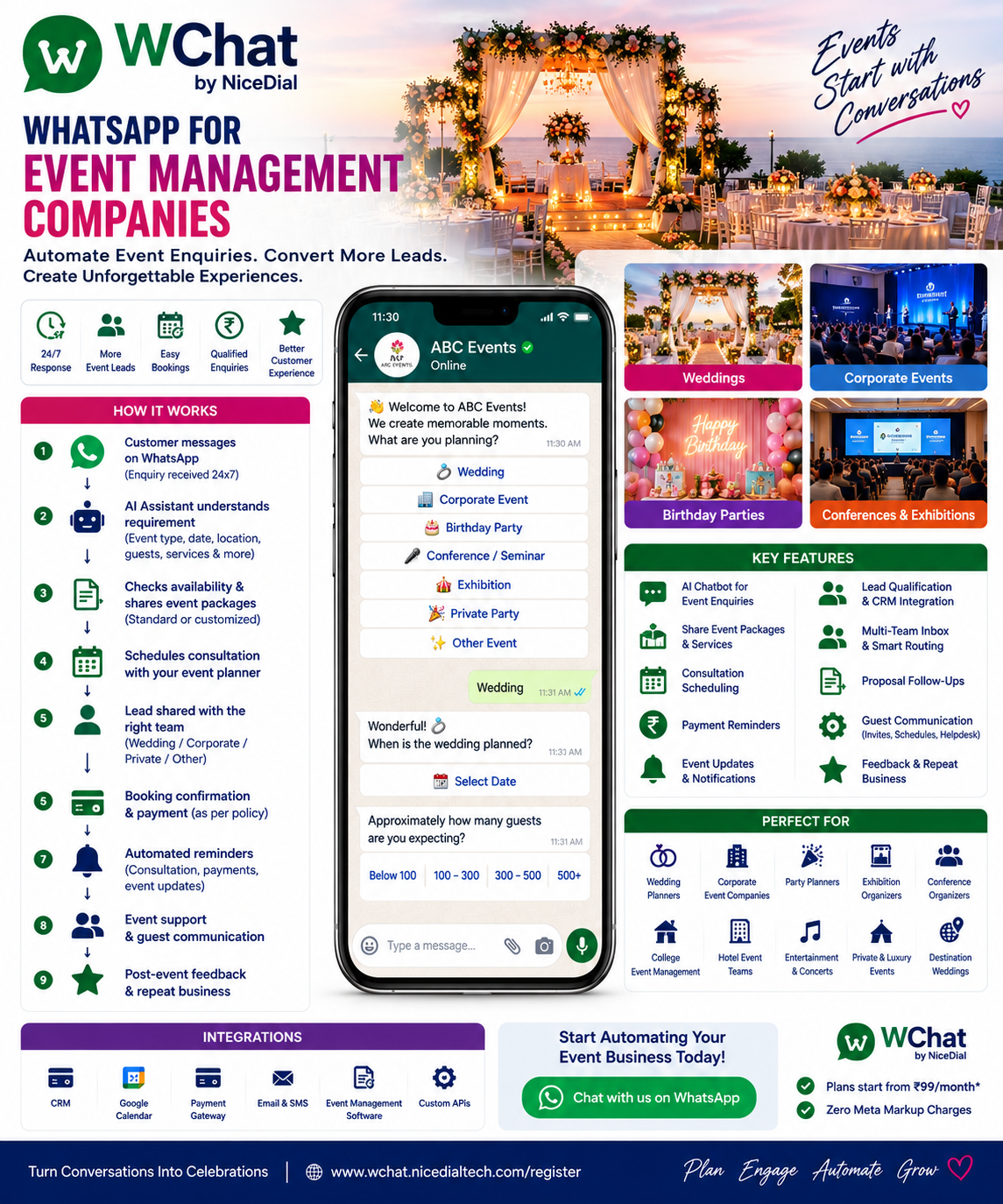
With WChat by NiceDial, event companies can turn WhatsApp into a structured enquiry, booking and customer-communication channel.
Enquiry → Event Requirement → Lead Qualification → Package/Services → Consultation → Proposal → Follow-Up → Booking → Planning Updates → Event Reminders → Post-Event Feedback
Why Event Management Companies Need WhatsApp Automation
Event management is highly conversational.
A customer rarely starts with a perfectly structured requirement.
They might simply say:
“Need wedding planner.”
“Birthday decoration price?”
“Corporate event for 500 people.”
“Need DJ and catering next Saturday.”
Your sales team then needs to ask multiple questions before understanding the opportunity.
WChat can automate the initial discovery process while keeping your event planners and sales team available for the creative and complex parts of the conversation.
What Is WhatsApp Automation for Event Management Companies?
WhatsApp event management automation combines conversational AI, structured workflows, team collaboration and integrations to manage repetitive customer communication.
A typical journey can become:
Google / Instagram / Facebook / Website
↓
Customer Opens WhatsApp
↓
WChat AI Assistant
↓
Event Type
↓
Date & Location
↓
Guest Count
↓
Services Required
↓
Budget / Preferences
↓
Lead Created in CRM
↓
Event Consultant
↓
Consultation
↓
Proposal
↓
Follow-Up
↓
Booking
↓
Planning & Guest Communication
↓
Event
↓
Feedback
WhatsApp becomes the conversation layer connecting customers with your event team and business systems.
1. Answer Event Enquiries 24×7
Customers often research event planners after work or during weekends.
Suppose someone messages at 11 PM:
“Do you organize destination weddings?”
Instead of waiting until the next morning, WChat can respond:
👋 Welcome to ABC Events.
Yes, we’d be happy to understand your event requirement.
What are you planning?
💍 Wedding
🏢 Corporate Event
🎂 Birthday Party
🎓 College / School Event
🎤 Conference
🎪 Exhibition
🎉 Private Party
🏆 Award Ceremony
✨ Other Event
The customer can immediately start sharing their requirements.
2. Automatically Identify the Event Type
Different events require completely different workflows.
A wedding enquiry might require:
💍 Venue
💐 Decoration
🍽️ Catering
📸 Photography
🎵 Entertainment
👗 Styling
🏨 Guest Accommodation
A corporate conference might require:
🏢 Venue
🎤 Stage
🔊 Audio / Visual
📺 LED Screens
🪑 Seating
🍽️ Catering
🪪 Registration
📸 Photography
🎥 Live Streaming
WChat can change the conversation based on the selected event type.
3. Collect Event Requirements Automatically
Suppose the customer chooses:
💍 Wedding
WChat can ask:
When is the wedding planned?
Customer:
15 December
Then:
Which city are you considering?
Customer:
Jaipur
Then:
Approximately how many guests are expected?
Below 100 | 100–300 | 300–500 | 500+
Customer chooses:
300–500
Then:
Which services are you interested in?
☑ Venue Assistance
☑ Decoration
☑ Catering
☑ Photography
☑ Entertainment
☑ Guest Management
☑ Complete Wedding Planning
A vague:
“Wedding package?”
has now become a meaningful sales lead.
4. AI Lead Qualification for Event Companies
Not every enquiry has the same commercial value or urgency.
WChat can collect approved qualification information such as:
📅 Event Date
📍 City
👥 Guest Count
🎉 Event Type
💰 Budget Range, where appropriate
🛠️ Services Required
⏱️ Planning Timeline
🏨 Venue Status
📞 Preferred Consultation Method
The information can then be sent to the appropriate event consultant.
The AI doesn’t need to decide whether a customer is “good” or “bad.”
Its job is to collect enough context for your sales team to respond effectively.
5. Budget Qualification Without Making the Conversation Awkward
Budget is important in event planning.
Instead of immediately asking:
“What is your budget?”
the conversation can first understand the event.
Then:
To help our event consultant recommend suitable options, which approximate planning range are you considering?
Your company can configure its own ranges.
For example:
₹1–3 Lakh
₹3–5 Lakh
₹5–10 Lakh
₹10 Lakh+
Need Consultation
This helps your team understand the requirement before preparing recommendations.
6. Automatically Route Leads to the Right Team
Suppose your event company handles multiple services.
WChat can route enquiries:
Wedding → Wedding Planning Team
Corporate Event → Corporate Events Team
Conference → Conference Team
Exhibition → Exhibition Team
Birthday → Private Events Team
Destination Wedding → Destination Wedding Specialist
Existing Customer → Event Coordinator
Your customers don’t need to know which employee to contact.
The workflow handles the routing.
7. Book Event Consultations on WhatsApp
Complex events usually require a consultation.
Once the basic requirement is collected:
Your event requirement looks interesting. Would you like to schedule a consultation with our event planner?
📞 Phone Consultation
💻 Video Consultation
🏢 Office Meeting
📍 Venue Meeting
When connected with the team’s calendar, WChat can offer genuine available appointment slots.
Customer chooses a slot.
↓
Calendar updated.
↓
Consultation confirmed.
↓
Reminder scheduled.
8. Automatically Send Consultation Reminders
Before the meeting:
📅 Event Consultation Reminder
Your consultation with ABC Events is scheduled tomorrow at 4:00 PM.
Event: Wedding
Location: JaipurConfirm | Request Reschedule | Contact Event Team
This reduces manual reminder calls and missed appointments.
9. Share Event Packages
Many event businesses have predefined packages.
For example:
Birthday Decoration
🎈 Basic Decoration
🎂 Premium Birthday Setup
✨ Theme Decoration
🎪 Complete Birthday Event
Or:
Wedding Services
💐 Decoration Package
📸 Photography Package
🍽️ Catering Package
🎵 Entertainment Package
💍 Complete Wedding Planning
WChat can share company-approved package information.
For customized events, the conversation can move to a planner.
10. AI Shouldn’t Invent Event Pricing
Event pricing can depend on:
📍 Venue
📅 Date
👥 Guest Count
🎨 Theme
🍽️ Menu
💐 Decoration
🎤 Artists
📸 Photography
🏨 Accommodation
🚚 Logistics
Therefore, AI shouldn’t guess:
“Your wedding will cost ₹5 lakh.”
A better workflow is:
Customer Requirement
↓
WChat collects details
↓
Pricing / CRM / Event Team
↓
Approved Estimate or Proposal
↓
Customer
The business remains the authoritative source for pricing.
11. Proposal Follow-Up Automation
One of the biggest sales problems for event companies happens after the proposal is sent.
The sales executive sends:
“Please find attached our proposal.”
Then nothing happens.
A few days later:
“Hi sir, any update?”
Then:
“Just following up.”
Then:
“Have you finalized?”
With an appropriate follow-up workflow and customer consent, WChat can help automate reminders.
For example:
Hi Rahul, just checking whether you had a chance to review the event proposal shared by our team.
Would you like to:
💬 Discuss Proposal | 📅 Schedule Call | 👨💼 Talk to Planner
The objective isn’t to spam customers.
It’s to ensure valuable event enquiries don’t disappear because someone forgot to follow up.
12. Event Booking Confirmation
Once the customer approves the proposal and the business confirms the booking:
🎉 Event Booking Confirmed
Event: Wedding
Date: 15 December
City: Jaipur
Event Coordinator: Assigned by ABC EventsBooking Reference: EVT-XXXXX
Our team will continue sharing approved planning updates through this WhatsApp conversation.
Now WhatsApp becomes part of the planning journey.
13. Payment Reminders
Events often involve milestone payments.
For example:
Booking Advance
↓
Planning Milestone
↓
Pre-Event Payment
↓
Final Settlement
WChat can send reminders based on the billing system.
💳 Payment Reminder
Your next event payment milestone is due according to your booking schedule.
View Invoice | Pay Now | Contact Accounts
Payment status should come from the billing/payment system rather than being guessed by AI.
14. Event Planning Updates
Once an event is booked, customers repeatedly ask:
“Decoration finalized?”
“Photographer confirmed?”
“Catering done?”
“What about DJ?”
“Venue confirmed?”
Where the project-management or CRM system contains these statuses, WChat can communicate appropriate updates.
For example:
Wedding Planning Status
✅ Venue Confirmed
✅ Photography Confirmed
✅ Catering Finalized
🔄 Decoration Design Under Review
⏳ Entertainment Confirmation Pending
This gives customers visibility without requiring the event manager to manually answer every status request.
15. Customer Approval Workflows
Events require many approvals.
For example:
🎨 Decoration Design
🍽️ Menu
💐 Floral Arrangement
🎂 Cake Design
📸 Photography Package
🎤 Entertainment
🪑 Seating Layout
📜 Invitation Design
WhatsApp can notify customers when an approval is required.
For example:
🎨 Decoration Design Ready for Review
Please review the proposal shared by our event team.
Approve | Request Changes | Talk to Planner
Final approval records can then be stored in the appropriate project or CRM system.
16. Vendor Coordination
Event companies work with:
🍽️ Caterers
📸 Photographers
🎥 Videographers
🎤 Artists
🎧 DJs
💐 Decorators
🚚 Logistics Providers
🪑 Equipment Vendors
💡 Lighting Teams
WChat can support structured internal or external communication workflows where appropriate.
However, the event-management system should remain the source of truth for assignments and schedules.
17. Wedding Planning on WhatsApp
Wedding planning is one of the strongest event-management use cases.
A wedding journey might include:
Wedding Enquiry
↓
City & Date
↓
Guest Count
↓
Budget Range
↓
Venue Requirement
↓
Services
↓
Planner Consultation
↓
Proposal
↓
Booking
↓
Planning
↓
Guest Communication
↓
Wedding
↓
Feedback
For destination weddings, additional workflows can support accommodation and guest logistics.
18. Corporate Event Management
Corporate customers may require:
🏢 Conferences
🎤 Seminars
🏆 Award Functions
🎉 Annual Parties
🚀 Product Launches
🤝 Dealer Meets
👥 Employee Events
📊 Investor Events
🎪 Exhibitions
WChat can collect:
Company Name
↓
Event Type
↓
Location
↓
Date
↓
Attendees
↓
Venue Requirement
↓
AV Requirements
↓
Food & Beverage
↓
Branding Requirements
↓
Contact Person
↓
Corporate Event Team
This turns a generic corporate enquiry into a structured B2B lead.
19. Conference Registration on WhatsApp
For events managed by the company, WhatsApp can also support attendee registration.
For example:
Welcome to Tech Leadership Summit 2026.
Would you like to:
🎟️ Register | 📅 View Agenda | 📍 Venue | 💬 Need Help
Registration can collect the required attendee information and connect with the event registration platform.
20. Event Registration Confirmation
Once registration is confirmed by the event system:
🎟️ Registration Confirmed
Tech Leadership Summit 2026
📅 20 October
📍 New DelhiRegistration ID: TLS-XXXXX
The attendee can keep important information directly in WhatsApp.
21. Event Reminders
Before an event:
🎉 Your Event Is Tomorrow
Tech Leadership Summit 2026
📅 20 October
🕘 Registration: 8:30 AM
📍 New DelhiView Agenda | Get Directions | Contact Support
This can improve attendee communication without depending entirely on email.
22. QR-Based Event Check-In
Where integrated with an event registration platform, WhatsApp can deliver a registration QR code or approved digital credential.
At the venue:
Guest Arrives
↓
QR Scanned
↓
Registration System Validates
↓
Check-In Recorded
This can reduce queues and manual registration work.
23. Guest Communication for Weddings & Private Events
Large weddings may involve hundreds of guests asking:
“Which hotel?”
“What time is the function?”
“Where is the venue?”
“When is the shuttle?”
“What is tomorrow’s schedule?”
A dedicated guest workflow can provide approved information.
For example:
Wedding Schedule
💛 Haldi — 10:00 AM
💚 Mehendi — 4:00 PM
🎵 Sangeet — 8:00 PM
💍 Wedding — 8:30 PM
Guests can access information without repeatedly calling the family or planning team.
24. Hotel & Accommodation Information
For destination events, WChat can share approved:
🏨 Hotel Information
📍 Location
🕐 Check-In Time
🚌 Transportation Details
📞 Helpdesk Information
If room allocation comes from an event or hotel system, WChat can retrieve the appropriate information from that system.
25. Guest Transportation Updates
Large events often require:
🚌 Shuttle Buses
🚐 Airport Transfers
🚘 VIP Cars
🏨 Hotel-to-Venue Transport
WhatsApp can communicate scheduled transport information.
For example:
🚌 Wedding Shuttle Update
Hotel → Wedding Venue
Departure: 6:30 PMPlease arrive at the designated pickup point before departure.
This can significantly reduce repetitive guest coordination.
26. Event-Day Helpdesk on WhatsApp
During a large event, attendees may need help.
Instead of searching for an organizer, they can message:
“Where is Hall B?”
“Where is registration?”
“When does the next session start?”
“I need transportation help.”
WChat can answer approved FAQs and route exceptions to the event support team.
27. AI + Human Event Planners
AI shouldn’t replace the creativity and judgment of event professionals.
🤖 AI & Automation Can Handle
✔ 24×7 Enquiries
✔ Event-Type Identification
✔ Requirement Collection
✔ Lead Qualification
✔ Approved Package Information
✔ Consultation Scheduling
✔ Appointment Reminders
✔ Proposal Follow-Ups
✔ Booking Notifications
✔ Payment Reminders
✔ Event FAQs
✔ Guest Communication
✔ Support Routing
✔ Feedback Collection
👨💼 Event Professionals Handle
✔ Event Concepts
✔ Creative Direction
✔ Budget Negotiation
✔ Venue Selection
✔ Vendor Negotiation
✔ Customized Pricing
✔ Event Design
✔ Crisis Management
✔ Complex Logistics
✔ Customer Relationships
The model becomes:
AI handles repetitive coordination. Event professionals create the experience.
28. AI + Human Handover
Suppose a customer says:
“We’re planning a 1,000-person product launch and need stage production, celebrity management and live streaming.”
That’s a high-value, complex enquiry.
WChat can collect initial information and hand over:
New Event Lead
Event: Product Launch
Guests: Approximately 1,000
Location: Mumbai
Requirements: Stage + Production + Artist + Streaming
Timeline: November
Reason for Handover: Custom Corporate Event
The sales team starts with context.
29. Shared WhatsApp Inbox for Event Teams
An event company may have:
💼 Sales
🎨 Creative
📅 Planning
🍽️ Catering Coordination
💐 Decoration
🎤 Production
📸 Media
🚚 Logistics
💳 Accounts
🎧 Guest Support
With WChat Shared Inbox, conversations can be assigned appropriately.
For example:
New Enquiry → Sales
Wedding → Wedding Planner
Corporate Event → Corporate Team
Payment → Accounts
Existing Event → Assigned Coordinator
Guest Question → Event Helpdesk
This helps prevent conversations from being lost across personal WhatsApp accounts.
30. Multi-Event Management
An event company may simultaneously manage:
💍 Wedding in Jaipur
🏢 Conference in Delhi
🎪 Exhibition in Mumbai
🎂 Birthday in Gurgaon
🚀 Product Launch in Bangalore
WChat can use event IDs, booking references or workflows to identify which event a customer or guest is contacting about.
This becomes particularly useful as the company scales.
31. Instagram → WhatsApp → Event Booking
Event management is highly visual.
Customers often discover planners through:
📸 Instagram
🎥 Reels
📌 Pinterest
🌐 Google
📱 Facebook
▶️ YouTube
A customer sees your wedding decoration reel.
↓
Clicks WhatsApp.
↓
WChat asks:
“Are you planning a wedding?”
↓
Requirement collected.
↓
Consultation booked.
This connects social-media marketing directly with the sales workflow.
32. Click-to-WhatsApp Event Ads
Imagine running:
Planning a Wedding in Jaipur? 💍
Tell us your date, guest count and requirements on WhatsApp.
Get Started
The advertisement opens a WChat conversation.
The campaign source can be associated with the lead where the implementation supports it.
Now you can understand which campaigns are generating event enquiries.
33. Event QR Codes
QR codes can be used for:
🎟️ Event Registration
📍 Venue Help
📅 Schedule Information
🍽️ Menu / Hospitality Information
🚌 Transportation
💬 Event Support
⭐ Feedback
Guests simply:
Scan → WhatsApp → Select Requirement
No additional app is necessarily required for basic conversational support.
34. Post-Event Feedback
After the event:
Thank you for choosing ABC Events. 🎉
How would you rate your experience?
⭐
⭐⭐
⭐⭐⭐
⭐⭐⭐⭐
⭐⭐⭐⭐⭐
Low ratings can be routed to customer service.
Positive feedback can trigger an appropriate review or testimonial request.
35. Repeat Business & Referrals
Event companies often grow through referrals.
After a successful event, WChat can support approved follow-ups such as:
“Thank you for celebrating with us.”
Customers can be given options to:
⭐ Leave Feedback
💬 Contact Their Planner
🎉 Plan Another Event
For marketing messages, companies should respect customer consent, opt-outs and applicable WhatsApp messaging requirements.
36. CRM Integration
WChat becomes significantly more valuable when connected with CRM.
For example:
Customer:
Need corporate event for 500 people.
↓
WChat collects:
Company
Date
City
Attendees
Requirements
Budget Range
Contact Details
↓
CRM Lead Created
↓
Corporate Event Consultant Assigned
↓
Conversation Continues
The sales team receives structured leads rather than scattered messages.
37. Event Management Software Integration
WChat can potentially integrate with compatible:
📊 CRM
📅 Calendar
🎟️ Event Registration Platforms
📋 Project Management Systems
💳 Payment Gateways
🧾 Billing Systems
📂 Document Systems
🏨 Accommodation Systems
🚐 Transportation Systems
⚙️ Custom APIs
The principle remains:
AI handles conversation.
Business systems provide operational information.
Event professionals make planning decisions.
38. AI Voice Agent for Event Management Companies
Not every event enquiry starts with WhatsApp.
Some customers call:
“We need someone to manage our annual conference.”
NiceDial can combine:
↓
Event Requirement
↓
Customer Information
↓
WhatsApp Continuation
↓
Consultation Scheduling
↓
Event Proposal
↓
Human Event Consultant
This creates a connected:
Voice + WhatsApp + Human Event Team
experience.
39. Example Wedding Enquiry Conversation
Customer
Need wedding planner in Jaipur.
WChat
💍 We’d love to understand your wedding plans.
When is the wedding?
Customer
15 December.
WChat
Approximately how many guests are you expecting?
Below 100 | 100–300 | 300–500 | 500+
Customer
300–500.
WChat
Which services are you interested in?
Venue | Decoration | Catering | Photography | Entertainment | Complete Planning
Customer
Complete planning.
↓
Date captured.
↓
City captured.
↓
Guest count captured.
↓
Requirement captured.
↓
Lead created.
↓
Wedding Planner
Instead of:
“Please call our office tomorrow.”
the customer has already progressed through the first stage of the sales journey.
40. Example Corporate Event Conversation
Customer
We need an event agency for our company conference.
WChat
🏢 Certainly. Let’s understand your requirement.
Approximately how many attendees are expected?
Customer:
Around 700.
WChat:
Which services are required?
☑ Venue
☑ Stage Production
☑ AV
☑ LED Screens
☑ Registration
☑ Catering
☑ Photography
☑ Live Streaming
↓
Company information.
↓
Date.
↓
Location.
↓
Requirement.
↓
Consultation.
↓
Corporate Event Team
The AI handles initial qualification.
The event professionals take over where creativity, commercial negotiation and execution matter.
Benefits of WhatsApp Automation for Event Management Companies
⚡ Faster Lead Response
Respond when customers are actively planning their event.
🎯 Better Lead Qualification
Collect event date, location, guests, services and other relevant information before sales calls.
📅 Easier Consultation Booking
Allow customers to schedule meetings through integrated availability.
🔔 Better Follow-Up
Reduce leads lost because nobody followed up.
👥 Better Team Collaboration
Route customers to sales, planners, accounts and support teams.
🎟️ Better Guest Experience
Use WhatsApp for registration, schedules, transportation and event support.
📊 Structured Customer Data
Push enquiry information into CRM or event systems.
😊 Better Customer Experience
Give customers one familiar communication channel from enquiry to event completion.
Who Can Use WChat?
WChat can support:
💍 Wedding Planners
🏢 Corporate Event Companies
🎪 Event Management Agencies
🎤 Conference Organizers
🏆 Award Show Organizers
🎉 Party Planners
🎂 Birthday Event Companies
✨ Luxury Event Planners
🌍 Destination Wedding Companies
🎪 Exhibition Organizers
🎵 Concert & Entertainment Companies
🎓 College Event Organizers
🏨 Hotel Event Teams
📊 B2B Event Agencies
🎟️ Event Registration Companies
Why WChat by NiceDial for Event Management Companies?
WChat combines WhatsApp Business automation, conversational AI, human collaboration and integrations.
Event Automation Capabilities
✔ 24×7 AI Event Assistant
✔ Event Enquiry Automation
✔ Lead Qualification
✔ Event Requirement Collection
✔ Wedding Enquiry Workflows
✔ Corporate Event Workflows
✔ Package Information
✔ Consultation Booking
✔ Calendar Integration
✔ Automated Reminders
✔ Proposal Follow-Ups
✔ Payment Reminders
✔ Booking Confirmation
✔ Customer Approval Workflows
✔ Guest Communication
✔ Event Registration
✔ Event Reminders
✔ Event Helpdesk
✔ Feedback Collection
✔ AI + Human Handover
✔ Shared Team Inbox
✔ CRM Integration
✔ Event Software Integration
✔ APIs & Webhooks
✔ Multi-Event Workflows
✔ Official WhatsApp Business API
Start Automating Your Event Enquiries on WhatsApp
Your next customer might message:
“Wedding package?”
“Need corporate event for 500 people.”
“Birthday decoration price?”
“Can we schedule a meeting?”
Instead of starting every enquiry manually, build a structured journey:
Enquiry → Event Type → Requirement → Qualification → Consultation → Proposal → Follow-Up → Booking → Planning → Event → Feedback
Let AI manage the repetitive coordination.
Let your event professionals focus on:
Creativity. Planning. Negotiation. Execution. Experience.
That’s where WChat by NiceDial can help.
💰 Plans start from ₹99/month
✅ Zero Meta Markup Charges
📖 Explore more NiceDial automation solutions
Frequently Asked Questions
Can event companies automate customer enquiries on WhatsApp?
Yes. WChat can collect event type, date, location, guest count, service requirements and other information before routing the lead to the appropriate team.
Can WChat qualify event leads?
Yes. The workflow can ask company-approved qualification questions and create structured lead information for sales or CRM.
Can customers book consultations through WhatsApp?
Yes. When integrated with a calendar or scheduling system, WChat can offer actual available appointment slots.
Can event packages be shared automatically?
Yes. Standard package information maintained by the event company can be shared automatically. Customized pricing should come from the company’s pricing process or event team.
Can WChat automate proposal follow-ups?
Yes. Follow-up workflows can remind appropriately opted-in prospects about proposals and provide options to speak with an event consultant.
Can WChat manage event registrations?
Yes. It can connect attendee conversations with compatible registration systems and communicate confirmations and event information.
Can it send event reminders to guests?
Yes, subject to appropriate consent and WhatsApp messaging requirements.
Can WChat manage wedding guest communication?
Yes. Approved schedules, venue information, accommodation details, transportation updates and helpdesk workflows can be delivered through WhatsApp.
Can multiple event employees use the same WhatsApp workflow?
Yes. WChat Shared Inbox can allow authorized sales, planning, accounts and support teams to collaborate with assignment and role-based access.
Can WChat integrate with our CRM?
Yes. Compatible CRM, calendar, event-management, payment and other systems can be integrated through available APIs and webhooks.