A customer lands at an airport and needs a car.
Another customer is planning a weekend trip and wants a self-drive SUV.
A corporate customer needs an airport pickup tomorrow morning.
They all ask similar questions:
Which cars are available?
What is the price per day?
Do you have an SUV?
Can I book for tomorrow?
Is airport pickup available?
What documents are required?
Can I extend my booking?
Where is my driver?
For a small car rental business, these conversations may be manageable manually.
But once a company manages multiple vehicles, locations, drivers and daily bookings, WhatsApp conversations can quickly become difficult to manage.
With WChat by NiceDial, car rental companies can automate much of the customer journey:
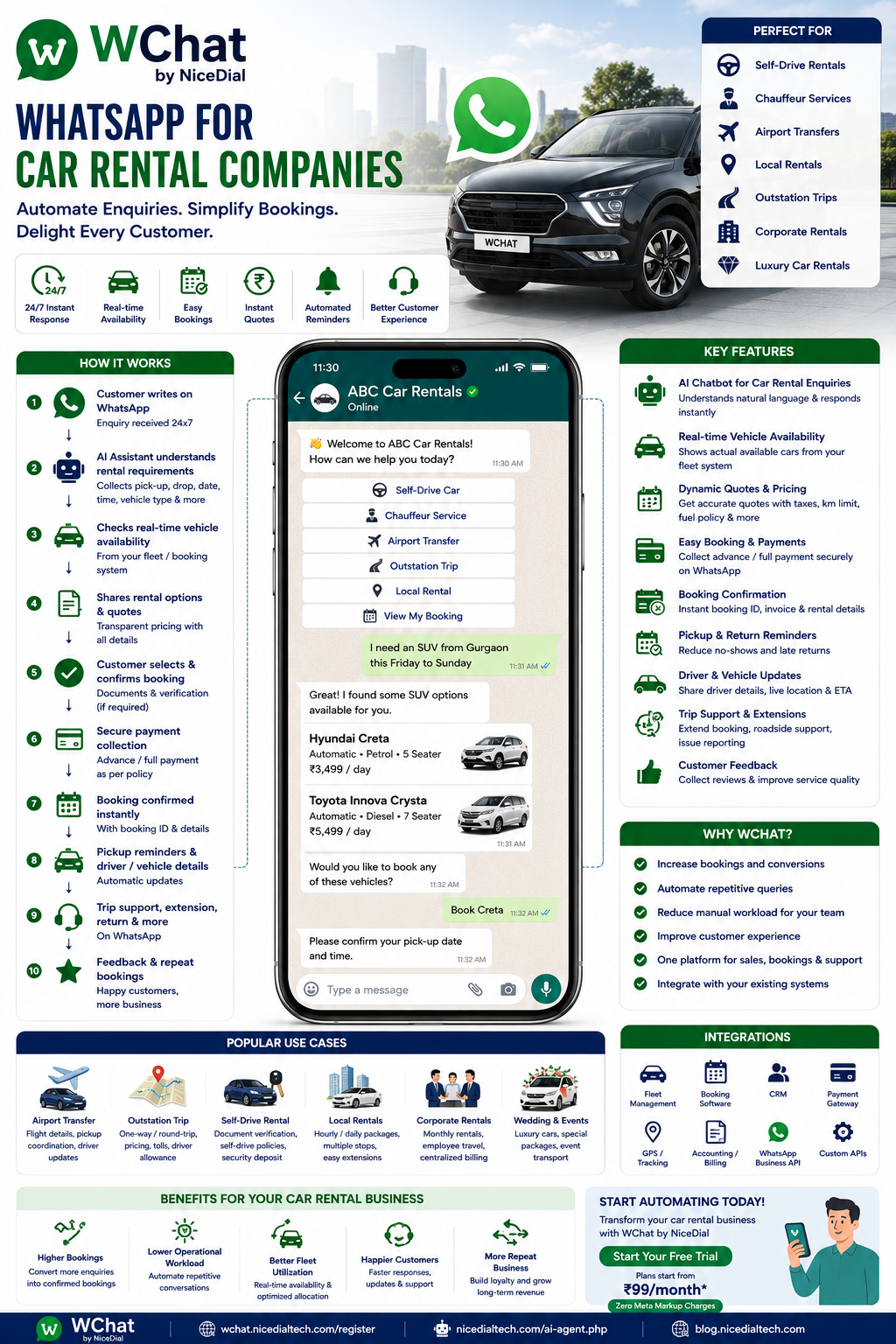
Enquiry → Rental Requirement → Vehicle Search → Availability → Quote → Booking → Payment → Confirmation → Pickup → Rental Support → Extension/Return → Feedback
The goal is simple:
Make renting a car through WhatsApp easier for the customer and easier to manage for the rental company.
Why Car Rental Companies Need WhatsApp Automation
Car rental enquiries are highly conversational.
Customers rarely start by saying:
“I want product SKU CR-103.”
Instead, they say:
“Need a 7-seater tomorrow.”
“SUV required from Delhi to Jaipur.”
“Need airport pickup at 6 AM.”
“Do you have a self-drive automatic?”
“Need Innova for 3 days.”
Every enquiry requires collecting several pieces of information before the company can provide the right option.
Typically:
📍 Pickup Location
📅 Pickup Date
🕐 Pickup Time
📍 Return / Destination Location
📅 Return Date
🚗 Vehicle Type
👥 Number of Passengers
🚘 Self-Drive or Chauffeur
🧳 Luggage Requirement
✈️ Flight Details, where relevant
WChat can collect this information conversationally before the booking team joins.
What Is WhatsApp Automation for Car Rental Companies?
WhatsApp car rental automation connects customer conversations with structured booking workflows and, where available, your fleet, booking, CRM, payment and operational systems.
For example:
Customer
↓
↓
WChat AI Assistant
↓
Rental Requirement
↓
Location & Dates
↓
Vehicle Preference
↓
Fleet / Booking System Availability
↓
Available Cars
↓
Rental Quote
↓
Customer Selection
↓
Booking / Payment
↓
Confirmation
↓
Pickup
↓
Support
↓
Return
↓
Feedback
WhatsApp becomes the customer conversation layer around the car-rental operation.
1. Answer Car Rental Enquiries 24×7
Customers search for cars at all hours.
A customer might message at 11:30 PM:
“Need an SUV tomorrow morning from Gurgaon.”
Instead of waiting until the next day, WChat can respond:
👋 Welcome to ABC Car Rentals.
I’d be happy to help with your rental request.
What type of service do you need?
🚘 Self-Drive Car
👨✈️ Car With Driver
✈️ Airport Transfer
🏙️ Local Rental
🛣️ Outstation Trip
🏢 Corporate Rental
The booking journey starts immediately.
2. Collect Rental Requirements Automatically
Suppose the customer selects:
🚘 Self-Drive Car
WChat can ask:
Where would you like to pick up the car?
Customer:
Gurgaon
Then:
Select your pickup date.
Customer:
5 September
Then:
What time would you like to pick it up?
Customer:
10 AM
Then:
When would you like to return the car?
Customer:
7 September at 6 PM
The system now has the basic rental period.
3. Let Customers Choose Vehicle Categories
Instead of asking the customer:
“Which car?”
WChat can present structured categories:
🚗 Hatchback
🚘 Sedan
🚙 SUV
🚐 MUV / 7-Seater
✨ Premium / Luxury
⚡ Electric Vehicle
For example:
Which type of vehicle would you prefer?
Customer chooses:
🚙 SUV
This makes the conversation faster while allowing the rental company to map the requirement to its fleet.
4. Show Actual Vehicle Availability
This is one of the most important parts of car-rental automation.
Suppose the customer requests:
Gurgaon
5 September, 10 AM
to
7 September, 6 PM
SUV
WChat can query the connected fleet or reservation system.
The customer might then see available options such as:
🚙 SUV Options
Option A
5 Seats | Automatic | Petrol
Option B
5 Seats | Automatic | Diesel
Option C
7 Seats | Automatic
The exact vehicle, availability and rental conditions should come from the rental company’s booking system.
Important Principle
AI understands what the customer wants.
Your fleet system determines what is actually available.
WChat should not invent vehicle availability.
5. Provide Real-Time Rental Quotes
Once a vehicle is selected, the booking system can calculate the applicable rental price.
For example:
Your Rental Estimate
🚙 Vehicle: SUV
📍 Pickup: Gurgaon
📅 Pickup: 5 September, 10 AM
📅 Return: 7 September, 6 PMBase Rental: ₹X
Taxes / Applicable Charges: ₹X
Security Deposit: ₹X
Estimated Total: ₹XPlease review the applicable rental terms before booking.
Pricing can depend on:
- Vehicle category
- Rental duration
- Location
- Kilometer allowance
- Weekend/weekday
- Seasonal demand
- Delivery/pickup charges
- Driver charges
- One-way charges
- Taxes
- Security deposit
- Add-ons
The pricing engine or booking system should remain the authoritative source.
6. Self-Drive Car Rental Booking on WhatsApp
Self-drive rentals require additional information.
The workflow might be:
Self-Drive Selected
↓
Pickup Location
↓
Pickup & Return Dates
↓
Vehicle Category
↓
Availability
↓
Vehicle Selected
↓
Customer Verification
↓
Required Documents
↓
Rental Terms
↓
Payment / Deposit
↓
Booking Confirmation
Depending on company policy and applicable requirements, customers may need to provide appropriate driving and identity documentation.
Sensitive documents should be handled securely and retained only as required.
7. Chauffeur-Driven Car Booking
Not every customer wants to drive.
WChat can also automate chauffeur-driven bookings.
For example:
What type of chauffeur service do you need?
🏙️ Local Rental
🛣️ Outstation Trip
✈️ Airport Transfer
🏢 Corporate Travel
💒 Event / Wedding
⏱️ Hourly Rental
Suppose the customer chooses:
Outstation Trip
The chatbot can collect:
📍 Pickup City
📍 Destination
📅 Travel Date
🕐 Pickup Time
👥 Number of Passengers
🚙 Preferred Vehicle
🔄 One-Way / Round Trip
The booking team receives a complete requirement instead of:
“Innova price?”
8. Airport Transfer Booking on WhatsApp
Airport transfers are a strong WhatsApp use case.
A customer can select:
✈️ Airport Transfer
Then:
Airport Pickup | Airport Drop
For airport pickup:
✈️ Airport
🔢 Flight Number
📅 Arrival Date
🕐 Arrival Time
📍 Drop Location
👥 Passengers
🧳 Luggage
🚗 Vehicle Preference
Once confirmed, the booking can move into the company’s dispatch workflow.
9. Flight Information Integration
Where an appropriate flight-data integration is available, the operational system can use flight information to help coordinate airport pickups.
For example:
Flight Delayed
↓
Operational System Updated
↓
Pickup Workflow Adjusted According to Company Rules
↓
Customer / Driver Notified Where Appropriate
This reduces unnecessary manual coordination.
The AI shouldn’t guess flight status; that information should come from an authoritative connected source.
10. Local Car Rental Packages
Many chauffeur rental companies offer packages such as:
4 Hours / 40 KM
8 Hours / 80 KM
12 Hours / 120 KM
WChat can display the company’s actual available packages.
Customer selects:
8 Hours / 80 KM
↓
Vehicle Category
↓
Availability
↓
Price
↓
Booking
This makes local rentals easier to sell conversationally.
11. Outstation Car Rental
Suppose a customer messages:
“Need Delhi to Jaipur cab tomorrow.”
WChat can convert this into a structured requirement:
Pickup: Delhi
Destination: Jaipur
Travel Date: Tomorrow
Trip: One Way / Round Trip
Passengers: 4
Vehicle: Sedan / SUV / MUV
Pickup Time: 7 AM
The system can then calculate or request the applicable fare.
12. One-Way Car Rental
For companies supporting one-way rentals:
Pickup City
↓
Destination City
↓
Date
↓
Vehicle
↓
One-Way Availability
↓
Applicable Drop Charge
↓
Quote
↓
Booking
This can be particularly useful for intercity rental networks.
13. Corporate Car Rental
Businesses may need vehicles for:
🏢 Employee Transportation
✈️ Airport Transfers
👨💼 Executive Travel
🏨 Guest Transportation
📅 Daily Office Travel
🎪 Corporate Events
🛣️ Outstation Travel
WChat can provide a separate corporate workflow:
Corporate Customer
↓
Company Details
↓
Travel Requirement
↓
Employee / Guest Information
↓
Vehicle Category
↓
Approval / Booking
↓
Vehicle Assignment
↓
Trip Updates
↓
Billing Workflow
This can help car rental companies manage both B2C and B2B enquiries from the same platform.
14. Monthly & Long-Term Car Rentals
Some customers need cars for:
1 Month
3 Months
6 Months
or longer.
Instead of processing these like short daily rentals, WChat can identify:
“I need a car for three months.”
and route the customer into a long-term rental workflow.
The assistant can collect:
🚗 Vehicle Requirement
📍 Location
📅 Rental Period
🏢 Individual / Corporate
🚘 Usage Type
💬 Contact Information
Then:
Long-Term Rental Team → Customer
15. Luxury Car Rental Enquiries
Luxury rentals often need more human involvement.
The chatbot can collect:
✨ Preferred Category
📅 Date
📍 Location
🎉 Occasion
⏱️ Duration
👨✈️ Chauffeur Requirement
Then hand over the enquiry to the premium booking team.
AI qualifies the enquiry.
Human sales converts the booking.
16. Wedding & Event Car Rentals
Customers may require:
💒 Wedding Cars
🎉 Event Transportation
🚘 Luxury Vehicles
🚐 Guest Transportation
👨✈️ Chauffeur Services
WChat can collect the event requirement and route it to the appropriate sales team.
This turns a generic:
“Wedding car available?”
into a structured sales lead.
17. Add-On Services
During booking, customers can be offered relevant available add-ons.
Examples may include:
👶 Child Seat
🧭 Navigation Equipment
🚗 Additional Driver
🏠 Vehicle Delivery / Collection
🛡️ Optional Protection Products
✨ Premium Vehicle Upgrade
Only actual services offered by the rental company should be shown.
18. Customer Verification Workflow
Before certain rentals, the company may need to verify the customer.
Depending on applicable law and company policy, the workflow can request required information and direct the customer through an approved verification process.
For example:
Booking Request
↓
Customer Details
↓
Required Verification
↓
Document / Identity Process
↓
Verification Status
↓
Booking Progression
For sensitive documents, a secure upload or verification system may be preferable to ordinary chat attachments.
19. Rental Terms & Conditions
Customers should understand key rental conditions before confirming.
WChat can share approved information covering areas such as:
📏 Kilometer Allowance
⛽ Fuel Policy
🕐 Late Return Policy
💰 Security Deposit
🚘 Usage Restrictions
👤 Driver Requirements
🛡️ Insurance / Protection Information
📍 Geographic Restrictions
💳 Payment Terms
Customers can then access the complete rental agreement or terms before proceeding.
20. Payment Collection
Once the booking is ready:
Your rental request is ready for confirmation.
The customer can be directed to an approved payment process.
Booking
↓
Payment Link
↓
Customer Pays
↓
Payment Gateway Confirms
↓
Reservation Confirmed
The payment gateway—not the chatbot—should determine whether payment succeeded.
21. Booking Confirmation on WhatsApp
Once the reservation system confirms the booking:
🚗 Car Rental Confirmed
📍 Pickup: Gurgaon
📅 Date: 5 September
🕐 Time: 10:00 AM
🚙 Category: SUV
📅 Return: 7 September, 6:00 PMBooking ID: CR-XXXXX
Please review your rental instructions and terms before pickup.
The customer now has the booking details directly in WhatsApp.
22. Automatic Pickup Reminders
Before the rental:
⏰ Rental Reminder
Your car rental begins tomorrow at 10:00 AM.
📍 Pickup Location: Gurgaon
Please review the pickup instructions and any required documentation.
This reduces manual reminder calls.
23. Driver & Vehicle Details
For chauffeur-driven bookings, once the operational system assigns a driver and vehicle, WChat can send the confirmed details.
For example:
🚘 Your vehicle has been assigned.
Vehicle: As assigned
Driver: As assigned
Pickup: 6:00 AMPlease use the available contact/support option if you need assistance.
The details should come from the dispatch system.
24. “Where Is My Driver?”
This is a common operational question.
If GPS or dispatch tracking is integrated, WChat can provide appropriate status information.
Customer:
“Where is my driver?”
↓
WChat queries dispatch system
↓
Actual status retrieved
↓
Customer receives available update
Again:
AI manages the question.
The operations system provides the truth.
25. Rental Extension Requests
A self-drive customer may message:
“Can I keep the car for one more day?”
Instead of simply saying yes, the workflow can check:
Current Booking
↓
Requested Extension
↓
Future Vehicle Availability
↓
Rental System
↓
Extension Price
↓
Customer Confirmation
↓
Payment if required
↓
Booking Extended
This prevents extensions from conflicting with the next reservation.
26. Early Return Requests
Customers may also want to return a vehicle early.
WChat can collect:
📅 Requested Return Date
🕐 Time
📍 Return Location
Then retrieve the applicable process from the booking system.
Any pricing adjustment should follow the rental company’s terms rather than being improvised by AI.
27. Breakdown & Roadside Assistance
During a rental, some conversations are urgent.
For example:
“The car won’t start.”
or:
“I have a flat tyre.”
or:
“The vehicle has been involved in an accident.”
These should trigger the company’s approved support process.
Customer Reports Issue
↓
Issue Category
↓
Location / Required Information
↓
Priority Human / Roadside Assistance Workflow
The chatbot should not invent mechanical or safety instructions.
Company-approved emergency guidance and qualified assistance should take priority.
28. Damage Reporting
Where appropriate, customers can report vehicle issues through a structured workflow.
For example:
Report Vehicle Issue
↓
Booking ID
↓
Issue Type
↓
Location
↓
Photo / Information if safe and appropriate
↓
Operations Team
↓
Human Assistance
This creates a documented support trail.
29. Rental Return Reminder
Before the scheduled return:
🚗 Rental Return Reminder
Your vehicle is scheduled for return tomorrow at 6:00 PM.
Please review the return location and instructions.
Return as Scheduled | Request Extension | Contact Support
This can reduce late returns and last-minute confusion.
30. Post-Rental Feedback
After the booking is completed:
Thank you for choosing ABC Car Rentals.
How was your rental experience?
⭐ 1
⭐⭐ 2
⭐⭐⭐ 3
⭐⭐⭐⭐ 4
⭐⭐⭐⭐⭐ 5
Poor feedback can be routed to customer support.
Positive experiences can be followed by an appropriate review request.
31. Repeat Booking
A previous customer might message:
“Need the same type of car again next weekend.”
WChat can use the conversation to start a new booking request.
The new booking should still verify current:
📅 Dates
📍 Location
🚙 Availability
💰 Pricing
Past availability or pricing should never be assumed to still apply.
32. AI + Human Booking Agents
Not every car rental conversation should be automated.
🤖 AI & Automation Can Handle
✔ 24×7 Enquiries
✔ Rental Requirement Collection
✔ Vehicle Category Selection
✔ Approved FAQs
✔ Availability Requests
✔ Quote Requests
✔ Booking Workflow
✔ Payment Links
✔ Confirmation
✔ Reminders
✔ Extension Requests
✔ Basic Support Routing
✔ Feedback
👨💼 Human Teams Handle
✔ Complex Pricing Negotiations
✔ Corporate Contracts
✔ Luxury Rentals
✔ Special Requirements
✔ Disputes
✔ Accidents / Emergencies
✔ Damage Cases
✔ Exceptional Refund Requests
✔ Complex Operational Issues
The model becomes:
AI handles repetitive conversations. Humans handle exceptions and decisions.
33. Shared WhatsApp Inbox for Car Rental Teams
A car rental company may have:
💼 Sales
📅 Reservations
🚘 Fleet Operations
👨✈️ Driver Operations
💳 Accounts
🛠️ Roadside Support
🏢 Corporate Sales
👨💼 Management
WChat Shared Inbox can route conversations appropriately.
For example:
New Rental → Reservations
Corporate Rental → Corporate Sales
Driver Issue → Operations
Payment → Accounts
Breakdown → Priority Support
Complaint → Customer Service
Everyone works from one controlled customer communication environment.
34. Multi-Location Car Rental Operations
A rental company may operate across:
📍 Delhi
📍 Gurgaon
📍 Noida
📍 Mumbai
📍 Bangalore
📍 Hyderabad
WChat can first identify the customer’s location.
Then:
Customer
↓
City
↓
Rental Requirement
↓
Local Fleet
↓
Local Booking Team
↓
Available Vehicle
This allows one WhatsApp number to support multiple branches where the operational setup permits it.
35. CRM + Fleet Management Integration
WChat becomes significantly more useful when connected to the company’s systems.
Potential integrations include:
🚘 Fleet Management System
📅 Reservation System
📊 CRM
💳 Payment Gateway
📍 GPS / Vehicle Tracking
👨✈️ Driver Management
📂 Customer Verification
🧾 Billing / Invoice System
⚙️ Custom APIs
For example:
Customer:
Is an SUV available tomorrow?
↓
WChat understands request
↓
Fleet system queried
↓
Availability returned
↓
Customer sees options
This is much more powerful than a chatbot working with static FAQs alone.
36. AI Voice Agent for Car Rental Companies
Not every customer wants to type.
NiceDial can combine AI Voice Agent + WChat + Human Booking Team.
For example:
Customer Calls
↓
AI Voice Agent answers
↓
Rental requirement collected
↓
WhatsApp continuation
↓
Available vehicle options
↓
Quote
↓
Booking
↓
Confirmation
↓
Human support when needed
This creates a connected customer journey across voice and WhatsApp.
37. Example WhatsApp Car Rental Conversation
Customer
Need SUV in Gurgaon from Friday to Sunday.
WChat
🚙 Sure. I’ll help you with your rental request.
Do you need:
Self-Drive | With Driver
Customer
Self-drive.
WChat
Please select your pickup time for Friday.
Customer
10 AM.
WChat
And your planned return time on Sunday?
Customer
6 PM.
↓
WChat sends request to booking system.
↓
Available SUV categories returned.
↓
Customer selects vehicle.
↓
Quote generated.
↓
Verification / payment process completed.
↓
Booking confirmed.
A vague enquiry has become a structured rental booking.
38. Example Airport Pickup Conversation
Customer
Need airport pickup tomorrow morning.
WChat
✈️ Sure. Which airport are you arriving at?
↓
Airport selected.
↓
Flight details.
↓
Arrival time.
↓
Drop location.
↓
Passengers.
↓
Vehicle category.
↓
Availability / quote.
↓
Booking.
↓
Driver assignment from operations.
↓
Pickup updates.
This can eliminate multiple calls between the customer, booking team and driver operations.
Benefits of WhatsApp Automation for Car Rental Companies
⚡ Faster Enquiry Response
Respond to customers around the clock.
🚘 Better Vehicle Discovery
Help customers find the right category based on their requirement.
📅 Easier Booking
Collect location, dates and rental preferences conversationally.
📈 Convert More Enquiries
Reduce delays between enquiry and booking.
🔔 Automated Reminders
Send pickup and return notifications.
👨💼 Reduce Booking-Team Workload
Automate repetitive questions and data collection.
👥 Improve Team Collaboration
Use Shared Inbox and department routing.
📊 Connect Customer Conversations With Operations
Integrate WhatsApp with fleet, CRM and reservation systems.
😊 Improve Customer Experience
Give customers one familiar channel throughout the rental journey.
Who Can Use WChat?
WChat can support:
🚗 Self-Drive Car Rental Companies
👨✈️ Chauffeur-Driven Car Rentals
✈️ Airport Taxi Companies
🛣️ Outstation Cab Operators
✨ Luxury Car Rental Companies
🏢 Corporate Car Rental Providers
🚐 Tourist Vehicle Operators
💒 Wedding Car Rental Companies
🏨 Hotel Transportation Providers
🌍 Multi-City Car Rental Companies
🚘 Local Car Rental Agencies
Why WChat by NiceDial for Car Rental Companies?
WChat combines conversational AI, WhatsApp automation, human collaboration and business-system integration.
Car Rental Automation Features
✔ 24×7 AI Assistant
✔ Rental Enquiry Automation
✔ Self-Drive Booking Workflow
✔ Chauffeur Booking Workflow
✔ Airport Transfer Booking
✔ Local / Outstation Rental
✔ Vehicle Category Selection
✔ Fleet Availability Integration
✔ Dynamic Quote Integration
✔ Booking Confirmation
✔ Payment Workflow
✔ Customer Verification Workflow
✔ Pickup Reminders
✔ Return Reminders
✔ Rental Extension Requests
✔ Driver / Vehicle Updates
✔ Support Routing
✔ AI + Human Handover
✔ Shared Team Inbox
✔ Multi-Location Routing
✔ CRM Integration
✔ Fleet Management Integration
✔ APIs & Webhooks
✔ Analytics
✔ Official WhatsApp Business API
Start Automating Your Car Rental Business on WhatsApp
Your customers are already asking:
“Car available?”
“Price?”
“Need SUV tomorrow.”
“Airport pickup possible?”
“Can I extend for one more day?”
Instead of treating every message as a new manual conversation, turn WhatsApp into a structured rental journey:
Enquiry → Requirement → Availability → Quote → Booking → Payment → Confirmation → Pickup → Support → Return → Repeat Booking
AI manages the conversation.
Your fleet and booking systems provide the operational truth.
Your team handles the exceptions.
That’s the opportunity with WChat by NiceDial.
💰 Plans start from ₹99/month
✅ Zero Meta Markup Charges
📖 Explore more NiceDial automation solutions
Frequently Asked Questions
Can customers book rental cars through WhatsApp?
Yes. WChat can collect the rental location, dates, vehicle preference and customer details and connect the conversation with the company’s booking workflow.
Can WChat show which cars are available?
Yes, when integrated with the company’s fleet or reservation system. Availability should come from that system rather than being generated by AI.
Can rental prices be shown automatically?
Yes. If the pricing or booking system provides the applicable rate through an integration, WChat can communicate the resulting quote.
Can customers pay through WhatsApp?
WChat can send an approved payment link and continue the workflow after the payment system confirms the transaction.
Can customers book airport transfers?
Yes. Airport pickup and drop workflows can collect flight, timing, destination, passenger and vehicle information.
Can customers extend their rental through WhatsApp?
Yes. The system can request an extension from the booking platform, check future availability and communicate the applicable terms or price.
Can WChat send driver details?
Yes. For chauffeur services, confirmed driver and vehicle details can be communicated once provided by the dispatch system.
Can WChat track drivers?
If the rental company’s GPS or dispatch platform exposes appropriate tracking information through an integration, WChat can communicate available status information.
Can multiple employees manage customer conversations?
Yes. WChat Shared Inbox can allow authorized reservation, operations, accounts and support teams to collaborate.
Can WChat work for multiple rental locations?
Yes. Customer conversations can be routed based on location and connected with the appropriate branch or fleet workflow.