Choosing an AI Agent is only the beginning.
The bigger question is:
How do you actually implement an AI Agent in your business?
Many companies make the mistake of starting with an ambitious goal:
“We want AI to automate our customer service.”
That’s too broad.
A successful AI Agent implementation usually starts much smaller:
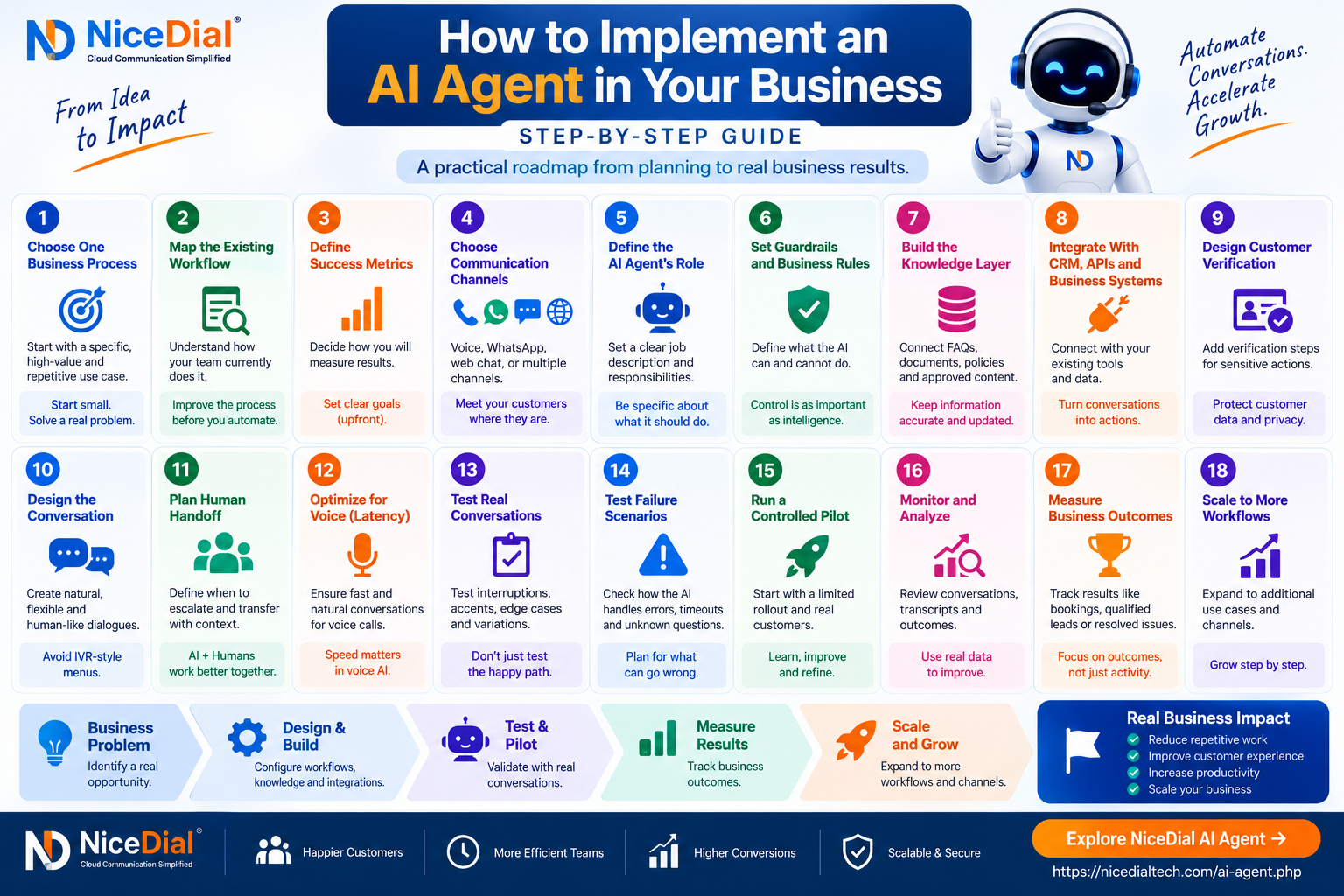
Choose One Workflow → Define the Process → Connect Business Systems → Add Guardrails → Test → Measure → Improve → Expand
Whether you’re considering an AI Agent for sales, customer support, appointments, lead qualification or phone calls, the implementation approach matters as much as the AI technology itself.
Here is a practical step-by-step framework.
Step 1: Choose One Business Process
Don’t start by trying to automate your entire company.
Start with one clearly defined process.
Good first AI Agent use cases are usually:
- High volume
- Repetitive
- Time consuming
- Easy to define
- Supported by accessible data
- Measurable
For example:
Sales
New Lead → Qualification → Demo Scheduling
Healthcare
Patient Call → Appointment Verification → Rescheduling → Confirmation
Customer Support
Customer Enquiry → Verification → CRM Lookup → Response
Contact Center
Incoming Call → Intent Detection → Resolution or Agent Transfer
Starting with one process makes implementation easier to control and evaluate.
Step 2: Map the Existing Human Workflow
Before designing the AI workflow, understand how your employees currently perform the task.
Suppose you’re automating lead qualification.
The existing workflow might be:
Lead Received
↓
Salesperson Calls
↓
Introduces Company
↓
Asks Requirement
↓
Asks Team Size
↓
Asks Timeline
↓
Checks CRM
↓
Updates Lead
↓
Schedules Demo
Document this process before introducing AI.
You may discover unnecessary steps that should be removed rather than automated.
Don’t automate a bad process.
Improve the workflow first.
Then automate it.
Step 3: Define What Success Means
Before deployment, decide how you will determine whether the AI Agent is working.
For a lead qualification AI Agent, success metrics might include:
- Leads contacted
- Conversations completed
- Qualified leads
- Demo appointments booked
- Human transfers
- CRM updates completed
- Failed conversations
For appointment automation:
- Appointments booked
- Appointments rescheduled
- Confirmations
- Cancellations
- Human transfers
- Failed bookings
For customer support:
- Enquiries handled
- Issues resolved
- Average response time
- Escalations
- Repeated enquiries
- Customer outcomes
Without predefined metrics, it’s difficult to determine whether AI actually improved the operation.
Step 4: Decide Where Customers Will Interact With AI
Your AI Agent needs a communication channel.
Depending on your business, this could be:
📞 Phone Calls
💬 WhatsApp
🌐 Website Chat
🎙️ Website Voice
💻 Internal Applications
Some businesses may need multiple channels.
For example, a hospital might use:
Phone → AI Voice Agent
Website → AI Assistant
WhatsApp → Appointment Communication
A sales organization may primarily need:
Inbound Calls + Outbound AI Calls + CRM
Start with the channel where the business problem occurs most frequently.
Step 5: Define the AI Agent’s Role
Your AI Agent needs a clear job description.
Don’t tell it:
“Help customers.”
That’s too broad.
Instead:
“Handle incoming appointment enquiries, collect required information, check approved appointment availability, book or reschedule appointments when permitted, and transfer complex cases to reception.”
Or:
“Contact new leads, understand their requirement, collect team size and timeline, update the CRM, and transfer high-intent prospects to sales.”
The more clearly the role is defined, the easier the workflow is to control.
Step 6: Define What the AI Can and Cannot Do
This is one of the most important implementation steps.
Create explicit boundaries.
For example, an AI Sales Agent may be allowed to:
✅ Explain approved products
✅ Ask qualification questions
✅ Capture requirements
✅ Schedule demos
✅ Update CRM
✅ Transfer to sales
But it may not be allowed to:
❌ Invent pricing
❌ Offer unauthorized discounts
❌ Promise unsupported features
❌ Change contractual terms
Similarly, a hospital administrative AI Agent may help with appointment and routine information workflows but should not be treated as a replacement for emergency services, medical diagnosis or clinical judgment.
Your AI needs clearly defined:
Allowed Actions
Restricted Actions
Verification Requirements
Human Approval Requirements
Escalation Conditions
These become the guardrails around the Agent.
Step 7: Build the Knowledge Layer
Your AI Agent needs reliable business information.
Potential knowledge sources include:
- Website
- FAQs
- Product documentation
- Internal knowledge base
- Policies
- Approved scripts
- Product catalog
- Pricing information
- Service information
- Business procedures
But uploading documents isn’t enough.
Ask:
Which information is authoritative?
Who updates it?
How frequently does it change?
What happens when two sources conflict?
What information should never be exposed?
Knowledge management becomes an ongoing part of operating an AI Agent.
Step 8: Connect Your CRM, APIs and Business Systems
This is where an AI Agent starts becoming operational.
Consider a customer asking:
“What’s the status of my application?”
Without integration:
AI → Explains how customer can check status
With integration:
Customer
↓
AI Agent
↓
Verification
↓
CRM/API
↓
Retrieve Application
↓
Check Status
↓
Provide Approved Response
The AI can potentially interact with systems such as:
- CRM
- ERP
- Helpdesk
- Appointment platform
- HMS/HIS
- Lead management
- Order management
- Billing platform
- Customer database
- Custom APIs
The principle should be:
Give AI only the access required for its specific workflow.
Step 9: Design Customer Verification
Some workflows require verification before information can be disclosed or changed.
For example:
A caller says:
“Change my appointment.”
The AI shouldn’t necessarily modify the appointment based only on a name.
Depending on the workflow, verification could involve:
- Registered phone number
- OTP
- Customer ID
- Date of birth
- Reference number
- Other approved verification methods
The flow becomes:
Request → Verify Customer → Retrieve Record → Perform Approved Action
Sensitive actions should have stronger controls than general FAQs.
Step 10: Design the Conversation
An AI Agent shouldn’t sound like an IVR disguised as AI.
Avoid conversations such as:
“Please say Sales, Support or Billing.”
Instead:
“How can I help you?”
Then allow the customer to explain naturally.
Good conversation design should consider:
- Greetings
- Intent detection
- Clarifying questions
- Interruptions
- Silence
- Incorrect information
- Customer changing their mind
- Multiple requests
- Human escalation
- Conversation closing
Real conversations rarely follow a perfect script.
Design for variation.
Step 11: Design Human Handoff Before Launch
Don’t treat human transfer as an afterthought.
Define exactly when AI should escalate.
Examples:
Sales
Transfer when:
- Customer requests salesperson.
- Commercial negotiation begins.
- Enterprise opportunity is identified.
- AI cannot answer confidently.
Customer Support
Transfer when:
- Customer is dissatisfied.
- Issue requires investigation.
- Account action requires approval.
- AI fails repeatedly.
Healthcare
Transfer when:
- Clinical guidance is requested.
- Sensitive situation arises.
- Emergency-related language is detected.
- Hospital policy requires staff involvement.
The AI should ideally transfer context as well.
For example:
Customer: Rahul Sharma
Intent: Product Enquiry
Requirement: AI Voice Agent
Users: 50
Language: Hindi + English
Timeline: 30 Days
Reason for Transfer: Pricing discussion
The employee continues the conversation instead of restarting it.
Step 12: For Voice AI, Optimize Latency
Voice AI has an additional challenge:
Speed matters.
A chatbot response appearing after two seconds may feel acceptable.
A two-second silence during every turn of a phone conversation can feel unnatural.
Voice architecture may include:
Caller
↓
Telephony
↓
Speech Recognition
↓
AI Reasoning
↓
Tools/API if Required
↓
Text-to-Speech
↓
Caller
Every component can add latency.
Evaluate:
- Speech recognition speed
- AI response generation
- Tool/API response time
- TTS generation
- Network latency
- Telephony routing
Don’t evaluate these components independently.
Measure the complete:
Customer Speaks → Customer Hears AI Response
experience.
Step 13: Test Interruptions and Unexpected Conversations
Your testing team might say:
“I need to book an appointment.”
Real customers say:
“Actually, I called yesterday and someone told me the doctor is available Saturday, but now I got a message saying Monday, so can you check?”
Real conversations are messy.
Test:
- Interruptions
- Long sentences
- Background noise
- Different accents
- Language switching
- Customer corrections
- Silence
- Unexpected questions
- Repeated questions
- Incorrect customer information
- API failures
The objective isn’t to prove the AI works.
It’s to discover where it doesn’t work before customers do.
Step 14: Test Failure Scenarios
Most demos show the happy path.
Production systems need to handle failure.
What happens if:
CRM is unavailable?
API times out?
Customer cannot be verified?
Speech recognition fails?
Requested appointment doesn’t exist?
AI doesn’t know the answer?
A good fallback might be:
“I’m unable to verify that information right now. I can connect you with our team or arrange a callback.”
Never allow a technical failure to turn into fabricated information.
Step 15: Start With a Controlled Pilot
Don’t immediately route every customer to your AI Agent.
Start with a limited pilot.
For example:
Phase 1
After-hours appointment enquiries.
Phase 2
Appointment rescheduling.
Phase 3
Appointment booking.
Phase 4
Reminders and follow-ups.
Or for sales:
Phase 1
New lead qualification.
Phase 2
Lead follow-up.
Phase 3
Demo scheduling.
Phase 4
CRM automation.
This makes it easier to identify problems and improve the workflow safely.
Step 16: Monitor Real Conversations
Once the pilot starts, review actual conversations.
Look for:
- Questions AI couldn’t answer
- Incorrect intent detection
- Unnecessary transfers
- Failed API calls
- Long response times
- Customer confusion
- Repeated questions
- Unexpected use cases
These interactions become your roadmap for improvement.
AI Agent deployment isn’t:
Configure → Launch → Finished
It’s:
Configure → Launch → Observe → Improve → Repeat
Step 17: Measure Business Outcomes
After the pilot, compare the results with the previous process.
For example:
Before AI
1,000 enquiries
700 handled by staff
200 missed
100 after-hours
After AI
Measure:
- AI conversations handled
- Successful outcomes
- Human transfers
- Failed interactions
- Appointments created
- Leads qualified
- Support requests resolved
Avoid measuring success only by:
“AI handled 5,000 calls.”
Instead ask:
“How many useful outcomes did those calls create?”
Step 18: Expand Only After the First Workflow Works
Once the initial workflow performs reliably, add the next one.
For example:
Stage 1 — Customer FAQs
↓
Stage 2 — Lead Qualification
↓
Stage 3 — CRM Lookup
↓
Stage 4 — Appointment/Demo Scheduling
↓
Stage 5 — Follow-Up
↓
Stage 6 — Additional Business Processes
This is generally safer than building one enormous AI Agent responsible for everything from day one.
A Practical AI Agent Architecture
A business AI Agent architecture can look like:
Customer
↓
Communication Layer
Phone / WhatsApp / Website
↓
AI Agent
Understand → Reason → Ask → Respond
↓
Business Tools
CRM / API / Database / Scheduling / Helpdesk
↓
Business Action
Lookup / Update / Book / Create / Route
↓
Human Agent When Required
This is what separates conversational AI from simple FAQ automation.
Example: AI Sales Agent Implementation
Imagine a company receives 500 leads per day.
Instead of asking salespeople to call every lead immediately:
Lead Arrives
↓
AI Agent Engages
↓
Understands Requirement
↓
Collects Team Size
↓
Collects Timeline
↓
Checks/Updates CRM
↓
Qualified?
YES
Schedule Demo / Transfer to Sales
NOT YET
Continue Approved Follow-Up Workflow
Salespeople spend more time on qualified conversations rather than repetitive initial screening.
Example: Hospital Appointment AI Agent
A patient calls:
“I need to reschedule tomorrow’s appointment.”
Workflow:
Patient
↓
AI Voice Agent
↓
Verify Patient
↓
Retrieve Appointment
↓
Check Available Slots
↓
Patient Selects Slot
↓
Update Appointment
↓
Send Confirmation
If something doesn’t match:
Transfer to Hospital Staff With Context
AI handles the repetitive workflow.
Hospital staff handle the exceptions.
AI Agent Implementation Mistakes to Avoid
❌ Trying to Automate Everything
Start with one workflow.
❌ No Clear Business Goal
Define measurable outcomes.
❌ No Human Escalation
Always create an appropriate fallback.
❌ Giving AI Too Much Access
Use minimum required permissions.
❌ Testing Only Perfect Conversations
Test messy real-world scenarios.
❌ Ignoring Latency
Especially important for Voice AI.
❌ Using AI Where Rules Work Better
Some workflows should remain deterministic.
❌ Launching and Forgetting
Continuously monitor and improve.
AI + Automation + Humans
The most practical business architecture isn’t:
AI vs Humans
It’s:
AI + Automation + Humans
AI Agent
Handles natural conversations and flexible reasoning.
Structured Automation
Handles deterministic actions and business rules.
Human Team
Handles judgment, relationships, negotiation, sensitive situations and exceptions.
Each layer does what it does best.
Where NiceDial AI Agent Fits
NiceDial AI Agent is designed for businesses that want to connect conversational AI with real communication and operational workflows.
Depending on the use case, an implementation can combine:
- AI Voice Agent
- Cloud Telephony
- CRM integration
- Business APIs
- Lead qualification
- Appointment workflows
- Customer-support workflows
- Human-agent escalation
- Conversation monitoring
A typical architecture can look like:
Customer
↓
NiceDial Cloud Telephony
↓
NiceDial AI Agent
↓
CRM / APIs / Business Systems
↓
Approved Business Action
↓
Human Agent When Required
The objective isn’t to remove people from every customer interaction.
It’s to automate repetitive work and bring employees into conversations where they add greater value.
Your First AI Agent Doesn’t Need to Be Complicated
You don’t need to begin with 50 workflows.
Pick one.
Lead Qualification
or
Appointment Rescheduling
or
After-Hours Enquiries
or
Customer Status Lookup
Build it.
Test it.
Measure it.
Improve it.
Then expand.
That’s how an AI Agent moves from an impressive demo to a useful business system.
🚀 Ready to Build Your First AI Agent Workflow?
Explore how NiceDial AI Agent can connect conversational AI with Voice, Cloud Telephony, CRM, APIs and Human Agents.
Start with one workflow. Prove the value. Then scale.
Frequently Asked Questions
How do I implement an AI Agent in my business?
Start by selecting one repetitive and measurable workflow. Map the existing process, define AI permissions and guardrails, connect the required knowledge and business systems, design human escalation, test real scenarios, launch a controlled pilot and measure the results.
How long does AI Agent implementation take?
Implementation time depends on workflow complexity, integrations, data availability, security requirements, communication channels and testing. A simple FAQ workflow may require significantly less work than an AI Agent connected to multiple enterprise systems.
Should I start with Voice AI or Chat AI?
Choose based on where the business problem occurs. If customers primarily call your business, Voice AI may be appropriate. If most interactions happen through your website or messaging channels, chat-based automation may be a better starting point.
Does an AI Agent need CRM integration?
Not always. However, CRM/API integration becomes valuable when the Agent needs to retrieve customer-specific information, update records or perform approved actions.
How do I prevent an AI Agent from giving incorrect information?
Use approved knowledge sources, structured API responses, clear guardrails, tool restrictions, validation, appropriate fallback responses and human escalation for situations the AI should not handle.
Should AI Agents replace employees?
AI Agents are generally most useful for automating suitable repetitive workflows. Human employees remain important for complex cases, relationships, negotiations, exceptions, sensitive conversations and judgment-heavy decisions.