A potential client has a legal problem.
They search online for a lawyer and send a WhatsApp message:
“I need to speak with a lawyer.”
Then come the questions:
“Are you available today?”
“How much is the consultation?”
“Can I meet tomorrow?”
“Do you handle property disputes?”
“Can we have a video consultation?”
“What documents should I bring?”
For a law firm, the first conversation is important—but lawyers shouldn’t have to personally manage every appointment request, scheduling question and reminder.
With WChat by NiceDial, law firms and independent lawyers can automate the administrative side of consultation booking on WhatsApp while keeping legal advice and professional judgment with qualified lawyers.
The journey can become:
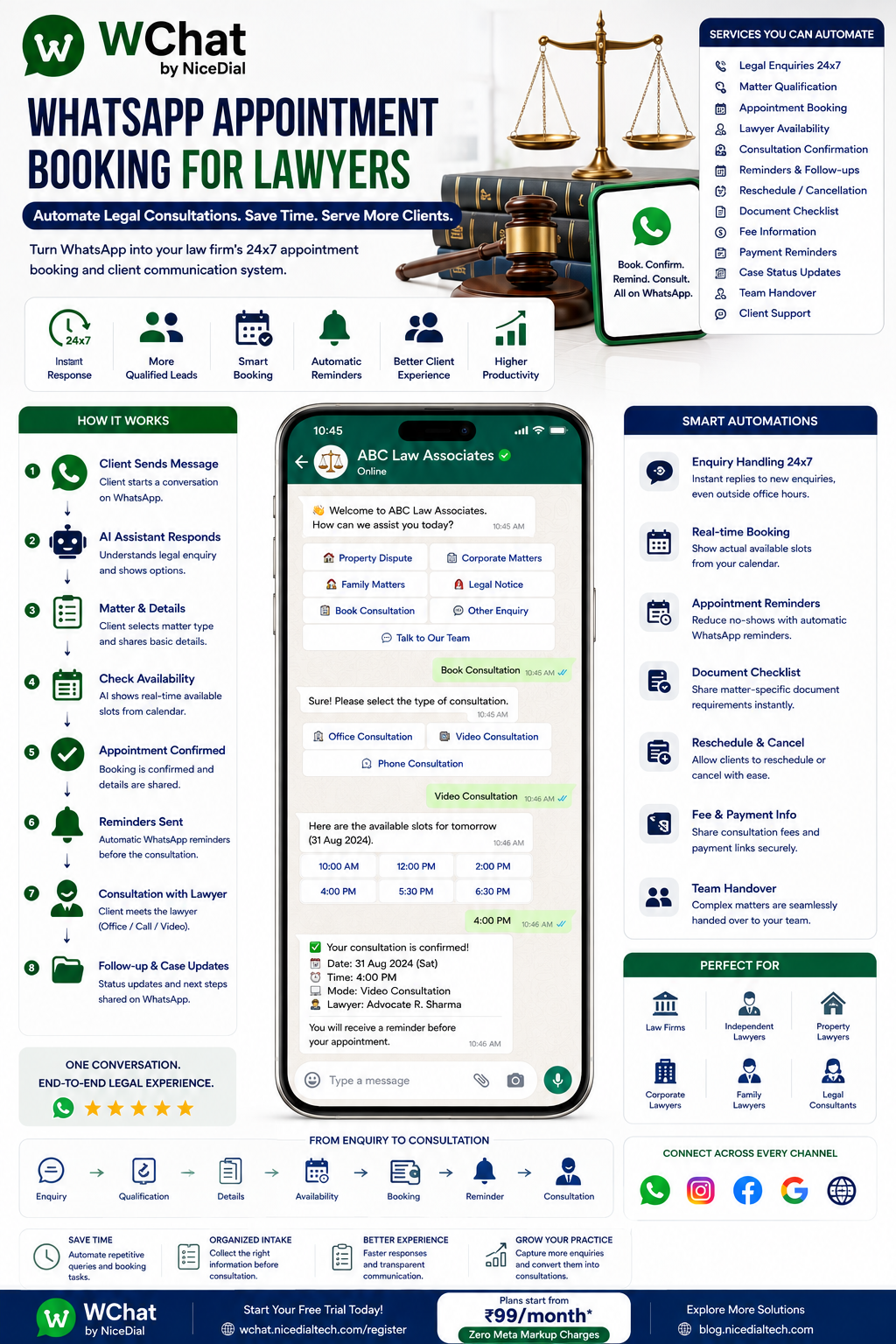
Legal Enquiry → Matter Category → Basic Intake → Conflict/Eligibility Process → Available Lawyer → Appointment → Reminder → Consultation → Follow-Up
Why Lawyers Need WhatsApp Appointment Automation
Potential clients often contact lawyers when they are dealing with stressful or time-sensitive situations.
They may need help with:
⚖️ Property Disputes
🏢 Corporate Matters
📄 Contracts
👨👩👧 Family Matters
💼 Employment Matters
🏠 Real Estate Documentation
💰 Recovery Matters
📑 Legal Notices
™️ Intellectual Property
🏢 Business Compliance
🌍 Immigration-related Matters
⚖️ Civil or Criminal Matters
When someone reaches out, they generally want to know two things quickly:
Can you handle my type of matter?
and
When can I speak to a lawyer?
WhatsApp automation can help answer the administrative part without attempting to replace the lawyer.
What Is WhatsApp Appointment Booking for Lawyers?
WhatsApp appointment booking allows a potential client to start a conversation with a law firm and move through a structured intake and scheduling process.
For example:
Client Opens WhatsApp
↓
Selects Legal Matter
↓
Basic Intake Information
↓
Required Screening / Conflict Process
↓
Relevant Lawyer / Department
↓
Available Consultation Slots
↓
Appointment Confirmed
↓
Automated Reminder
↓
Consultation
↓
Follow-Up
With WChat connected to the firm’s scheduling or practice-management system, the customer can be shown genuine available appointments.
1. Respond to Legal Enquiries 24×7
Imagine someone discovers your law firm through Google at 10:30 PM.
They message:
“Need a lawyer for a property dispute.”
WChat can immediately respond:
👋 Welcome to ABC Legal.
We can help you request a consultation.
Please select the general area of your enquiry:
🏠 Property / Real Estate
🏢 Corporate / Business
📄 Contracts
👨👩👧 Family Matters
💼 Employment
💰 Recovery / Commercial Dispute
™️ Intellectual Property
⚖️ Other Legal Matter
📅 Book Consultation
💬 Contact Our Team
The client doesn’t need to wait until the office opens just to begin the intake process.
2. Identify the Type of Legal Matter
The first step is understanding which team may be appropriate.
Suppose the client selects:
🏠 Property / Real Estate
The workflow can present firm-defined categories such as:
📄 Property Documentation
🏠 Property Dispute
🤝 Sale / Purchase Documentation
🏢 Commercial Property
📑 Agreement Review
⚖️ Other Property Matter
This information can be used for routing and intake, not for automated legal conclusions.
3. Collect Basic Client Information
WChat can collect administrative information such as:
👤 Name
📱 Contact Details
📧 Email
📍 Location
⚖️ General Matter Category
📝 Short Description
📅 Preferred Consultation Date
💻 Preferred Consultation Mode
This gives the law firm useful context before an employee starts the conversation.
4. Keep Initial Legal Intake Focused
Legal clients may immediately begin sharing a long and sensitive description of their dispute.
A better workflow can first collect only the information the firm needs for intake and screening.
For example:
Please briefly describe the general nature of your matter. Avoid sending confidential or highly sensitive information until our firm confirms the appropriate intake process.
This is particularly important for new prospective clients.
A WhatsApp conversation should not automatically be treated as establishing an attorney-client relationship.
The firm’s own engagement and confidentiality procedures should remain authoritative.
5. Conflict Checks Before Detailed Consultation
This is an important difference between appointment automation for a law firm and appointment automation for a salon or service center.
Before accepting a new legal matter, a law firm may need to perform a conflict-of-interest check.
Depending on the firm’s process, WChat can collect basic information needed for screening, such as:
Prospective Client Name
and, where appropriate:
Other Party / Organization Name
The information can then be routed into the firm’s approved conflict-check process.
The system should not independently decide whether a legal conflict exists unless the firm’s authorized system explicitly provides that determination.
6. Route Clients to the Right Lawyer
A firm may have different practice areas.
For example:
🏠 Property → Property Lawyer
🏢 Corporate → Corporate Team
📄 Contracts → Commercial Lawyer
👨👩👧 Family → Family Law Team
💼 Employment → Employment Lawyer
™️ Trademark → IP Team
WChat can route the appointment request according to configured rules.
This is especially useful for multi-lawyer practices.
7. Book Lawyer Appointments on WhatsApp
Once the appropriate scheduling workflow is reached, the client can select:
Consultation Type
🏢 Office Consultation
📞 Phone Consultation
💻 Video Consultation
Then:
Please select an available appointment.
For example:
31 August
10:00 AM
12:30 PM
4:00 PM
The available slots should come from the lawyer’s connected calendar or appointment system.
This prevents double booking.
8. Appointment Confirmation
Once successfully booked:
⚖️ Legal Consultation Confirmed
Matter: Property Consultation
Date: 31 August
Time: 4:00 PM
Mode: Video Consultation
Consultant: Assigned LawyerYour appointment has been scheduled successfully.
The firm can include its own consultation terms or instructions where appropriate.
9. Automated Appointment Reminders
Law firms can lose valuable professional time when clients forget appointments.
WChat can send reminders such as:
⏰ Consultation Reminder
Your legal consultation is scheduled for tomorrow at 4:00 PM.
Please confirm your appointment.
Options:
✅ Confirm | 📅 Request Reschedule | 💬 Contact Firm
A second reminder can be configured according to the firm’s workflow.
10. Reschedule Legal Consultations
Instead of:
“Can we shift tomorrow’s meeting?”
followed by several messages between the client, receptionist and lawyer, WChat can initiate a rescheduling workflow.
Request Reschedule
↓
Retrieve available alternatives
↓
Customer selects new slot
↓
Calendar updated
↓
New confirmation sent
The actual availability should always come from the connected scheduling system.
11. Appointment Cancellation
Customers can also be provided an appropriate cancellation workflow.
For example:
Would you like to cancel your consultation scheduled for 31 August at 4:00 PM?
Yes, Cancel Appointment
Once confirmed in the scheduling system:
Your appointment has been cancelled.
The slot becomes available according to the firm’s scheduling rules.
12. Consultation Fee Information
A common question is:
“What are your consultation charges?”
If the law firm has standardized consultation pricing, WChat can provide approved information.
For example:
Our initial consultation fee starts from ₹X depending on the consultation type and matter.
or:
Consultation fees vary by matter and lawyer. Please select your requirement and our team will confirm the applicable fee.
AI should not invent or negotiate professional fees.
Pricing should come from the firm’s configured information or authorized staff.
13. Consultation Payment
If the firm requires advance payment, the booking journey can be integrated with an approved payment system.
For example:
Select Consultation
↓
Choose Available Slot
↓
Fee Displayed
↓
Secure Payment
↓
Payment Confirmed
↓
Appointment Confirmed
The firm’s billing and payment system should remain the source of truth for payment status.
14. Document Checklist Before Consultation
Some legal consultations require clients to bring or submit specific documents.
For a property consultation, for example, the firm might maintain an approved checklist relevant to the service.
Instead of the lawyer manually sending instructions, WChat can provide the appropriate checklist after booking.
For example:
📂 Documents for Your Consultation
Please review the document checklist prepared by our legal team before your appointment.
The exact requirements should be created and maintained by the law firm.
15. Secure Document Collection
Legal documents can contain highly confidential information.
Firms should carefully determine what should be collected through chat and what should instead be submitted through a secure document-management platform.
WChat can provide:
📂 Upload Documents Securely
↓
Secure portal
↓
Documents associated with the appropriate matter/client record
Where available, this can be preferable to having sensitive documents scattered across conversations.
16. AI Should Not Give Unsupervised Legal Advice
This is one of the most important principles for legal AI automation.
Suppose a customer asks:
“My landlord sent me this notice. Can he legally evict me?”
or:
“Should I sign this agreement?”
or:
“What should I say in my reply to this legal notice?”
These questions can require jurisdiction-specific legal analysis and professional judgment.
A safer workflow is:
AI Identifies Legal Advice Request
↓
Collects Appropriate Administrative Context
↓
Offers Consultation
↓
Routes to Qualified Lawyer
The AI can support intake and approved informational workflows without pretending to be the client’s lawyer.
17. AI + Human Lawyers
The best model for law firms is usually not:
AI OR Lawyer
It is:
AI + Lawyer
🤖 Let AI Handle
✔ 24×7 First Response
✔ Practice Area Selection
✔ Basic Intake
✔ Appointment Booking
✔ Approved FAQs
✔ Consultation Fee Information
✔ Appointment Confirmation
✔ Appointment Reminders
✔ Rescheduling
✔ Administrative Follow-Ups
✔ Routing
👨⚖️ Let Lawyers Handle
✔ Legal Advice
✔ Case Evaluation
✔ Legal Strategy
✔ Contract Interpretation
✔ Negotiations
✔ Litigation Decisions
✔ Legal Opinions
✔ Client-Specific Recommendations
✔ Complex or Sensitive Matters
AI handles administration.
Lawyers handle legal judgment.
18. Example WhatsApp Lawyer Booking Conversation
Client
Hi, I need a lawyer for a property issue.
WChat
👋 Welcome to ABC Legal.
We can help you request a consultation.
Please select the general type of property matter:
🏠 Property Dispute | 📄 Documentation | 🤝 Sale/Purchase | ⚖️ Other
Client
Property Dispute
WChat
Thank you.
Would you like to schedule an initial consultation?
📅 Book Consultation | 💬 Contact Team
Client
Book Consultation
WChat
Please choose your preferred consultation mode:
🏢 Office | 📞 Phone | 💻 Video
Client
Video
The connected calendar provides available slots.
Available Appointments
10:00 AM
12:30 PM
4:00 PM
Client
4:00 PM
↓
Appointment created.
↓
Confirmation sent.
↓
Reminder scheduled.
A potential client has moved from:
“Need lawyer.”
to:
Consultation Confirmed.
19. Human Handover with Context
Suppose the prospective client says:
“This is urgent. I received a legal notice today.”
WChat can escalate the conversation according to the firm’s configured rules.
The receiving employee could see:
Client: Rahul Sharma
Matter: Property Dispute
Request: Legal Consultation
Urgency: Client reports recent legal notice
Preferred Mode: Video
Reason for Transfer: Human Review Requested
The lawyer or intake team starts with context rather than asking the client to repeat everything.
20. Shared WhatsApp Inbox for Law Firms
A legal practice may have:
👨⚖️ Partners
⚖️ Associates
📄 Legal Assistants
📅 Reception / Scheduling
💰 Billing
🎧 Client Support
🏢 Different Practice Areas
With WChat Shared Inbox, authorized staff can manage WhatsApp conversations centrally.
Features can include:
✔ Role-Based Access
✔ Conversation Assignment
✔ Practice-Area Routing
✔ AI + Human Handover
✔ Conversation History
✔ Client Context
✔ Access Management
Sensitive matters should be restricted according to the firm’s confidentiality and access policies.
21. Practice-Area Routing
For example:
🏠 Property
→ Property Team
🏢 Corporate
→ Corporate Lawyers
📄 Contracts
→ Commercial Team
™️ Trademark/IP
→ IP Team
💼 Employment
→ Employment Team
👨👩👧 Family
→ Relevant Family-Law Team
💰 Billing
→ Accounts
This helps larger law firms organize inbound enquiries.
22. Multi-Office Law Firms
A law firm operating across multiple locations can also route appointment requests based on:
📍 City
🏢 Office
⚖️ Practice Area
👨⚖️ Lawyer
📅 Availability
💻 Consultation Type
For example:
Delhi → Property → Office Consultation
or
Mumbai → Corporate → Video Consultation
The appropriate calendar can then provide availability.
23. After-Hours Legal Enquiries
Legal enquiries don’t always happen during business hours.
Someone may receive a notice at 9 PM.
A business owner may discover a contractual problem over the weekend.
A prospective client may search for a lawyer late at night.
WChat can provide an immediate administrative response:
“We have received your consultation request.”
It can collect basic intake information and help the person request the next available consultation.
This doesn’t mean promising immediate legal assistance unless the firm actually provides it.
24. Existing Client Appointment Booking
WhatsApp booking isn’t only for new leads.
Existing clients may need:
📅 Case Discussion
📄 Document Review Meeting
🏢 Office Appointment
💻 Video Meeting
📞 Lawyer Call
📝 Follow-Up Consultation
After appropriate identification, WChat can route them into the firm’s existing-client scheduling workflow.
25. Follow-Up After Consultation
After a consultation, the firm may need additional steps.
For example:
Consultation Completed
↓
Additional Documents Required
↓
Secure Upload Link
↓
Lawyer Reviews
↓
Engagement / Next-Step Process
↓
Future Appointment
WChat can support the administrative communication around these stages.
26. Lead Follow-Up for Law Firms
A potential client may book an enquiry but not immediately proceed.
Where appropriate and permitted, the firm can create follow-up workflows.
For example:
Thank you for speaking with our team.
If you would like to schedule the next consultation or need assistance with the administrative next steps, please contact us here.
Law firms should configure marketing and follow-up communications according to applicable professional conduct, advertising, privacy, consent and WhatsApp messaging requirements.
27. CRM & Practice Management Integration
WChat becomes more powerful when connected with the systems a law firm already uses.
Potential integrations include:
📊 CRM
⚖️ Legal Practice Management Software
📅 Calendar
📂 Document Management System
💳 Billing / Payment System
🎫 Client Support System
⚙️ Custom Legal Applications
For example:
Client Requests Appointment
↓
WChat checks calendar
↓
Actual availability returned
↓
Client selects slot
↓
Appointment created
↓
CRM updated
↓
Reminder triggered
This is workflow automation—not simply chatbot messaging.
28. WhatsApp + AI Voice Agent for Law Firms
Some clients prefer calling rather than messaging.
NiceDial can combine WChat with an AI Voice Agent.
For example:
Prospective Client Calls
↓
AI Voice Agent
↓
General Requirement Identified
↓
Practice Area Selected
↓
Basic Intake
↓
WhatsApp Continuation
↓
Appointment Options
↓
Consultation Confirmed
↓
Human Lawyer
This creates a connected:
Voice + WhatsApp + Human Legal Team
experience.
29. From Google Search to Lawyer Consultation
Imagine the complete journey:
Potential Client Searches “Property Lawyer Near Me”
↓
Finds your law firm
↓
Clicks WhatsApp
↓
WChat Responds
↓
Matter Category Selected
↓
Basic Intake
↓
Firm’s Screening Process
↓
Consultation Type Selected
↓
Real Availability Retrieved
↓
Appointment Booked
↓
Reminder Sent
↓
Lawyer Consultation
Instead of losing a lead because nobody responded after office hours, the firm can capture the consultation request immediately.
Benefits of WhatsApp Appointment Booking for Lawyers
⚡ Faster Initial Response
Capture consultation requests 24×7.
📅 Reduce Scheduling Work
Automate appointment selection, confirmation and reminders.
🎯 Better-Qualified Enquiries
Understand the general matter before assigning it.
👨⚖️ Protect Lawyer Time
Let legal professionals focus on legal work rather than repetitive scheduling.
🔀 Route Matters Correctly
Send enquiries to appropriate practice areas.
👥 Improve Team Collaboration
Use a shared inbox for authorized firm employees.
📂 Organize Pre-Consultation Requirements
Provide approved document instructions before appointments.
🔔 Reduce Missed Consultations
Automatically remind clients of scheduled appointments.
Who Can Use WChat?
WhatsApp appointment automation can support:
⚖️ Law Firms
👨⚖️ Independent Lawyers
🏢 Corporate Law Firms
🏠 Property Lawyers
📄 Contract Lawyers
™️ IP & Trademark Firms
💼 Employment Law Practices
👨👩👧 Family Law Practices
📑 Legal Consultants
🏢 Legal & Compliance Firms
The actual workflows should be adapted to each firm’s jurisdiction, professional obligations and practice areas.
Why Choose WChat by NiceDial?
WChat combines WhatsApp automation, AI-powered conversations, human collaboration and business-system integrations.
Features for Law Firms
✔ 24×7 AI Assistant
✔ Legal Enquiry Intake
✔ Practice Area Selection
✔ Consultation Booking
✔ Real Calendar Availability
✔ Appointment Confirmation
✔ Automated Reminders
✔ Rescheduling Workflows
✔ Consultation Fee Information
✔ Approved Document Checklists
✔ Secure Upload Workflow Integration
✔ AI + Human Handover
✔ Shared Team Inbox
✔ Practice-Area Routing
✔ Role-Based Access
✔ CRM Integration
✔ Calendar Integration
✔ API / Webhook Integration
✔ Reports & Analytics
✔ Official WhatsApp Business API
Start Booking Legal Consultations on WhatsApp
A lawyer’s time should be spent on:
Clients. Cases. Contracts. Negotiations. Strategy. Legal Advice.
Not repeatedly answering:
“Are you available tomorrow?”
“Can I book at 4 PM?”
“Where is your office?”
“Can we do a video consultation?”
“Can I reschedule?”
Use WChat to automate the administrative layer:
Enquiry → Intake → Screening → Scheduling → Confirmation → Reminder → Lawyer
while keeping professional legal judgment exactly where it belongs:
with the lawyer.
💰 Plans start from ₹99/month
✅ Zero Meta Markup Charges
📖 Explore more NiceDial automation solutions
Frequently Asked Questions
Can clients book lawyer appointments directly through WhatsApp?
Yes. When WChat is connected to the firm’s scheduling system, clients can select genuine available consultation slots and receive confirmation through WhatsApp.
Can WChat provide legal advice?
WChat can support administrative intake and firm-approved informational workflows. Client-specific legal advice, legal strategy and professional interpretation should be handled by qualified legal professionals.
Can appointments be rescheduled through WhatsApp?
Yes, if the connected scheduling system supports rescheduling. Available alternative slots can be presented to the client.
Can WChat send consultation reminders?
Yes. Automated appointment reminders can be configured to help reduce missed consultations.
Can clients upload legal documents?
Document workflows can be supported, but legal documents may contain confidential information. Firms should determine whether sensitive materials should instead be collected through an integrated secure document portal.
Can WChat perform a conflict check?
WChat can collect information required by the firm’s intake process and pass it to an approved conflict-check workflow. The actual conflict determination should remain with the firm’s authorized process.
Can different legal enquiries go to different lawyers?
Yes. Matters can be routed according to practice area, office, availability and other configured rules.
Can multiple lawyers use the same WhatsApp business channel?
WChat Shared Inbox can allow authorized team members to work through a centralized channel with role-based access and conversation assignment.