Tax season arrives.
A Chartered Accountant or tax consultancy starts receiving dozens of WhatsApp messages:
Sir, what documents are required for ITR?
I have sent my Form 16. Did you receive it?
What is the status of my return?
Please send GST filing reminder.
My GST documents are ready.
Can I book a consultation?
Please share your fees.
The challenge isn’t necessarily answering one client.
It’s managing hundreds of conversations, documents, follow-ups and deadlines simultaneously while ensuring sensitive financial matters receive appropriate professional attention.
With WChat by NiceDial, CA firms and tax consultants can turn WhatsApp into a structured client communication channel for enquiries, document collection, appointment booking, reminders, status updates and team collaboration.
AI handles routine communication. Your professionals handle tax and financial advice.
Why CA & Tax Consultants Need WhatsApp Automation
WhatsApp is already widely used for communication between consultants and clients.
But without a structured system, conversations can become difficult to manage.
A client sends a Form 16.
Another sends a bank statement.
Someone asks about GST.
Another wants an appointment.
A business client asks about TDS.
Meanwhile, your team is following up with 50 clients for pending documents.
The problem isn’t WhatsApp itself.
The problem is using WhatsApp without workflow automation and team management.
What Can CA Firms Automate on WhatsApp?
WChat can help structure workflows around:
📄 ITR Enquiries
🧾 GST Services
🏢 Company Compliance
💰 TDS-related Communication
📅 Consultation Booking
📂 Document Collection
🔔 Filing & Document Reminders
📊 Filing Status Updates
💳 Payment Reminders
🏢 Business Registration Enquiries
📑 Accounting Service Enquiries
👨💼 Human Consultant Handover
🎫 Client Support
The exact workflow should reflect the firm’s services and professional processes.
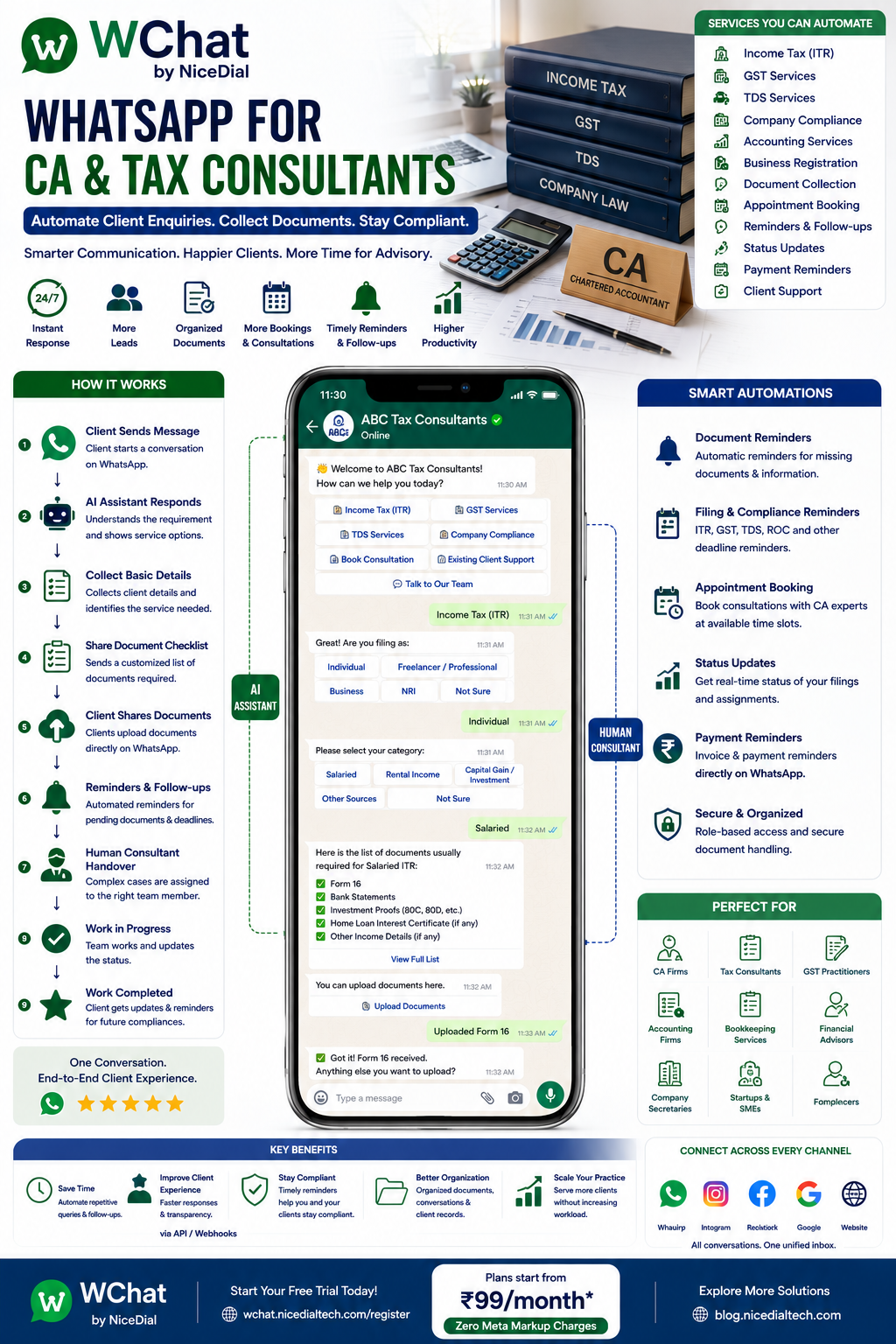
The Complete CA Client Journey on WhatsApp
A typical workflow can look like:
Google / Website / Referral / Advertisement
↓
Customer Opens WhatsApp
↓
WChat AI Assistant
↓
Service Requirement Identified
↓
Individual / Business
↓
Basic Information Collected
↓
Document Checklist Shared
↓
Documents Collected Securely According to Firm Policy
↓
CA / Tax Team Assigned
↓
Consultation, if Required
↓
Service Initiated
↓
Pending Document Reminders
↓
Status Updates
↓
Completion
↓
Future Compliance Reminders
This transforms scattered conversations into a structured client journey.
1. Respond to Client Enquiries 24×7
Suppose a prospective client messages at 10:30 PM:
“Need help filing income tax return.”
Instead of waiting until office hours, WChat can immediately respond:
👋 Welcome to ABC Tax Consultants.
How can we assist you?
Options:
📄 Income Tax Return
🧾 GST Services
🏢 Business Registration
📊 Accounting Services
💰 TDS Services
📅 Book Consultation
📂 Existing Client Support
💬 Talk to Our Team
The customer can begin the process immediately.
2. Separate Individual and Business Clients
Not every tax enquiry is the same.
WChat can first identify:
Are you looking for assistance as:
👤 Individual
💼 Freelancer / Professional
🏪 Proprietorship
🤝 Partnership / LLP
🏢 Company
🏬 Other Business
This allows different workflows to be triggered.
An individual looking for ITR assistance doesn’t need the same questions as a company seeking accounting and compliance services.
3. Automate ITR Enquiry Qualification
Suppose the customer chooses:
📄 Income Tax Return
The assistant can collect basic non-advisory information defined by the firm.
For example:
Are you filing as an individual or business?
↓
What type of assistance are you looking for?
Options might include:
💼 Salaried Individual
🏠 Rental Income
📈 Investment / Capital-Gain Related Assistance
💼 Freelancer / Professional
🏢 Business Income
🌍 NRI Tax Assistance
📄 Other / Need Consultation
The objective is not for AI to provide tax advice.
The objective is to understand the enquiry and route it to the right professional.
4. Share Document Checklists Automatically
One of the most repetitive questions during tax season is:
“Which documents do I need?”
Instead of typing the same response repeatedly, WChat can provide firm-approved document checklists based on the selected service.
For example:
Salaried ITR — Illustrative Checklist
Depending on the client’s circumstances and the firm’s requirements, the checklist could include items such as:
📄 Form 16
🏦 Relevant bank/interest information
📈 Investment-related documents
🏠 Applicable property/rent information
📑 Other supporting tax documents
The exact checklist should always be maintained and approved by the CA/tax firm because requirements vary by taxpayer, transaction, filing type, and current regulations.
5. Collect Documents Through a Structured Workflow
Clients frequently send documents one by one:
Form16.pdf
Five minutes later:
bank.pdf
Then:
investment.pdf
Two days later:
Sir anything pending?
A structured workflow can make this easier.
For example:
Document Status
✅ Form 16 — Received
✅ Bank Information — Received
⏳ Investment Document — Pending
⏳ Additional Information — Pending
The underlying document-management or CRM system can maintain the authoritative checklist and status.
6. Protect Sensitive Client Information
This is especially important for CA and tax-consulting workflows.
Tax documents can contain sensitive personal and financial information.
A firm’s workflow should be designed around:
🔐 Appropriate Access Controls
👥 Role-Based Permissions
📋 Defined Data-Retention Policies
🔗 Secure Document-Collection Processes
🗑️ Appropriate Data Deletion
📜 Applicable Privacy and Regulatory Requirements
For highly sensitive documents, firms may choose to use WhatsApp to send a secure upload link rather than requesting every document directly in chat.
WChat should be part of the communication workflow—not a reason to weaken the firm’s existing security controls.
7. Automated Pending Document Reminders
One of the biggest operational challenges for accountants is chasing clients.
“Please send Form 16.”
“Bank statement pending.”
“Please send purchase details.”
“We still need the required GST records.”
This follow-up consumes significant staff time.
WChat can automate approved reminder workflows.
For example:
📂 Document Reminder
Hi Rahul,
We are still waiting for the documents/information required to continue your filing process.
Pending: Investment supporting document
Please submit it through the approved document channel or contact our team if you need assistance.
This can reduce repetitive manual follow-ups.
8. GST Client Communication
CA firms managing GST compliance for multiple businesses can create dedicated workflows.
For example:
GST Services
↓
GST Registration
or
GST Return Assistance
or
GST-related Consultation
or
Existing Client Support
For recurring clients, WChat can also help with document and information reminders according to the firm’s compliance calendar.
9. GST Document Reminders
Instead of manually contacting every client:
“Please send this month’s documents.”
an approved workflow can trigger reminders.
For example:
🧾 GST Document Reminder
Please provide the records required by our team for the applicable filing period.
Submit Documents | Ask a Question
The checklist should be configured by the firm’s professionals based on the client’s filing requirements.
10. Filing Deadline Reminders
CA firms manage numerous deadlines.
WhatsApp can be used to send relevant reminders for:
📄 Income Tax
🧾 GST
💰 TDS
🏢 Company Compliance
📑 Other recurring client obligations
However, dates and regulatory requirements can change.
Therefore, compliance reminders should come from a maintained compliance calendar or authorized professional workflow, rather than relying on an AI model’s memory of tax deadlines.
This distinction is important.
11. Appointment Booking with CA or Tax Consultant
Some enquiries require professional discussion.
The customer can choose:
📅 Book Consultation
WChat can ask:
What would you like to discuss?
Options:
📄 Income Tax
🧾 GST
🏢 Business Taxation
🌍 NRI Taxation
📈 Tax Planning
🏢 Company Compliance
💬 Other
Then:
Phone Consultation | Video Consultation | Office Visit
When integrated with the firm’s calendar, customers can select genuine available slots.
12. Consultation Confirmation
Once an appointment is successfully scheduled:
📅 Consultation Confirmed
Topic: Income Tax Consultation
Date: 31 August
Time: 4:00 PM
Mode: Video ConsultationYour consultant will review the information submitted through the approved process.
The customer can also receive a reminder before the appointment.
13. Consultation Reminders
For example:
⏰ Consultation Reminder
Your tax consultation is scheduled for tomorrow at 4:00 PM.
Confirm | Request Reschedule | Contact Team
This can help reduce missed appointments.
14. Client Service Status on WhatsApp
Another common question is:
“What is the status?”
Instead of requiring an employee to check manually, WChat can retrieve available status information from the firm’s connected CRM or workflow system.
For example:
📄 ITR Service Status
Client: Rahul Sharma
Status: Documents Under Review
Next Step: Additional information required
or:
Status: Ready for Client Review
or:
Status: Filing Process Completed
The terminology should reflect the firm’s actual process.
15. Never Let AI Invent Filing Status
This is particularly important.
If a client asks:
“Has my return been filed?”
the AI should not infer the answer from previous conversation context.
It should query the appropriate system.
Customer
↓
“Has my return been filed?”
↓
WChat
↓
CRM / Tax Workflow System
↓
Actual Status Retrieved
↓
Response to Client
If the system cannot verify the status, WChat should route the enquiry to the team.
16. Payment & Invoice Reminders
CA firms can also automate appropriate billing communication.
For example:
💳 Payment Reminder
Invoice: INV-1048
Amount: ₹4,500
Status: PendingView Invoice | Contact Accounts
Payment information should come from the firm’s accounting or billing system.
17. Business Registration Enquiries
Many tax consultants also assist entrepreneurs with business-registration and compliance services.
A potential client might ask:
“I want to register my business.”
WChat can help qualify the enquiry without giving legal conclusions.
For example:
What assistance are you looking for?
🏢 Company-related Registration
🤝 LLP-related Assistance
🏪 Proprietorship Setup Assistance
🧾 GST Registration
📑 Other Registration / Compliance
💬 Not Sure — Speak to Consultant
If the customer is unsure which structure is appropriate, the enquiry should go to a qualified professional.
18. Lead Qualification for CA Firms
Not every website or WhatsApp enquiry has the same intent.
WChat can help organize enquiries according to business-defined criteria.
Example: High-Priority Enquiry
🔥 Immediate filing/compliance requirement
🔥 Business client
🔥 Consultation requested
🔥 Multiple services required
Example: Standard Enquiry
🟡 Comparing services
🟡 Asking about fees
🟡 Future requirement
The firm can create its own rules and route enquiries appropriately.
19. Automated Fee Enquiries
Prospects often ask:
“How much do you charge for ITR?”
If your firm has standardized starting prices, WChat can provide approved pricing information.
For example:
Our service pricing depends on the type and complexity of the filing.
Please answer a few questions so we can connect you with the appropriate service option.
This is better than allowing AI to estimate fees without knowing the requirement.
20. AI + Human Agents for CA Firms
Tax and accounting are excellent examples of where AI + Human collaboration is more appropriate than trying to automate everything.
Let AI Handle
✔ First Response
✔ Service Selection
✔ Basic Enquiry Qualification
✔ Approved FAQs
✔ Document Checklist Delivery
✔ Document Reminders
✔ Appointment Scheduling
✔ Status Requests
✔ Payment Reminders
✔ Conversation Routing
Let Professionals Handle
✔ Tax Advice
✔ Tax Planning
✔ Return Review
✔ Interpretation of Tax Law
✔ Complex GST Matters
✔ Notices and Disputes
✔ NRI Tax Matters
✔ Corporate Taxation
✔ Legal/Regulatory Interpretation
✔ Client-Specific Recommendations
The model becomes:
AI handles repetitive communication.
Qualified professionals handle professional judgment.
21. Example AI-to-CA Handover
Customer asks:
“I sold shares and property this year. Which tax option is better for me?”
This should not simply receive a generic AI recommendation.
Instead:
This requires review of your individual tax situation. I’ll connect you with our tax consultant.
The CA receives context such as:
Client: Rahul Sharma
Enquiry: Income Tax
Income/Transaction Context: Shares + Property Sale
Documents: Partially Submitted
Reason for Handover: Professional Tax Advice Required
Now the consultant can continue from the right context.
22. Shared WhatsApp Inbox for CA Offices
A CA firm may have:
👨💼 Partners
📄 Income Tax Team
🧾 GST Team
📚 Accounting Team
🏢 Corporate Compliance Team
💰 Accounts / Billing
🎧 Client Support
👩💼 Admin Team
With WChat Shared Inbox, authorized employees can manage conversations centrally.
Features can include:
✔ Role-Based Access
✔ Conversation Assignment
✔ Department Routing
✔ Conversation History
✔ AI + Human Handover
✔ Internal Ownership
✔ Controlled Employee Access
This is significantly more manageable than having client conversations scattered across employees’ individual workflows.
23. Automatically Route Clients to the Right Team
For example:
📄 ITR
→ Income Tax Team
🧾 GST
→ GST Team
🏢 Company Compliance
→ Corporate Team
📚 Accounting
→ Accounting Team
💰 Invoice / Payment
→ Accounts
⚠️ Complex Tax Question
→ CA / Senior Consultant
Routing can happen automatically based on the client’s selected requirement.
24. Multi-Office CA Firms
Larger firms can also route conversations according to:
📍 Branch
👨💼 Consultant
🏢 Client Company
📑 Service
🌍 Geography
💼 Client Category
This allows one WhatsApp entry point to support a larger organization.
25. Recurring Compliance Communication
One major advantage of tax-consulting relationships is that they are often recurring.
A client may require assistance throughout the year.
With appropriate consent and applicable messaging requirements, firms can create workflows around:
🔔 Document Reminders
📅 Compliance Reminders
📄 Filing Preparation
💳 Invoice Reminders
📂 Missing Information
📅 Consultation Reminders
This helps move the relationship from reactive communication to structured client servicing.
26. Example ITR WhatsApp Conversation
Client
Hi, I need help with ITR filing.
WChat
👋 Welcome to ABC Tax Consultants.
We’d be happy to help.
Please select the type of assistance you need:
💼 Salaried | 🏢 Business | 💻 Freelancer | 🌍 NRI | 📄 Other
Client
Salaried
WChat
Thank you.
Do you have your Form 16 available?
✅ Yes | ❌ Not Yet | 💬 Need Help
Client
Yes
WChat
Great. We can guide you through our approved document-submission process.
What would you like to do next?
📂 Submit Documents | 📅 Book Consultation | 💬 Talk to Team
The client has now moved from:
“Need ITR help”
to a structured service workflow.
27. Example GST Client Workflow
Existing business client receives:
🧾 GST Document Reminder
We are preparing the applicable GST compliance work for your account.
Some information is still pending.
View Requirements | Submit Documents | Contact GST Team
Customer submits information.
↓
System updates status.
↓
GST team reviews.
↓
Additional information requested if necessary.
↓
Client receives appropriate completion/status communication.
This can remove a large amount of repetitive follow-up work.
28. From Google Search to Long-Term Client
Imagine this journey:
Customer searches “CA near me”
↓
Finds your firm
↓
Clicks WhatsApp
↓
WChat responds instantly
↓
Requirement identified
↓
Client qualified
↓
Consultation scheduled
↓
Documents collected
↓
Professional assigned
↓
Service completed
↓
Recurring compliance reminders
↓
Long-term client relationship
WhatsApp can become more than a messaging tool.
It can become the communication layer of the client lifecycle.
29. CRM Integration for CA Firms
WChat can connect with compatible business systems through APIs and webhooks.
Possible integrations include:
📊 CRM
📂 Document Management System
📚 Accounting Software
💳 Billing System
📅 Appointment Calendar
🎫 Ticketing System
📑 Tax Workflow Software
⚙️ Custom Practice Management Software
This enables more reliable automation.
For example:
Client asks for status
↓
WChat checks CRM
↓
Actual status returned
rather than asking an AI model to guess.
30. WhatsApp + AI Voice Agent for CA Firms
Not every client wants to type.
NiceDial can combine WChat with an AI Voice Agent.
For example:
Prospect Calls CA Office
↓
AI Voice Agent Answers
↓
Requirement Identified
↓
ITR / GST / Accounting / Consultation
↓
Basic Information Collected
↓
WhatsApp Conversation Started
↓
Document Checklist / Secure Upload Link
↓
Appointment Scheduled
↓
Human Consultant
This creates a connected:
Voice + WhatsApp + Human Professional
Benefits of WhatsApp Automation for CA & Tax Consultants
⚡ Faster Response
Prospective clients receive an immediate first response even outside office hours.
📂 Reduce Document Follow-Ups
Automate reminders for missing information.
📅 Simplify Consultation Booking
Allow clients to schedule available consultation slots.
🧾 Organize GST Communication
Separate GST enquiries and recurring compliance communication.
🎯 Improve Lead Qualification
Understand the service requirement before assigning an employee.
👥 Improve Team Collaboration
Manage client conversations through a shared inbox.
🔔 Improve Compliance Communication
Create structured reminders driven by a maintained compliance workflow.
💼 Focus Professionals on Professional Work
Reduce the amount of time qualified employees spend answering repetitive administrative questions.
Who Can Use WChat?
The solution can be useful for:
👨💼 Chartered Accountant Firms
📊 Tax Consultants
📚 Accounting Firms
🧾 GST Consultants
🏢 Corporate Compliance Firms
💼 Financial & Business Consultants
📑 Bookkeeping Firms
🌍 NRI Tax Consultants
🏪 SME Accounting Service Providers
👨💻 Independent Tax Professionals
Why Choose WChat by NiceDial?
WChat combines WhatsApp automation, AI assistants, human collaboration and integrations.
Features for CA & Tax Consultants
✔ 24×7 AI Assistant
✔ Client Enquiry Automation
✔ ITR Lead Qualification
✔ GST Enquiry Automation
✔ Document Checklist Workflows
✔ Document Reminders
✔ Consultation Booking
✔ Appointment Reminders
✔ Service Status Updates
✔ Payment Reminders
✔ AI + Human Handover
✔ Shared Team Inbox
✔ Department Routing
✔ CRM Integration
✔ API / Webhook Integration
✔ Reports & Analytics
✔ Role-Based Access
✔ Official WhatsApp Business API
Start Automating Your CA Firm’s WhatsApp Communication
Your professional expertise should be spent on:
Taxation. Accounting. Compliance. Advisory.
Not repeatedly typing:
“Please send your documents.”
“Which service do you need?”
“Your appointment is tomorrow.”
“Let me check your status.”
Use WChat to automate routine communication while keeping professional judgment with your qualified team.
The model is simple:
Client Enquiry → AI Qualification → Documents → Consultant → Service → Reminders → Long-Term Relationship
💰 Plans start from ₹99/month
✅ Zero Meta Markup Charges
📖 Explore more NiceDial automation solutions
Frequently Asked Questions
Can CA firms automate client enquiries on WhatsApp?
Yes. WChat can identify the service required, collect basic information, answer approved FAQs and route the client to the appropriate team.
Can WChat give tax advice automatically?
WChat can automate approved general information and administrative workflows, but client-specific tax advice, interpretation and professional recommendations should be handled by qualified professionals.
Can clients submit tax documents through WhatsApp?
A workflow can support document collection, but firms should consider the sensitivity of tax and financial documents. For highly sensitive information, a secure upload portal or document-management system may be preferable.
Can WChat remind clients about pending documents?
Yes. When connected to the firm’s workflow or CRM, reminders can be triggered for information marked as pending.
Can WChat send tax filing deadline reminders?
Yes, but deadlines should come from a maintained compliance calendar or authorized workflow because tax requirements and dates can change.
Can clients check their filing status on WhatsApp?
Yes, when WChat is integrated with the system holding the actual service status.
Can clients book a consultation?
Yes. With calendar integration, clients can select genuine available consultation slots.
Can multiple employees manage one WhatsApp number?
Yes. WChat Shared Inbox can allow authorized team members to manage conversations with role-based access and assignment.
Can different enquiries go to different departments?
Yes. ITR, GST, accounting, billing and other enquiries can be routed according to configured workflows.