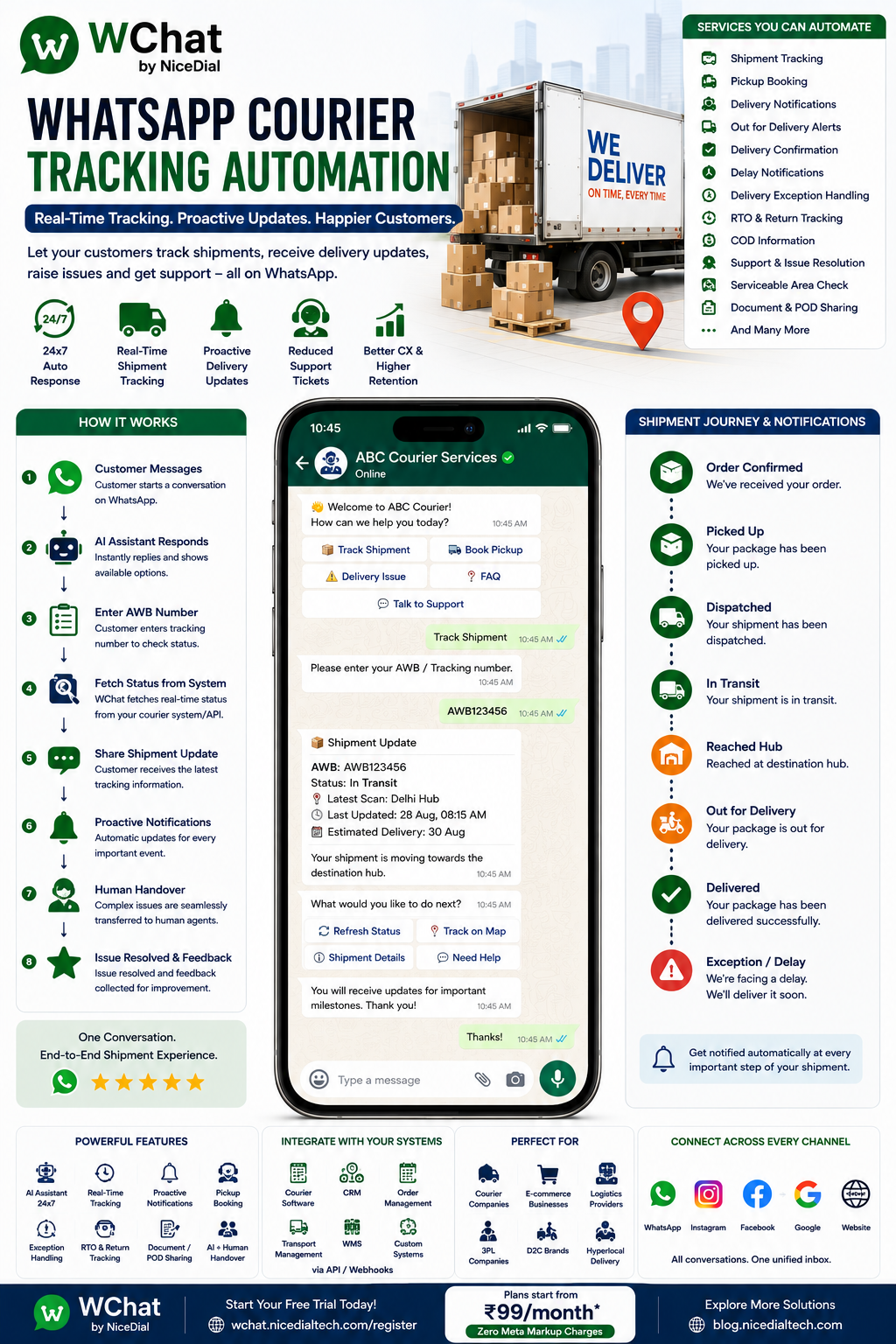
Turn Where Is My Parcel? Into an Automated WhatsApp Experience
A customer places an order.
The package is dispatched.
A few hours later, the messages begin:
“Where is my parcel?”
“Has my order been shipped?”
“When will it arrive?”
“Is it out for delivery?”
“Can I change the delivery address?”
“My package says delivered, but I haven’t received it.”
For courier, logistics and delivery companies, these questions can generate a huge volume of repetitive customer-support conversations.
What if customers could simply message your business on WhatsApp:
TRACK AWB123456
and immediately receive the latest shipment status?
With WChat by NiceDial, courier and logistics businesses can connect WhatsApp with their shipment-tracking systems to automate tracking enquiries, delivery notifications, exception alerts, customer support and human-agent handover.
What Is WhatsApp Courier Tracking Automation?
WhatsApp courier tracking automation connects customer conversations on WhatsApp with a courier company’s shipment, order, or logistics system.
Instead of requiring customers to:
- Call customer care
- Visit a tracking website
- Search for the tracking page
- Enter an AWB number repeatedly
- Wait for an agent
customers can request shipment information directly through WhatsApp.
A typical journey looks like:
Customer Opens WhatsApp
↓
Track My Shipment
↓
Enter AWB / Tracking Number
↓
WChat Requests Status from Courier API
↓
Latest Shipment Status Retrieved
↓
Customer Receives Update
For example:
📦 Shipment Update
AWB: AWB123456
Status: In Transit
Last Update: Delhi Distribution Hub
Expected Delivery: 30 August🚚 Your shipment is moving toward the destination hub.
The information displayed should come from the connected logistics system rather than being generated by AI.
Why Courier Companies Need WhatsApp Automation
Shipment tracking is one of the most repetitive customer-service activities in logistics.
Customers want visibility throughout the delivery journey.
Typical questions include:
“Has the seller shipped my order?”
“Where is my parcel?”
“Why hasn’t the tracking changed?”
“When will it reach me?”
“Is it out for delivery?”
“Who is delivering my parcel?”
“Why was delivery unsuccessful?”
If agents manually answer every tracking enquiry, support teams spend significant time retrieving information customers could receive automatically.
The Complete WhatsApp Courier Journey
WChat can help create a customer journey such as:
Order Confirmed
↓
Shipment Created
↓
AWB Generated
↓
Pickup Completed
↓
Shipment Dispatched
↓
In Transit
↓
Destination Hub
↓
Out for Delivery
↓
Delivered
↓
Feedback
If something goes wrong:
Delivery Exception
↓
WhatsApp Notification
↓
Customer Action / Support
↓
Human Agent if Required
This turns WhatsApp into a proactive shipment communication channel.
1. Track Courier Through WhatsApp
The customer messages:
Hi
WChat responds:
👋 Welcome to ABC Courier.
How can we help?
Options:
📦 Track Shipment
🚚 Book Pickup
📍 Find Service Location
⚠️ Delivery Issue
💬 Talk to Support
The customer selects:
📦 Track Shipment
WChat asks:
Please enter your AWB or tracking number.
Customer:
AWB123456
WChat queries the connected courier system.
2. Provide Current Shipment Status
The customer can then receive the latest available status.
For example:
📦 Shipment Tracking
AWB: AWB123456
Current Status: In Transit 🚚
Latest Scan: Delhi Hub
Last Updated: 28 Aug, 8:15 AM
Estimated Delivery: 30 AugWe’ll keep you updated.
This gives the customer useful information without requiring a support agent.
3. Automatic Shipment Dispatched Notification
Don’t wait for customers to ask where their order is.
When the shipment is dispatched, WChat can send an appropriate WhatsApp notification based on the connected system.
For example:
📦 Your Shipment Has Been Dispatched
Tracking ID: AWB123456
Your package has been handed over for delivery.
Track Shipment
Customers can then access tracking directly from the conversation.
4. Pickup Confirmation
For courier companies handling customer pickups:
✅ Package Picked Up
Your shipment AWB123456 has been successfully picked up.
We’ll notify you as it moves through our network.
This provides immediate reassurance that the shipment has entered the courier network.
5. In-Transit Updates
For longer-distance deliveries, customers can receive meaningful milestone notifications.
For example:
🚚 Shipment Update
Your package has reached the Delhi distribution hub and is moving toward the destination facility.
You don’t necessarily need to send a WhatsApp message for every internal scan.
Focus on customer-relevant milestones to avoid excessive notifications.
6. Out-for-Delivery Notification
This is one of the most valuable courier notifications.
On the delivery day:
🚚 Your Package Is Out for Delivery
Shipment: AWB123456
Your package is scheduled for delivery today.
Please ensure someone is available to receive it.
Depending on the courier’s workflow, customers could also be given relevant delivery-management options.
7. Delivery Confirmation
Once the connected courier system records successful delivery:
✅ Package Delivered
Shipment AWB123456 has been marked as delivered.
Thank you for choosing ABC Courier.
The customer can then be invited to provide feedback.
8. Failed Delivery Automation
Not every delivery succeeds on the first attempt.
Reasons might include:
- Customer unavailable
- Address issue
- Access restriction
- Delivery attempt unsuccessful
- Operational exception
When the courier system records an exception, WChat can send:
⚠️ Delivery Attempt Update
We were unable to complete delivery of shipment AWB123456.
Please choose an option:
📅 Request Reattempt | 💬 Contact Support
Only options actually supported by the courier’s operational system should be offered.
9. Delivery Address Issue
Sometimes the delivery team cannot locate the destination.
Instead of repeatedly calling the customer, the workflow can request appropriate clarification.
For example:
📍 We need additional information to complete your delivery.
Please review the delivery details or contact our support team.
Any address changes should follow the courier company’s verification and security process.
This is particularly important because unauthorized shipment rerouting can create fraud risks.
10. Reschedule Delivery Through WhatsApp
Where supported by the courier system, customers may be allowed to request a different delivery date.
For example:
When would you prefer another delivery attempt?
📅 Tomorrow
📅 Choose Another Available Date
Once the request is successfully processed:
✅ Delivery Request Updated
This reduces the need for customer-support calls.
11. AI Assistant for Courier FAQs
Not every courier enquiry requires API tracking.
WChat AI can answer approved general questions such as:
“What are your working hours?”
“Do you deliver internationally?”
“How can I book a pickup?”
“Where is your nearest branch?”
“How do I track my courier?”
“What items are prohibited?”
For shipment-specific questions, the system should retrieve information from the courier platform rather than having the AI guess.
12. Human Agent Handover
Automation works well for standard tracking.
But some situations require human investigation.
For example:
“My shipment shows delivered, but I haven’t received it.”
or:
“The parcel arrived damaged.”
or:
“Tracking hasn’t changed for four days.”
These conversations should be escalated.
AI / Tracking Automation
↓
Shipment Details Retrieved
↓
Issue Identified
↓
Human Support Agent
The agent can receive context such as:
AWB: AWB123456
Current Status: Delivered
Customer Issue: Parcel not received
Latest Scan: Delivery Completed
Reason for Handover: Delivery Dispute
The customer doesn’t need to repeat everything.
13. Automatically Create Support Tickets
When WChat is connected to a ticketing or CRM system, delivery issues can become structured support cases.
For example:
Customer Reports Problem
↓
AWB Validated
↓
Shipment Retrieved
↓
Issue Type Selected
↓
Ticket Created
↓
Ticket ID Shared
↓
Support Team Assigned
For example:
🎫 Support Request Created
Ticket ID: SUP1048
Our support team will review your delivery issue.
This provides customers with a clear reference.
14. Courier Complaint Categories
WChat can help customers identify their problem.
Options might include:
📦 Shipment Delayed
❌ Delivery Failed
🏠 Delivered but Not Received
📦 Damaged Shipment
📍 Address Issue
💰 Billing / COD Issue
🔄 Return Shipment
💬 Other
The conversation can then be routed to the appropriate support queue.
15. Cash-on-Delivery Notifications
For COD shipments, customers can receive an appropriate pre-delivery notification.
For example:
🚚 Your COD shipment is out for delivery today.
Amount Due: ₹1,499
Please use the payment methods supported by the courier at delivery.
This can help customers prepare for delivery.
The amount should be retrieved from the order or logistics system.
16. Return-to-Origin (RTO) Updates
RTO can be costly for logistics companies and e-commerce businesses.
When appropriate, WChat can notify customers about delivery issues before a shipment moves further into an RTO process.
For example:
⚠️ Action Required for Your Shipment
We couldn’t complete your delivery.
Please contact us or select an available delivery option.
For shipments already marked RTO:
📦 Shipment Update
Your shipment is being returned to the sender according to the current delivery status.
This improves transparency for customers.
17. Return Shipment Tracking
Returns are another major customer-service journey.
WChat can provide:
Return Requested
↓
Pickup Scheduled
↓
Return Picked Up
↓
In Transit
↓
Reached Seller / Warehouse
↓
Return Completed
This can be particularly valuable for e-commerce logistics.
18. Courier Pickup Booking on WhatsApp
Courier automation doesn’t need to stop at tracking.
Customers can also initiate pickup requests.
For example:
What would you like to do?
📦 Track Shipment
🚚 Book Pickup
For pickup booking, WChat can collect:
- Pickup PIN Code
- Destination PIN Code
- Package Type
- Approximate Weight
- Dimensions
- Preferred Pickup Date
- Customer Contact Details
The request can then be sent to the courier booking system.
19. Serviceability Check
Before accepting a courier booking:
Enter pickup PIN code
↓
Enter destination PIN code
↓
Courier API checks serviceability.
↓
Service Available
✅ Delivery service is available for this route.
or
Not Available
We’re currently unable to service this route.
This prevents your team from manually checking every location pair.
20. Estimated Delivery Date
When the courier system provides an estimated delivery date, WChat can surface it directly.
For example:
Estimated Delivery: 30 August
However, the AI should never invent delivery estimates.
ETAs should come from the logistics platform or courier API.
21. Proactive Delay Notifications
One of the biggest opportunities in customer experience is informing customers before they ask.
Suppose a shipment is delayed due to an operational exception.
Instead of waiting for:
“Where is my parcel?”
WChat can send:
⚠️ Shipment Update
Your shipment is experiencing a delay.
Current estimated delivery: 31 August
We apologize for the inconvenience.
Proactive communication can reduce uncertainty and inbound support volume.
22. Shared Team Inbox for Courier Support
Courier companies may have:
🎧 Customer Support
🚚 Operations
📦 Delivery Teams
💰 Billing
🔄 Returns Team
🏢 Branch Teams
👨💼 Supervisors
With WChat Shared Inbox, authorized employees can manage conversations centrally.
Features can include:
✔ Role-Based Access
✔ Conversation Assignment
✔ Department Routing
✔ Customer Context
✔ Complete Conversation History
✔ AI + Human Handover
✔ Access Management
This allows support teams to collaborate without relying on shared direct Business WhatsApp account access.
23. Route Courier Issues Automatically
WChat can help route conversations according to the issue.
For example:
📦 Tracking Enquiry
→ Automated Tracking
⚠️ Delayed Shipment
→ Customer Support
🏠 Delivered but Not Received
→ Delivery Investigation
📦 Damaged Parcel
→ Claims / Support
🔄 Return Shipment
→ Returns Team
💰 Billing / COD
→ Billing Team
🚚 Pickup Request
→ Booking / Operations
This reduces manual conversation forwarding.
24. Multi-Branch Courier Operations
Courier companies with multiple hubs or branches can route conversations according to:
- AWB
- Customer location
- Shipment hub
- Service type
- Issue category
A centralized WhatsApp number can still support multiple operational teams behind the scenes.
25. E-Commerce Integration
Courier tracking automation is particularly useful for e-commerce businesses.
The journey could be:
Customer Places Order
↓
Order Confirmed
↓
Courier Assigned
↓
AWB Generated
↓
WhatsApp Shipment Notification
↓
Pickup
↓
In Transit
↓
Out for Delivery
↓
Delivered
↓
Feedback
This gives the customer a continuous post-purchase communication experience.
26. CRM + Courier API Integration
WChat can connect with compatible systems through APIs and webhooks.
Possible integrations include:
- Courier Management System
- Transport Management System
- Order Management System
- CRM
- E-Commerce Platform
- Warehouse Management System
- Ticketing Software
- Delivery Management System
- Custom Logistics Applications
This is what makes real tracking automation possible.
WhatsApp is the conversation layer.
Your courier system remains the source of truth.
27. Example WhatsApp Courier Tracking Conversation
Customer
Hi
WChat
👋 Welcome to ABC Courier.
How can we help?
📦 Track Shipment | 🚚 Book Pickup | ⚠️ Delivery Issue | 💬 Support
Customer
📦 Track Shipment
WChat
Please enter your AWB number.
Customer
AWB123456
WChat retrieves the shipment.
WChat
📦 Shipment Status
AWB: AWB123456
Status: In Transit 🚚
Latest Scan: Delhi Hub
Estimated Delivery: 30 AugustWhat would you like to do?
🔄 Refresh Status | 💬 Need Help
The customer gets the answer in seconds.
28. Example: Delivery Problem
Customer:
My parcel shows delivered but I haven’t received it.
WChat:
Please provide your tracking number.
Customer:
AWB123456
↓
Shipment retrieved
↓
Status: Delivered
↓
Issue classified:
Delivered but Not Received
↓
Support ticket created
↓
Human agent assigned
The agent receives the tracking information and customer complaint together.
29. WhatsApp + AI Voice Agent for Courier Companies
Some customers prefer messaging.
Others call customer support.
NiceDial can combine WChat with an AI Voice Agent.
For example:
Customer Calls
↓
↓
“Please tell me your AWB number.”
↓
Courier API queried
↓
Shipment status spoken to customer
↓
Optional WhatsApp tracking link / confirmation sent
For complex problems:
AI Voice Agent → Human Call-Centre Agent
This creates a connected Voice + WhatsApp + Human Support experience.
Benefits of WhatsApp Courier Tracking Automation
📦 24×7 Self-Service Tracking
Customers can check shipment status without waiting for an agent.
📞 Reduce “Where Is My Order?” Calls
Automate one of the most repetitive logistics enquiries.
🚚 Proactive Delivery Updates
Keep customers informed before they contact support.
⚠️ Handle Delivery Exceptions Faster
Guide customers toward appropriate actions when something goes wrong.
🎫 Automate Support Ticket Creation
Turn delivery problems into structured support cases.
👥 Improve Agent Productivity
Let human agents focus on complex delivery issues.
🔄 Improve Return Communication
Provide visibility across forward and reverse logistics.
⭐ Improve Customer Experience
Keep customers informed throughout the shipment journey.
Who Can Use WhatsApp Courier Tracking Automation?
WChat can support:
🚚 Courier Companies
📦 Logistics Companies
🛒 E-Commerce Businesses
🏪 Online Retailers
🚛 Transport Companies
🏭 Manufacturers
📦 Fulfilment Companies
🏬 Warehouses
🍔 Delivery Businesses
🏢 3PL Providers
🔄 Reverse Logistics Companies
🌍 Cross-Border Logistics Providers
Why Choose WChat by NiceDial?
WChat combines WhatsApp automation, AI conversations, human-agent collaboration and API integrations.
Courier & Logistics Features
✔ WhatsApp Shipment Tracking
✔ AWB-Based Tracking
✔ 24×7 AI Assistant
✔ Dispatch Notifications
✔ Pickup Confirmation
✔ In-Transit Updates
✔ Out-for-Delivery Alerts
✔ Delivery Confirmation
✔ Delay Notifications
✔ Failed Delivery Workflows
✔ RTO Updates
✔ Return Shipment Tracking
✔ Pickup Booking
✔ Serviceability Checks
✔ Support Ticket Creation
✔ AI + Human Handover
✔ Shared Team Inbox
✔ Department Routing
✔ Courier API Integration
✔ CRM Integration
✔ Reports & Analytics
✔ Official WhatsApp Business API
Start Automating Courier Tracking on WhatsApp
Your customers shouldn’t need to call your support team every time they want to know:
“Where is my parcel?”
Give them a simpler journey:
WhatsApp → Enter AWB → Retrieve Status → Get Update
And when something requires human attention:
Tracking → Issue Detected → Ticket → Human Support
With WChat by NiceDial, WhatsApp can become an important part of your courier customer-service infrastructure.
Track. Notify. Resolve. Deliver. 📦🚚
💰 Plans start from ₹99/month
✅ Zero Meta Markup Charges
📖 Explore more NiceDial automation solutions
Frequently Asked Questions
Can customers track a courier directly on WhatsApp?
Yes. WChat can collect an AWB or tracking number and query a connected courier system or API to return the latest available shipment status.
Does AI generate the tracking information?
No. Shipment-specific information should come from the courier, order, or logistics system. AI can manage the conversation, but the operational system should remain the source of truth.
Can WChat automatically send out-for-delivery notifications?
Yes. When the connected system generates the relevant shipment event, WChat can trigger an appropriate WhatsApp notification subject to applicable WhatsApp messaging requirements.
Can customers report a missing parcel?
Yes. WChat can collect the AWB, classify the issue, create a support request and route the conversation to a human agent.
Can customers reschedule a delivery?
If the courier system supports delivery rescheduling, WChat can expose the available workflow through WhatsApp.
Can WChat send COD information?
Yes. COD information can be retrieved from the connected order or courier system and included in appropriate delivery notifications.
Can WChat track return shipments?
Yes. Reverse-logistics statuses can be presented when available from the connected system.
Can multiple support agents manage courier enquiries?
Yes. WChat Shared Inbox can provide authorized support, operations and other teams with controlled access to customer conversations.
Can WChat integrate with our existing courier software?
WChat can integrate with compatible courier, logistics, order-management, CRM and custom systems through available APIs and webhooks.