Artificial Intelligence is moving beyond chatbots that simply answer questions.
Businesses can now use AI Agents to participate in real workflows—talking with customers, qualifying leads, scheduling appointments, retrieving information from business systems, creating requests, following up, and handing conversations to employees when human involvement is required.
Think about how much time your team spends every day on repetitive activities:
- Answering the same customer questions
- Calling new leads
- Scheduling appointments
- Following up with prospects
- Checking information in CRM
- Routing enquiries
- Creating support requests
- Sending reminders
- Updating customer records
- Handling routine calls
Many of these activities don’t necessarily require a person for every interaction.
That’s where AI Agents can help.
Instead of asking:
“Can AI replace this employee?”
a more useful question is:
“Which repetitive parts of this employee’s workflow can AI handle?”
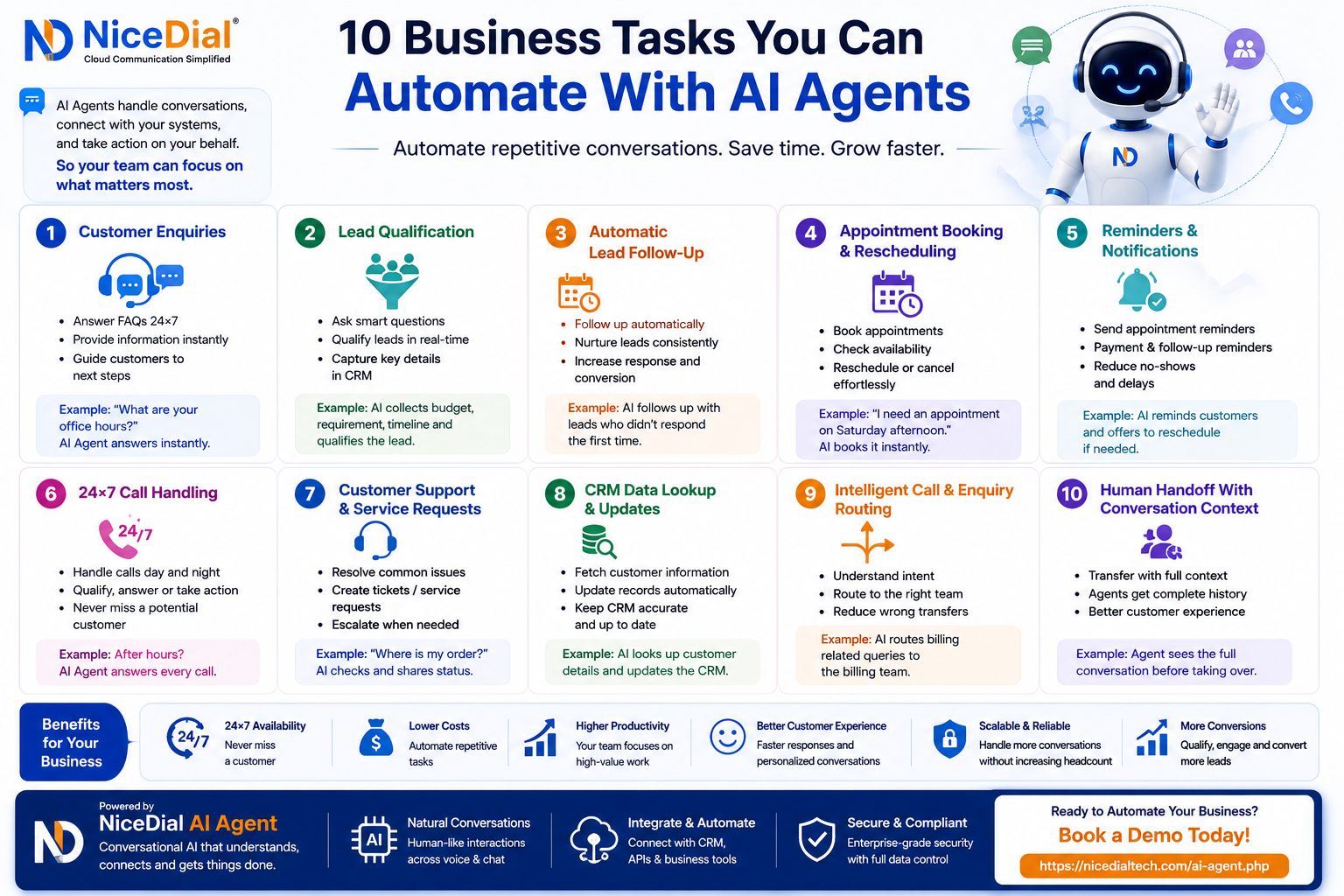
Here are 10 practical business tasks you can automate with AI Agents.
1. Customer Enquiries
One of the most obvious applications of AI Agents is handling repetitive customer questions.
Customers frequently ask:
“What are your business hours?”
“Where are you located?”
“What services do you offer?”
“How can I book an appointment?”
“Can someone call me back?”
Traditionally, these enquiries reach a receptionist, customer-service agent, sales representative, or contact center.
An AI Agent can provide approved answers instantly.
The interaction can happen through channels such as voice or digital conversations depending on the deployment.
Instead of simply displaying an FAQ page, the AI can understand the customer’s question and continue the conversation.
Example
Customer:
“Are you open on Sunday?”
AI Agent:
“Yes. Our Sunday business hours are 10 AM to 4 PM. Would you like help booking an appointment?”
The AI doesn’t just answer the question.
It can potentially move the customer toward the next useful action.
2. Lead Qualification
Generating leads is expensive.
But sales teams often spend significant time determining which leads are actually relevant.
An AI Sales Agent can conduct the initial qualification conversation.
For example:
AI Agent:
“Which solution are you looking for?”
Prospect:
“Cloud contact center.”
AI Agent:
“Approximately how many agents would use the solution?”
Prospect:
“About 75.”
AI Agent:
“Are you primarily looking for inbound support, outbound calling, or both?”
Within a short interaction, the AI can potentially collect:
Product: Cloud Contact Center
Users: 75
Requirement: Inbound + Outbound
CRM Integration: Required
Timeline: 30 days
Demo: Requested
Instead of receiving only a name and phone number, the sales team receives a qualified conversation with context.
This can allow sales representatives to spend more time on higher-intent opportunities.
3. Automatic Lead Follow-Up
Many businesses don’t necessarily have a lead-generation problem.
They have a follow-up problem.
A prospect submits an enquiry.
The salesperson calls once.
The customer doesn’t answer.
Another follow-up is planned.
Then other leads arrive.
Eventually, the original opportunity is forgotten.
AI Agents can support structured follow-up workflows.
For example:
New Lead
↓
Initial AI Engagement
↓
Customer Interested
↓
Qualification
↓
Follow-Up Required
↓
AI Continues Approved Follow-Up
↓
Demo / Sales Handoff
AI can handle repetitive parts of the follow-up process while the sales team focuses on prospects who are ready for deeper conversations.
4. Appointment Booking and Rescheduling
Appointment scheduling creates significant repetitive work across industries.
This applies to:
🏥 Hospitals and clinics
💇 Salons
🏠 Real estate companies
🚗 Automobile service centers
🏨 Hotels
🏋️ Fitness centers
👨💼 Consultants
🦷 Dental clinics
🐾 Veterinary clinics
Consider:
Customer:
“I’d like an appointment Saturday afternoon.”
An AI Agent connected to the appropriate scheduling system can potentially check availability and offer suitable options.
AI Agent:
“I have availability at 3:00 PM and 4:30 PM. Which would you prefer?”
Customer:
“4:30.”
The booking can then be created through the approved workflow.
The same approach can be used for rescheduling.
Instead of calling a receptionist simply to move an appointment, the customer can potentially complete the process conversationally.
5. Appointment and Payment Reminders
Businesses spend significant effort reminding customers about upcoming actions.
Examples include:
- Appointment reminders
- Payment reminders
- Renewal reminders
- Service reminders
- EMI reminders
- Subscription reminders
- Insurance renewal reminders
- Follow-up reminders
Traditional automation usually sends a static message.
An AI Agent can make suitable reminder workflows conversational.
For example:
AI Voice Agent:
“Hello. This is a reminder about your appointment tomorrow at 11 AM. Will you be able to attend?”
Customer:
“No, I need to change it.”
Instead of ending the reminder call, the AI can potentially continue into the approved rescheduling workflow.
This transforms:
Reminder
into:
Reminder → Conversation → Action
6. 24×7 Phone Call Handling
Businesses don’t stop receiving calls when employees leave the office.
Potential customers may call at:
10 PM
2 AM
Sunday afternoon
During a holiday
Traditionally, these calls may reach voicemail, an after-hours message, or simply go unanswered.
An AI Voice Agent can provide another layer of availability.
Instead of:
“Our office is currently closed. Please call tomorrow.”
the caller could hear:
“Hello. How can I help you today?”
The AI Agent can identify why the person is calling and handle suitable requests.
For example:
- Product enquiries
- Appointment requests
- Basic support questions
- Lead qualification
- Callback requests
- Order enquiries
- Routine account enquiries
When the interaction requires a person, the AI can follow the configured escalation or callback workflow.
7. Customer Support and Service Requests
Customer-support teams repeatedly handle similar requests.
Examples include:
“Where is my order?”
“What’s my application status?”
“I need to create a service request.”
“Can someone call me back?”
“My appointment isn’t showing.”
An AI Agent connected with CRM, helpdesk, order management, or another business system can potentially retrieve the required information.
The workflow becomes:
Customer Question
↓
AI Understands Intent
↓
Verify Customer if Required
↓
CRM / API Lookup
↓
Retrieve Information
↓
Provide Approved Response
Or, where appropriate:
Create Ticket / Service Request
The AI is no longer simply answering FAQs.
It becomes part of the customer-service workflow.
8. CRM Data Lookup and Updates
Sales and customer-service teams spend significant time switching between communication systems and CRM software.
Imagine a customer asks:
“What is the status of my application?”
A traditional workflow might require an agent to:
- Ask for customer information.
- Open the CRM.
- Search for the customer.
- Find the application.
- Check its status.
- Explain it to the customer.
- Add a conversation note.
An AI Agent integrated with the CRM can potentially automate suitable parts of this workflow.
Customer → AI → Verification → CRM Lookup → Response → CRM Update
AI Agents can also potentially record structured information gathered during conversations.
For example:
Lead Requirement: AI Voice Agent
Team Size: 50
Language: Hindi + English
Timeline: 30 days
Demo Requested: Yes
This reduces repetitive administrative work and gives human teams better context.
9. Intelligent Call and Enquiry Routing
Traditional routing is usually based on menus.
“Press 1 for Sales.”
“Press 2 for Support.”
“Press 3 for Billing.”
The problem is that customers don’t always know which department should handle their issue.
AI Agents can use the conversation itself to determine intent.
For example:
Customer:
“My payment went through, but my account hasn’t been activated.”
The AI can identify the relevant issue and determine the appropriate workflow or team.
This changes routing from:
Customer Chooses Department
to:
AI Understands Requirement → Routes Accordingly
When the conversation is transferred, the receiving employee can potentially receive relevant context as well.
10. Human Handoff With Conversation Context
Automation isn’t about making AI handle everything.
Some conversations require:
- Human judgment
- Empathy
- Negotiation
- Investigation
- Exceptions
- Specialized knowledge
- Commercial decisions
A good AI Agent needs to recognize when the conversation should move to a person.
But the handoff shouldn’t mean starting over.
Imagine an AI Agent has already collected:
Customer: Rahul Sharma
Requirement: Cloud Contact Center
Users: 100
CRM: Existing CRM integration required
Timeline: 30 days
Demo: Requested
Reason for Transfer: Commercial discussion
The salesperson can begin with:
“Rahul, I understand you’re looking for a cloud contact center for approximately 100 users and need CRM integration.”
Instead of:
“Hello. How can I help you?”
The customer doesn’t need to repeat the entire conversation.
This is where AI + Human collaboration becomes particularly powerful.
AI Agents Can Work Across Multiple Business Functions
These ten tasks aren’t limited to one department.
Sales
AI Agents can assist with:
- New enquiries
- Lead qualification
- Lead follow-up
- Demo scheduling
- CRM updates
- Sales routing
Customer Support
AI can support:
- FAQs
- Customer verification
- Status enquiries
- Service requests
- Ticket creation
- Human escalation
Operations
AI can assist with:
- Appointment management
- Reminders
- Callback requests
- Information collection
- Workflow triggers
Contact Centers
AI Agents can support:
- Inbound conversations
- Outbound calling
- Intent detection
- Intelligent routing
- CRM lookups
- Human-agent handoff
AI Agents Become More Powerful With Business-System Integration
A standalone AI chatbot can answer questions.
An integrated AI Agent can potentially take action.
The architecture can look like:
Customer
↓
AI Agent
↓
Understand Intent
↓
CRM / API / Database / Scheduling System
↓
Retrieve Information or Perform Approved Action
↓
Respond
↓
Resolve or Transfer to Human
Possible integrations include:
- CRM
- ERP
- Helpdesk
- Appointment systems
- Customer databases
- Hospital Management Systems
- Loan-management platforms
- Order-management systems
- Billing systems
- Custom APIs
The exact capabilities depend on the systems being connected and the permissions provided to the AI workflow.
AI Agent vs Basic Chatbot
| Basic Chatbot | AI Agent |
|---|---|
| Primarily answers questions | Can participate in workflows |
| Often menu or rule based | More conversational |
| Limited context | Can maintain conversational context |
| Mostly information delivery | Can retrieve information and trigger approved actions |
| Basic routing | Intent-based routing |
| Limited integrations | Can work with CRM/APIs/tools |
| Static interactions | Multi-step conversations |
| Simple escalation | Contextual human handoff |
Traditional chatbots still make sense for simple and predictable interactions.
AI Agents become useful when conversations require multiple steps, context, tool access, or actions.
AI Agents Don’t Need to Replace Employees
One of the biggest misconceptions about business AI is that automation means replacing people.
A more practical model is:
AI Handles
- Repetitive questions
- Initial qualification
- Routine follow-up
- Data collection
- Basic lookups
- Appointment workflows
- Reminders
- Simple routing
Humans Handle
- Complex problem solving
- Relationship building
- Negotiation
- Exceptions
- Sensitive conversations
- Strategic decisions
- High-value interactions
The objective should be:
Automate repetitive work. Amplify human capability.
Which Businesses Can Use AI Agents?
AI Agent automation can be relevant across many industries.
Healthcare
Appointments, reminders and routine patient enquiries.
Banking & Fintech
Lead qualification, application enquiries and customer follow-up.
Insurance
Renewals, policy enquiries and lead engagement.
Real Estate
Property enquiries, lead qualification and site-visit scheduling.
Automobile
Service bookings, reminders and customer follow-up.
Education
Admission enquiries and counselling appointments.
E-commerce
Order enquiries, support requests and callbacks.
Professional Services
Initial enquiries, appointment scheduling and lead qualification.
Contact Centers
Inbound automation, outbound campaigns and intelligent routing.
The best starting point is usually a high-volume, repetitive and clearly defined workflow.
How to Decide What You Should Automate First
Don’t start by asking:
“Where can we put AI?”
Start with your existing operation.
Look for tasks that are:
High Volume — your team performs them repeatedly.
Repetitive — the same questions or steps occur frequently.
Rule-Based — clear business rules already exist.
Time Sensitive — customers expect quick responses.
Data Accessible — required information can be retrieved securely.
Measurable — you can track whether automation actually improves the process.
For example, if your reception team receives 500 appointment-related calls every day, appointment automation may be a better first project than trying to automate every hospital interaction.
Start narrow.
Measure.
Improve.
Then expand.
Guardrails Are Essential
Giving an AI Agent access to business systems also means businesses need strong controls.
Define:
- What information AI can access
- Which actions AI can perform
- When customer verification is required
- Which APIs are available
- What information AI must never disclose
- When human approval is required
- When the conversation must be escalated
- What should be logged
- How data should be retained
The goal isn’t to give AI unlimited access.
The goal is to give the AI Agent exactly the tools required for the approved workflow.
Where NiceDial AI Agent Fits
NiceDial AI Agent is designed for conversational business workflows where organizations need more flexibility than traditional scripted automation.
Businesses can use AI Agent workflows for areas such as:
- Customer enquiries
- AI-powered sales conversations
- Lead qualification
- Lead follow-up
- Voice automation
- Appointment workflows
- Customer support
- CRM/API lookups
- Intelligent routing
- Human-agent escalation
Combined with NiceDial Cloud Telephony, organizations can build an architecture such as:
Customer → Cloud Telephony → AI Agent → CRM/APIs → Business Action → Human Agent When Required
The objective isn’t to automate everything.
It’s to identify where conversational AI can remove repetitive work while keeping people available for the conversations where they add the most value.
Start With One Task
You don’t need to transform your entire business overnight.
Pick one repetitive workflow.
Maybe it’s:
Qualifying incoming leads.
Or:
Answering after-hours calls.
Or:
Booking appointments.
Or:
Following up with prospects.
Or:
Handling routine customer enquiries.
Automate that workflow.
Measure response time, automation rate, transfers, customer outcomes and operational impact.
Then decide what to automate next.
That’s a much more practical AI strategy than trying to deploy AI everywhere at once.
🚀 What Business Task Would You Automate First?
AI Agents are moving business automation from:
“Answer this question.”
toward:
“Understand the request, find the right information, take an approved action, and involve a human when necessary.”
That creates opportunities across sales, support, operations and customer engagement.
Explore how NiceDial AI Agent can connect conversational AI with Voice, Cloud Telephony, CRM, APIs and your existing team.
Explore NiceDial AI Agent / Request a Demo
Automate repetitive conversations. Connect AI with real workflows. Keep humans focused on higher-value work.
Frequently Asked Questions
What business tasks can AI Agents automate?
AI Agents can automate suitable repetitive tasks such as customer enquiries, lead qualification, follow-up, appointment scheduling, reminders, CRM lookups, customer-service requests, call handling and intelligent routing.
What is the difference between an AI Agent and a chatbot?
A chatbot primarily handles conversations or predefined information requests. An AI Agent can additionally use connected tools, APIs and business systems to retrieve information or perform approved actions as part of a multi-step workflow.
Can AI Agents work with CRM software?
Yes. When suitable APIs or integrations are available, AI Agents can retrieve approved CRM information, capture conversation data, update records and trigger defined workflows.
Can AI Agents make and receive phone calls?
Voice-enabled AI Agents can support suitable inbound and outbound calling workflows when integrated with telephony infrastructure.
Can an AI Agent transfer a customer to a human?
Yes. Businesses can define escalation rules so the AI transfers suitable interactions to employees, potentially along with relevant conversation context.
Should businesses automate everything with AI?
No. Automation should be based on the suitability of the workflow. Complex, sensitive, high-risk or judgment-heavy interactions may require human involvement.
AI Sales Agent → AI Sales Agent: Automate Your First Customer Conversation
AI Lead Follow-Up → How AI Agents Automatically Follow Up With Leads
AI Voice Agent → How AI Voice Agents Handle Customer Calls 24×7
AI Voice Agent vs IVR → AI Voice Agent vs Traditional IVR
AI Agent for Hospitals → AI Agent for Hospitals: Automate Patient Enquiries