Recruitment often starts with a simple message:
Hi, is this job still available?
Then come the questions:
Can freshers apply?
What is the salary?
Where is the office?
How can I apply?
Where should I send my resume?
Can I schedule my interview?
Any update on my application?
For one candidate, these questions are easy to manage.
For 500, 1,000 or 5,000 candidates, they become a recruitment operation of their own.
An AI Recruitment Chatbot on WhatsApp can help organizations automate these repetitive conversations while allowing recruiters to focus on candidate evaluation, interviews and hiring decisions.
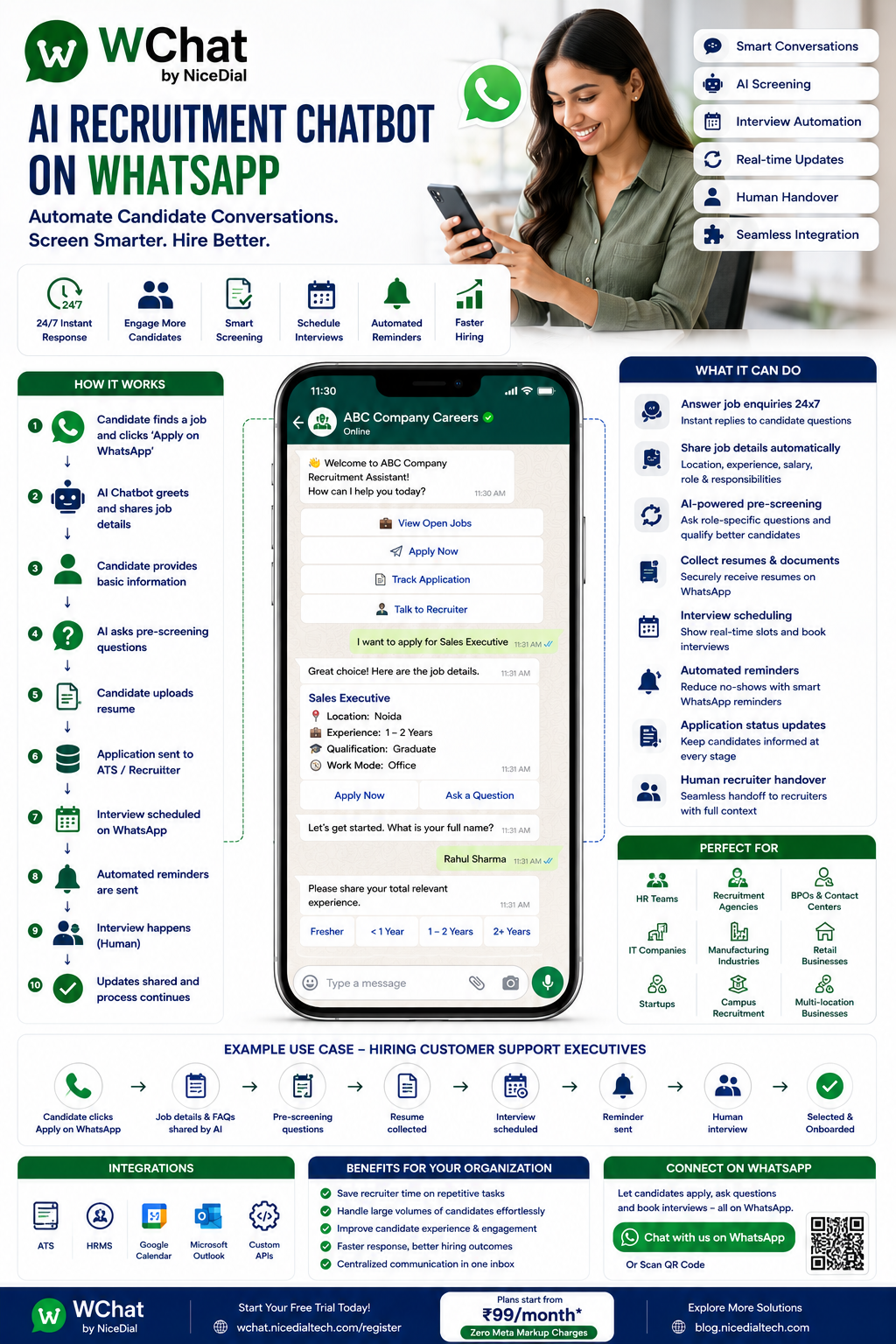
With WChat by NiceDial, the recruitment journey can become:
Job Discovery → WhatsApp → AI Recruitment Chatbot → Job Selection → Candidate Screening → Resume Collection → ATS/Recruiter Review → Interview Booking → Reminders → Human Recruiter → Hiring
What Is an AI Recruitment Chatbot on WhatsApp?
An AI recruitment chatbot is a conversational assistant designed to manage routine interactions between candidates and recruitment teams.
Instead of asking candidates to wait for an HR executive, the chatbot can immediately help with tasks such as:
💼 Finding available jobs
📄 Viewing job descriptions
🤖 Answering approved job FAQs
📝 Starting an application
🎯 Asking pre-screening questions
📎 Collecting resumes
📅 Scheduling interviews
🔔 Sending interview reminders
🔄 Handling rescheduling requests
📊 Providing available application-status information
👩💼 Connecting candidates with recruiters
The objective isn’t to replace recruiters.
It is to automate the repetitive communication surrounding recruitment.
Why Use WhatsApp for Recruitment?
Candidates don’t necessarily want another complicated application process.
Many already use WhatsApp every day.
Imagine a candidate sees your recruitment advertisement:
We’re Hiring – Customer Support Executives
📍 Gurgaon
💼 Freshers & Experienced Candidates
📱 Apply on WhatsApp
The candidate clicks Apply Now.
WhatsApp opens.
The recruitment chatbot immediately begins the application.
No separate first-contact email.
No waiting for HR just to learn basic job information.
No lengthy back-and-forth before the candidate can apply.
How an AI Recruitment Chatbot Works
A typical WChat recruitment workflow could look like:
Candidate Finds Vacancy
↓
Clicks Apply on WhatsApp
↓
AI Recruitment Chatbot
↓
Job Identified
↓
Job Details Shared
↓
Candidate Chooses Apply
↓
Basic Information Collected
↓
Job-Relevant Pre-Screening
↓
Resume Collected
↓
Candidate Profile Created / ATS Updated
↓
Recruiter Review
↓
Interview Invitation
↓
Interview Booking
↓
Automated Reminder
↓
Human Interview
↓
Recruitment Process Continues
This creates a structured journey from initial interest to recruiter interaction.
1. Answer Job Enquiries 24×7
Recruitment enquiries don’t arrive only between 9 AM and 6 PM.
A candidate might see your job advertisement at 11 PM.
They message:
“Is Sales Executive vacancy available?”
Instead of waiting until morning, WChat can respond:
👋 Welcome to ABC Company’s Recruitment Assistant.
We’re currently hiring for multiple positions.
Please select a vacancy:
💼 Sales Executive
🎧 Customer Support Executive
💻 Software Developer
📊 Data Analyst
👨💼 Team Leader
📄 View All Openings
The candidate can start exploring jobs immediately.
2. Automatically Share Job Descriptions
The candidate selects:
🎧 Customer Support Executive
WChat can provide HR-approved vacancy information:
Customer Support Executive
📍 Location: Gurgaon
🏢 Work Mode: Office
💼 Experience: 0–2 Years
🕐 Shift: As per published role requirements
🎓 Qualification: As per company criteriaWould you like to apply?
✅ Apply Now | 📄 More Details | 💬 Talk to Recruiter
This allows candidates to understand the basic requirement before applying.
3. AI-Powered Candidate Conversations
Traditional recruitment bots often depend entirely on fixed menus.
An AI recruitment chatbot can also understand natural-language questions.
A candidate might type:
“Do you have any jobs for freshers in Noida?”
or:
“I have 3 years sales experience. Any vacancy?”
or:
“Mujhe customer support ki job chahiye.”
The AI can understand the request and use the organization’s approved vacancy information to guide the candidate toward relevant openings.
This makes the interaction feel more natural while keeping the underlying workflow structured.
4. Candidate Pre-Screening on WhatsApp
Once the candidate selects a vacancy, the chatbot can ask standardized, job-relevant screening questions configured by HR.
For example:
How much relevant experience do you have?
Fresher
Less than 1 Year
1–2 Years
2+ Years
Then:
Are you comfortable working from our Gurgaon office?
Yes | No
Then:
Are you comfortable with the shift requirements mentioned in the job description?
Yes | No
Then:
When could you potentially join?
Immediately
Within 15 Days
Within 30 Days
More than 30 Days
The recruiter receives structured information instead of starting every candidate conversation from zero.
5. Collect Candidate Details Automatically
The chatbot can collect information required by the recruitment workflow, such as:
👤 Candidate Name
📱 Phone Number
📧 Email Address
📍 Current Location
🎓 Qualification
💼 Relevant Experience
🛠️ Relevant Skills
📅 Joining Availability
📄 Resume
Only information genuinely necessary for the recruitment process should be requested.
6. Resume Collection on WhatsApp
Instead of:
“Please email your CV to careers@company.com.”
WChat can guide the candidate through an approved resume-submission process.
For example:
📄 Please upload your latest resume to continue your application.
Candidate sends:
Rahul_Sharma_CV.pdf
WChat responds:
✅ Resume received.
Thank you, Rahul. Your application information has been submitted for the next stage of our recruitment process.
Depending on the integration, the resume and candidate information can be passed to an ATS, recruitment CRM or other hiring system.
7. AI-Assisted Resume Understanding
When integrated with an appropriate recruitment system, AI can help extract job-relevant information from resumes.
For example:
Resume Uploaded
↓
AI extracts available information:
Experience: 2.5 Years
Skills: Sales, CRM, Lead Management
Previous Role: Sales Executive
Location: Noida
Education: Graduate
↓
Candidate Profile Created
↓
Recruiter Reviews
This can reduce repetitive data entry.
However, extracted resume information should be treated as an aid to recruiters rather than assumed to be perfectly accurate.
8. Match Candidates With Relevant Vacancies
Suppose a candidate messages:
“I have 4 years experience in PHP and MySQL.”
The AI assistant can use the organization’s current vacancy information to identify potentially relevant roles.
For example:
Based on the information you’ve shared, these currently listed roles may be relevant:
💻 PHP Developer
💻 Backend DeveloperWould you like to view the job descriptions?
The chatbot should only recommend real vacancies available in the connected recruitment system.
It shouldn’t invent openings.
9. AI Should Assist Recruitment — Not Make Uncontrolled Hiring Decisions
Recruitment AI needs appropriate safeguards.
A chatbot can efficiently:
✔ Ask consistent screening questions
✔ Organize candidate information
✔ Extract information from resumes
✔ Answer approved FAQs
✔ Schedule interviews
✔ Route candidates
✔ Summarize candidate conversations
But employers should carefully govern automated decisions that materially affect candidates.
Hiring workflows should focus on legitimate, job-related criteria and avoid inappropriate use of protected or irrelevant personal characteristics.
The stronger model is:
AI organizes and assists.
Recruiters evaluate and decide.
10. Route Qualified Applications to Recruiters
Once the configured intake process is completed:
Candidate Application
↓
Screening Responses
↓
Resume
↓
ATS / Recruitment Workflow
↓
Recruiter Review
Recruiters can receive a structured candidate summary such as:
Candidate: Rahul Sharma
Role: Sales Executive
Experience: 2 Years
Location: Noida
Joining Availability: 15 Days
Resume: Received
Application: Ready for Review
This allows the recruiter to focus on evaluation rather than data collection.
11. Interview Scheduling Through WhatsApp
After recruiter or ATS progression, WChat can send:
🎉 Your application has progressed to the interview stage.
Please select an available interview time.
When connected to a scheduling system:
2 September
🕙 10:00 AM
🕛 12:00 PM
🕞 3:30 PM
Candidate chooses:
12:00 PM
The interview is created in the calendar.
12. Interview Confirmation
The candidate receives:
✅ Interview Confirmed
Position: Sales Executive
Date: 2 September
Time: 12:00 PM
Mode: Video InterviewPlease follow the interview instructions provided in your confirmation.
Everything remains in the WhatsApp conversation for easy reference.
13. Automated Interview Reminders
Before the interview:
⏰ Interview Reminder
Your interview for the Sales Executive position is scheduled tomorrow at 12:00 PM.
Confirm | Request Reschedule | Contact Recruiter
This can help reduce missed interviews and manual reminder calls.
14. Interview Rescheduling on WhatsApp
Candidate:
“I can’t attend tomorrow. Can I reschedule?”
Instead of waiting for HR:
Reschedule Requested
↓
Scheduling System Checked
↓
Alternative Available Slots
↓
Candidate Selects Time
↓
Calendar Updated
↓
New Confirmation
This eliminates unnecessary coordination.
15. Automate Candidate FAQs
Recruiters repeatedly answer questions such as:
“Can freshers apply?”
“Is this work from home?”
“Where is your office?”
“What is the interview process?”
“What experience is required?”
“What are the working days?”
“What documents should I bring?”
WChat AI can answer using the organization’s approved recruitment knowledge base.
If the answer isn’t available or requires individual discussion:
💬 Talk to Recruiter
16. Multilingual Candidate Conversations
Recruitment campaigns often attract candidates who are more comfortable communicating in different languages.
A conversational AI workflow can support configured languages so candidates can communicate more naturally.
For example:
“Mujhe sales ki job chahiye.”
The assistant can understand that the candidate is asking about sales vacancies and continue the appropriate workflow.
This can be particularly useful for high-volume hiring across diverse candidate groups.
17. Candidate Application Status on WhatsApp
After an interview, candidates frequently message:
“Any update?”
With ATS integration, WChat can retrieve the status available in the recruitment system.
For example:
📋 Application Status
Position: Sales Executive
Current Stage: Interview ReviewWe will notify you when the recruitment team records the next update.
The chatbot should never invent selection or rejection decisions.
18. Proactive Recruitment Updates
Organizations don’t need to wait for candidates to ask for every update.
Where appropriate, candidates can receive meaningful process notifications:
📩 Application Received
📋 Under Review
📅 Interview Invitation
🔔 Interview Reminder
➡️ Next-Round Update
📄 Administrative Next Steps
This creates a more transparent candidate experience.
19. AI + Human Recruiter Handover
Some conversations should immediately involve a recruiter.
For example:
“I already have another offer and need to discuss my joining date.”
or:
“Can I discuss the compensation?”
or:
“I need clarification about the role before accepting.”
WChat can transfer the conversation while preserving context.
Recruiter Receives
Candidate: Rahul Sharma
Position: Sales Executive
Stage: Final Process
Joining Availability: 15 Days
Reason for Transfer: Joining-Date Discussion
The candidate doesn’t need to repeat the entire conversation.
20. Shared WhatsApp Inbox for Recruitment Teams
Large organizations rarely have one recruiter handling everything.
There may be:
👩💼 Talent Acquisition
🎧 Operations Recruitment
💻 Technology Recruitment
🏭 Field Recruitment
📅 Interview Coordinators
🏢 Hiring Managers
👨💼 HR Leadership
With WChat Shared Inbox, authorized teams can manage recruitment conversations centrally.
Features can include:
✔ Role-Based Access
✔ Candidate Assignment
✔ Department Routing
✔ Conversation History
✔ Candidate Context
✔ AI + Human Handover
✔ Controlled Employee Access
21. High-Volume Recruitment
This is where an AI recruitment chatbot becomes especially useful.
Imagine a BPO needs:
200 Customer Support Executives
and receives:
5,000 enquiries.
Without automation:
5,000 Enquiries
↓
Manual Responses
↓
Manual Screening
↓
Resume Collection
↓
Manual Scheduling
↓
Interview Coordination
With WChat:
5,000 Enquiries
↓
AI Recruitment Chatbot
↓
Job Information
↓
Structured Pre-Screening
↓
Resume Collection
↓
ATS / Recruiter Review
↓
Interview Scheduling
↓
Reminders
↓
Human Interviews
The recruiter spends less time on repetitive administration.
22. Walk-In Interview Registration
Companies conducting mass walk-ins can create:
Walk-In Hiring Drive
📅 5 September
📍 Gurgaon
🎧 Customer Support ExecutivesRegister on WhatsApp
Candidate clicks or scans a QR code.
↓
Basic Details
↓
Screening Questions
↓
Resume
↓
Registration
↓
Interview Instructions
This can make walk-in recruitment easier to organize.
23. Recruitment QR Codes
Put a QR code on:
📄 Recruitment Posters
🏢 Office Entrances
🎪 Job Fairs
🎓 College Campuses
📰 Advertisements
📱 Social Media Creatives
Candidate scans:
QR Code → WhatsApp → Recruitment Chatbot → Application
A physical recruitment advertisement becomes an interactive application channel.
24. Click-to-WhatsApp Recruitment Campaigns
Recruitment advertisements on digital channels can direct interested candidates straight into a WhatsApp application flow.
For example:
We’re Hiring Customer Support Executives
📍 Gurgaon
💼 Freshers WelcomeApply on WhatsApp
The campaign can open the correct job workflow automatically.
This reduces friction between discovering the vacancy and beginning the application.
25. AI Recruitment Chatbot for Recruitment Agencies
Recruitment agencies can use the chatbot as a candidate-discovery assistant.
For example:
What type of job are you looking for?
💻 IT
🎧 BPO
💰 Banking & Finance
💼 Sales
🏭 Manufacturing
🚚 Logistics
🏥 Healthcare
Then:
Category → Location → Experience → Current Vacancies → Application → Recruiter
This helps agencies handle larger candidate pools across multiple clients.
26. Campus Recruitment Chatbot
Universities and employers can also use WhatsApp for campus recruitment.
A student scans the employer’s QR code.
The chatbot collects:
🎓 College / University
📚 Course
📅 Graduation Year
🛠️ Relevant Skills
📄 Resume
💼 Preferred Role
Then:
Assessment / Recruiter Review → Interview → Updates
This can simplify large campus hiring programs.
27. Recover Incomplete Applications
Some candidates begin an application and stop halfway.
With appropriate consent, WChat can send a follow-up:
You started your application for Sales Executive but haven’t completed it.
Would you like to continue?
▶ Continue Application | 💬 Need Help
This can help recover potentially valuable candidates who dropped out because of distraction or confusion.
28. Talent Pool Engagement
A candidate may be suitable but not for the current vacancy.
With appropriate consent and retention practices, the organization can maintain the candidate within an approved talent pool.
When a relevant vacancy becomes available:
A new Sales Team Leader opportunity is available. Would you like to view the role?
The candidate can choose whether to proceed.
This should follow applicable privacy, consent and messaging requirements.
29. Offer & Joining Communication
After an authorized hiring decision is recorded, WChat can support administrative next steps.
For example:
Candidate Selected
↓
Offer Process
↓
Candidate Response
↓
Documentation
↓
Joining Date
↓
Joining Reminder
↓
Onboarding
The AI chatbot should not independently decide who receives an employment offer.
That decision belongs to the authorized recruitment process.
30. Recruitment to Employee Onboarding
The same WhatsApp journey can potentially continue after hiring.
Applicant
↓
Candidate
↓
Interview
↓
Selected Candidate
↓
New Joiner
↓
Employee
↓
HR Support
This creates opportunities for:
📂 Joining Document Workflows
📅 Joining Reminders
🏢 First-Day Instructions
📚 Orientation Information
🎓 Training Notifications
💬 HR Helpdesk
One conversational channel can support multiple stages of the employee lifecycle.
31. Candidate Data Privacy Matters
Recruitment involves personal data.
Organizations should implement appropriate:
🔐 Access Controls
📂 Secure Document Management
📋 Privacy Notices / Consent Where Required
🗑️ Data Retention Policies
👥 Role-Based Access
⚖️ Employment and Privacy Compliance
A candidate’s information shouldn’t be kept indefinitely simply because it was collected through WhatsApp.
32. Example AI Recruitment Chatbot Conversation
Candidate
Hi, any jobs for freshers?
WChat
👋 Welcome to ABC Company’s Recruitment Assistant.
Yes, we currently have the following entry-level opportunities available:
🎧 Customer Support Executive
💼 Sales ExecutiveWhich position would you like to explore?
Candidate
Customer Support
WChat
Great.
📍 Location: Gurgaon
🏢 Work Mode: OfficeWould you like to apply?
✅ Apply Now | 📄 View Details
Candidate
Apply Now
WChat
Please tell us your highest qualification.
↓
Qualification collected.
↓
Location collected.
↓
Availability collected.
↓
Resume requested.
↓
Application created.
↓
Recruiter / ATS receives candidate.
The conversation started with:
“Any jobs?”
and became a structured job application.
33. AI Recruitment Chatbot + ATS
The chatbot becomes significantly more useful when connected with an Applicant Tracking System.
For example:
WhatsApp Candidate
↓
WChat
↓
Candidate Profile
↓
ATS
↓
Recruitment Stage
↓
Interview Calendar
↓
Recruiter
↓
ATS Updated
↓
WhatsApp Status Communication
The ATS remains the system of record.
WhatsApp becomes the conversational interface.
34. AI Recruitment Chatbot + AI Voice Agent
Some candidates prefer speaking rather than typing.
NiceDial can combine:
AI Voice Agent + WChat + Human Recruiter
For example:
Candidate Calls
↓
AI asks which job they’re interested in
↓
Basic information collected
↓
WhatsApp message sent
↓
Candidate uploads resume
↓
Interview scheduled
↓
Recruiter joins
This creates a connected Voice + WhatsApp recruitment journey.
Benefits of an AI Recruitment Chatbot on WhatsApp
⚡ 24×7 Candidate Response
Candidates don’t need to wait for office hours to begin an application.
📈 Handle Recruitment at Scale
Support high-volume hiring without requiring HR to manually respond to every initial enquiry.
🎯 Structured Candidate Screening
Ask consistent job-relevant questions.
📄 Simplify Resume Collection
Guide candidates through a structured submission workflow.
📅 Automate Interview Scheduling
Let candidates select genuine available slots.
🔔 Reduce Interview No-Shows
Send confirmations and reminders.
💬 Improve Candidate Communication
Provide clear, timely recruitment updates.
👩💼 Improve Recruiter Productivity
Let recruiters focus on candidate evaluation rather than repetitive coordination.
Who Can Use an AI Recruitment Chatbot?
WChat can support recruitment for:
🎧 BPO & Contact Centers
🏦 BFSI Companies
💻 IT Companies
🏭 Manufacturing
🛒 Retail
🚚 Logistics
🏨 Hotels
🏥 Healthcare Organizations
🏢 Corporate HR Teams
👩💼 Recruitment Agencies
🎓 Campus Recruitment
🛵 Field & Gig Workforce
🚀 Startups
🏪 Multi-Location Businesses
Why WChat by NiceDial?
WChat combines WhatsApp Business automation, conversational AI, human-agent collaboration and integrations.
Recruitment Capabilities
✔ AI Recruitment Chatbot
✔ 24×7 Candidate Assistance
✔ Vacancy Discovery
✔ Job Description Automation
✔ Candidate Application Workflows
✔ Pre-Screening Questions
✔ Resume Collection
✔ Candidate Information Capture
✔ Interview Scheduling
✔ Calendar Integration
✔ Automated Interview Reminders
✔ Rescheduling
✔ Candidate Status Workflows
✔ Multilingual Conversations
✔ AI + Human Recruiter Handover
✔ appointment-booking-on-whatsapp-automate-pt-leads-sessions-with-wchat/">Shared Team Inbox
✔ Recruiter Assignment
✔ ATS / HRMS Integration
✔ APIs & Webhooks
✔ Reports & Analytics
✔ Official WhatsApp Business API
Start Building Your AI Recruitment Assistant on WhatsApp
Your recruiters don’t need AI to replace them.
They need AI to remove the repetitive work around them.
Instead of:
“Please send your resume.”
“Which position?”
“How much experience?”
“Are you available tomorrow?”
“Your interview is at 12 PM.”
“Please wait for an update.”
build a structured recruitment journey:
Discover → Apply → Screen → Submit Resume → Review → Schedule → Remind → Interview → Hire
AI handles the repetitive candidate journey.
Recruiters handle the hiring decisions.
💰 Plans start from ₹99/month
✅ Zero Meta Markup Charges
📖 Read more NiceDial automation articles
Frequently Asked Questions
What is an AI recruitment chatbot on WhatsApp?
It is a conversational recruitment assistant that can help candidates discover jobs, answer approved questions, complete applications, provide screening information, submit resumes, schedule interviews and communicate with recruiters through WhatsApp.
Can candidates apply directly through WhatsApp?
Yes. WChat can create structured application workflows that collect the information required by the employer.
Can the chatbot screen candidates?
It can ask employer-approved, job-relevant screening questions and organize the responses. Employers should maintain appropriate human oversight over hiring decisions.
Can candidates upload resumes?
Yes. Resume collection can be incorporated into the recruitment workflow, subject to the organization’s privacy and document-management policies.
Can AI read candidate resumes?
AI-assisted extraction can identify information such as skills, experience and education when implemented with an appropriate recruitment system. Extracted information should be reviewed where necessary.
Can interviews be booked automatically?
Yes. With calendar integration, candidates can select genuine available interview slots.
Can candidates reschedule interviews?
Yes, where the connected scheduling system allows it.
Can candidates check their application status?
Yes. When integrated with an ATS, WChat can retrieve and communicate the status recorded in that system.
Can multiple recruiters use WChat?
Yes. WChat Shared Inbox can allow authorized recruitment team members to manage candidate conversations with assignment and role-based access.
Can WChat integrate with an ATS?
WChat can integrate with compatible ATS, HRMS, CRM and other recruitment systems through available APIs and webhooks.