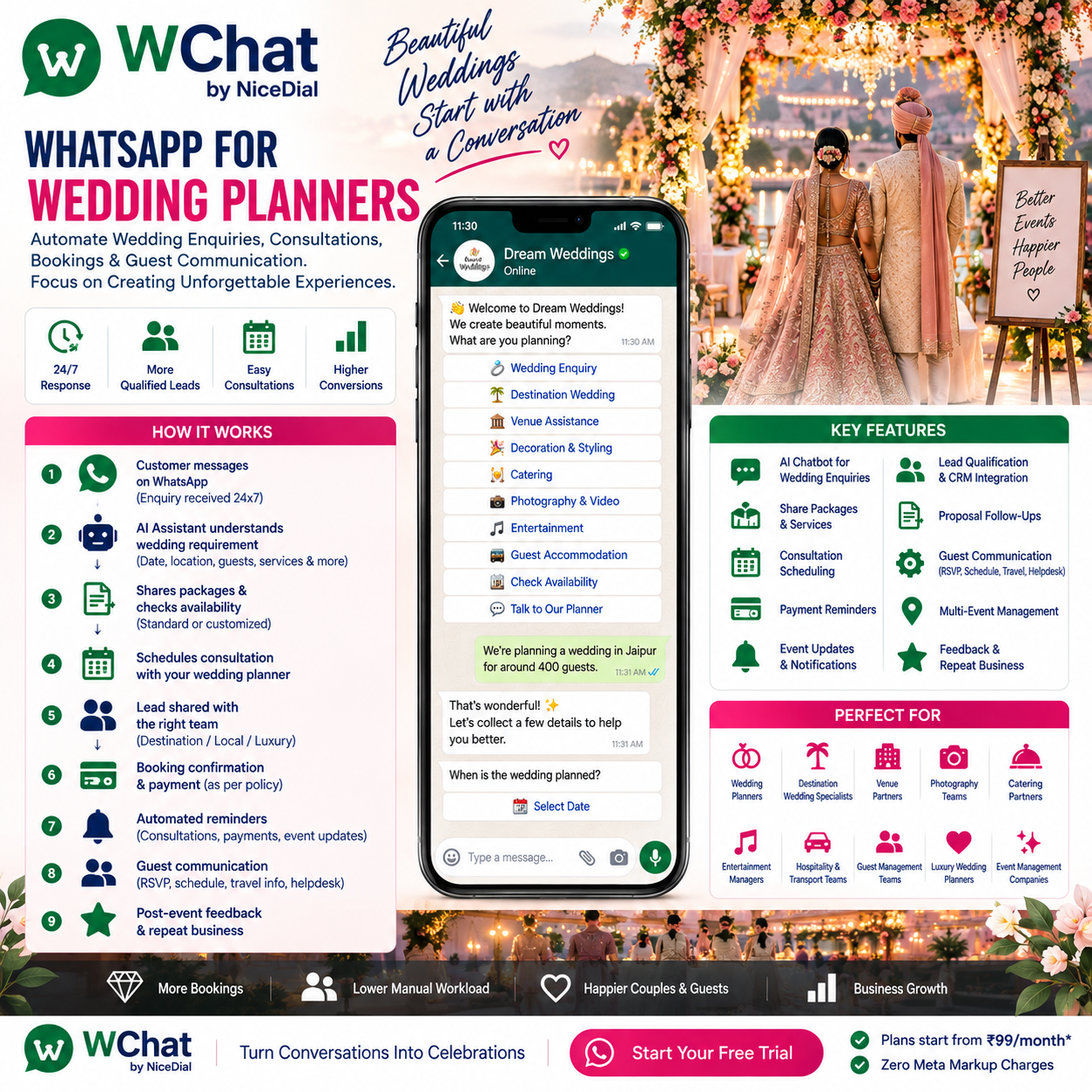
Planning a wedding often begins with one simple WhatsApp message:
“Hi, what are your wedding planning packages?”
Then the conversation grows:
We are planning a wedding in Jaipur.
Around 400 guests.
Can you help us find a venue?
Do you manage decoration and catering?
Can we schedule a consultation?
Can you coordinate hotel and transport for our guests?
For a wedding planner, every enquiry can involve dozens of conversations before the couple even confirms the booking.
And after the booking?
The communication increases.
Venue discussions. Decoration approvals. Catering. Photography. Entertainment. Accommodation. Guest transportation. Event schedules. Payments. Last-minute changes.
With WChat by NiceDial, wedding planners can use WhatsApp to automate repetitive communication while keeping their planners focused on what matters most:
creating and executing the wedding experience.
The complete journey can become:
Wedding Enquiry → Requirement Collection → Lead Qualification → Consultation → Proposal → Follow-Up → Booking → Wedding Planning → Guest Communication → Wedding Day Support → Feedback
Why Wedding Planners Need WhatsApp Automation
Wedding planning is naturally conversational.
Couples rarely complete a long form containing every requirement before speaking with a planner.
They usually start with something like:
“Wedding planner required in Udaipur.”
or:
“What will a 300-person wedding cost?”
or:
“Can you manage a destination wedding in Goa?”
Your team then needs to understand:
💍 Wedding Date
📍 City / Destination
👥 Number of Guests
🏨 Venue Status
💰 Approximate Budget
💐 Decoration Requirements
🍽️ Catering
📸 Photography & Videography
🎵 Entertainment
🏨 Accommodation
🚐 Guest Transportation
✨ Other Functions & Experiences
WChat can collect much of this initial information automatically.
Instead of receiving an unqualified:
“Wedding package?”
your planner can receive a structured wedding enquiry.
What Is WhatsApp Automation for Wedding Planners?
WhatsApp automation allows wedding planning businesses to create structured customer and guest journeys through WhatsApp.
A typical workflow can look like:
Instagram / Google / Website / Referral
↓
Customer Opens WhatsApp
↓
WChat AI Wedding Assistant
↓
Wedding Date
↓
Destination
↓
Guest Count
↓
Venue Status
↓
Services Required
↓
Budget Range
↓
Lead Created
↓
Wedding Consultant
↓
Consultation
↓
Proposal
↓
Follow-Up
↓
Booking
↓
Planning & Approvals
↓
Guest Communication
↓
Wedding
↓
Feedback
AI handles repetitive coordination.
Wedding professionals handle the creative and high-value work.
1. Answer Wedding Enquiries 24×7
Wedding research doesn’t happen only during office hours.
A couple might spend the evening browsing Instagram and message your company at 11:30 PM:
“Hi, do you plan destination weddings?”
Instead of waiting until the following morning, WChat can immediately respond:
💍 Welcome to ABC Weddings!
We’d love to understand what you’re planning.
What type of wedding are you considering?
🏙️ Local Wedding | ✈️ Destination Wedding | 🏖️ Beach Wedding | 🏰 Palace Wedding | ✨ Luxury Wedding
The enquiry starts immediately without requiring a planner to be online.
2. Automatically Collect the Wedding Date
One of the first questions every planner asks is:
“What is your wedding date?”
WChat can capture this automatically.
For example:
When are you planning your wedding?
Customer:
15 December.
This information can immediately become part of the lead record.
If the couple hasn’t finalized the date:
Date Finalized | Tentative Dates | Need Help Choosing
The workflow can continue appropriately.
3. Identify the Wedding Destination
Next:
Where are you planning the wedding?
The customer might respond:
Jaipur.
or:
Looking at Jaipur or Udaipur.
The AI can capture the preference and continue the discovery process.
For destination-wedding planners, common enquiries may include:
🏰 Jaipur
🏰 Udaipur
🏖️ Goa
🏔️ Mussoorie
🌴 Kerala
🏨 Jim Corbett
🌊 International Destinations
The available destinations should reflect the wedding planner’s actual service areas.
4. Capture Guest Count
Guest count affects almost every part of wedding planning.
WChat can ask:
Approximately how many guests are you expecting?
Below 100
100–250
250–500
500–1,000
1,000+
The planner now has a much clearer understanding of the scale of the event.
5. Ask Whether the Venue Is Already Finalized
The chatbot can ask:
Have you already finalized your wedding venue?
✅ Yes
🔍 No, Need Venue Assistance
🤔 Shortlisting Venues
If venue assistance is required, WChat can route the enquiry into the company’s venue-selection workflow.
6. Understand Which Wedding Services Are Required
Not every couple wants end-to-end wedding planning.
Some may only need decoration.
Others need complete planning.
WChat can ask:
Which services would you like help with?
💐 Wedding Decoration
🏨 Venue Selection
🍽️ Catering
📸 Photography & Videography
🎵 Entertainment
👰 Bridal / Groom Coordination
🚐 Guest Transportation
🏨 Guest Accommodation
🎁 Wedding Invitations / Gifting
📋 Wedding Coordination
✨ Complete Wedding Planning
Customers can select multiple services.
This helps your sales team understand the commercial opportunity before the first consultation.
7. Wedding Lead Qualification on WhatsApp
A useful wedding lead can include:
Wedding Date: 15 December
Destination: Jaipur
Guests: 300–500
Venue: Not Finalized
Requirement: Complete Wedding Planning
Accommodation: Required
Transportation: Required
Consultation: Requested
Instead of your planner spending the first 15 minutes collecting basic information, they can begin with context.
8. Handle Budget Conversations More Naturally
Budget is essential in wedding planning, but asking for it too early can make the conversation feel transactional.
WChat can first collect the event requirements and then ask:
To help our wedding consultant recommend suitable options, what approximate planning range are you considering?
The company can configure its own ranges.
For example:
₹5–10 Lakh
₹10–25 Lakh
₹25–50 Lakh
₹50 Lakh+
Need Consultation
These are only examples; the actual ranges should match the planner’s positioning and market.
The AI should not decide whether someone is a “good” or “bad” customer simply because of their selected budget.
9. Route Wedding Enquiries to the Right Planner
A wedding company may have specialized teams.
WChat can help route:
Local Wedding → Local Planning Team
Destination Wedding → Destination Wedding Team
Luxury Wedding → Premium Wedding Consultant
Decoration Only → Decor Team
Existing Client → Assigned Wedding Coordinator
Guest Question → Guest Helpdesk
Customers don’t need to know which person to contact.
The workflow handles it.
10. Book Wedding Consultations on WhatsApp
Once the requirement is captured:
Thank you. Would you like to schedule a consultation with our wedding planner?
The couple can choose:
📞 Phone Consultation
💻 Video Consultation
🏢 Office Meeting
📍 Venue Meeting
When WChat is connected to the planner’s calendar, it can show actual available slots.
For example:
Tomorrow
🕚 11:00 AM
🕑 2:00 PM
🕔 5:00 PM
The couple chooses:
5:00 PM
↓
Calendar updated
↓
Consultation confirmed
↓
Reminder scheduled
11. Send Consultation Reminders Automatically
Before the consultation:
💍 Wedding Consultation Reminder
Your consultation with ABC Weddings is scheduled tomorrow at 5:00 PM.
Wedding: 15 December
Location: JaipurConfirm | Request Reschedule | Contact Planner
This reduces manual coordination for your sales team.
12. Share Wedding Packages Through WhatsApp
Wedding planners may have standardized service packages.
For example:
💐 Wedding Decoration
Essential Decor
Premium Decor
Luxury Theme Decor
📸 Photography
Traditional Photography
Candid Photography
Cinematography
Pre-Wedding Shoot
💍 Planning
Wedding Coordination
Partial Planning
Complete Wedding Planning
Destination Wedding Management
WChat can provide company-approved package information.
Customized requirements can then be handed over to a planner.
13. AI Should Never Invent Wedding Pricing
A customer might ask:
“How much will a 400-guest wedding in Jaipur cost?”
There is no responsible fixed answer without understanding the requirement.
Wedding pricing can depend on:
🏨 Venue
📅 Dates
👥 Guest Count
💐 Decoration
🍽️ Menu
📸 Photography
🎤 Artists
🏨 Rooms
🚐 Transportation
🎨 Production
✨ Customer Preferences
The better workflow is:
AI collects requirement
↓
Wedding team / pricing process
↓
Customized proposal
↓
Customer
AI manages the conversation.
Your business determines the price.
14. Automate Wedding Proposal Follow-Ups
A common sales problem occurs after the proposal.
Your planner spends hours creating a beautiful proposal.
It gets sent.
Then…
silence.
Instead of relying entirely on manual follow-up, WChat can support an appropriate follow-up journey.
For example:
Hi Rahul, we hope you’ve had a chance to review the wedding proposal shared by our planning team.
Would you like to:
💬 Discuss Proposal
📅 Schedule Another Call
👨💼 Talk to Wedding Planner
This helps ensure valuable enquiries aren’t forgotten.
Promotional or follow-up messaging should respect consent, opt-outs and applicable WhatsApp requirements.
15. Wedding Booking Confirmation
Once the couple approves the proposal and the booking is recorded:
💍 Your Wedding Planning Is Confirmed!
📅 Wedding Date: 15 December
📍 Destination: Jaipur
👥 Guests: Approx. 400
👨💼 Wedding Coordinator: AssignedBooking Reference: WED-XXXXX
We’re excited to be part of your celebration. ❤️
WhatsApp can now move from a sales channel to a planning channel.
16. Automate Payment Milestone Reminders
Wedding payments may happen across multiple milestones.
For example:
Booking Advance
↓
Planning Milestone
↓
Vendor Confirmation
↓
Pre-Wedding Payment
↓
Final Settlement
WChat can send reminders based on the billing system.
💳 Wedding Payment Reminder
Your next payment milestone is due according to your booking schedule.
View Invoice | Pay Now | Contact Accounts
Payment status should always come from the billing/payment system.
17. Share Wedding Planning Status
Once planning starts, couples naturally want updates.
“Is the photographer confirmed?”
“What about the decorator?”
“Has catering been finalized?”
When WChat is connected to the planner’s CRM or project-management system, customers can receive approved status information.
For example:
💍 Wedding Planning Progress
✅ Venue Confirmed
✅ Photography Confirmed
✅ Catering Finalized
🔄 Decoration Design Under Review
🔄 Guest Accommodation Allocation
⏳ Entertainment Confirmation
This can reduce repetitive status calls while improving transparency.
18. Wedding Approval Workflows
Wedding planning involves many decisions.
Couples may need to approve:
🎨 Stage Design
💐 Floral Concepts
🍽️ Menu
🎂 Wedding Cake
📸 Photography Package
🎵 Entertainment
🪑 Seating Layout
💌 Invitation Design
🎁 Welcome Hampers
WChat can notify the couple:
🎨 Your Sangeet stage concept is ready for review.
Please review the design shared by our planning team.
Approve | Request Changes | Talk to Planner
Formal approvals can be recorded in the appropriate planning system.
19. Manage Multiple Wedding Functions
Indian weddings often involve multiple events.
For example:
Day 1
💛 Haldi
💚 Mehendi
Day 2
🎵 Sangeet
Day 3
💍 Wedding
🥂 Reception
Each event can have its own:
📍 Venue
🕐 Timing
🎨 Theme
👗 Dress Code
🍽️ Menu
🎤 Entertainment
🚐 Transportation
WChat can help communicate these details to the couple, family and guests.
20. Guest Communication on WhatsApp
This is one of the biggest opportunities for wedding planners.
Imagine a destination wedding with 400 guests.
Guests repeatedly ask:
“Which hotel are we staying in?”
“What time is the Sangeet?”
“Where is the wedding venue?”
“When does the airport shuttle leave?”
“Who do I contact for help?”
Instead of hundreds of repetitive calls, a guest can interact with the wedding WhatsApp assistant.
21. Example Wedding Guest Assistant
Guest:
Hi
WChat:
💍 Welcome to Rahul & Priya’s Wedding Assistant
How can we help?
📅 Wedding Schedule
🏨 Hotel Information
🚐 Transportation
📍 Venue Directions
👗 Dress Code
🍽️ Event Information
💬 Guest Helpdesk
Guest chooses:
📅 Wedding Schedule
WChat:
Wedding Schedule
💛 Haldi — 10:00 AM
💚 Mehendi — 4:00 PM
🎵 Sangeet — 8:00 PM
💍 Wedding — 8:30 PM
One assistant can answer common questions for hundreds of guests.
22. Hotel & Room Information
For destination weddings, accommodation coordination can become a major workload.
Guests may ask:
“Which hotel?”
“What time is check-in?”
“Which room?”
“Who is my roommate?”
WChat can provide approved general hotel information.
Where room allocation is integrated with the planner’s guest-management or accommodation system, authorized guests can receive their relevant allocation information through an appropriately secure workflow.
23. Airport Pickup & Guest Transportation
Destination weddings often involve:
✈️ Airport Pickup
🚉 Railway Station Pickup
🏨 Hotel Transfers
🚌 Hotel-to-Venue Shuttles
🚘 VIP Transportation
WChat can collect or communicate transportation information.
For example:
🚌 Sangeet Shuttle
Hotel → Event Venue
Departure: 7:15 PMPlease arrive at the designated pickup point before departure.
For individual transportation status, operational information should come from the connected transport system.
24. Guest Arrival Information
Before the wedding, the planner may need:
✈️ Flight Number
📅 Arrival Date
🕐 Arrival Time
🚉 Train Details
👥 Number of Guests
🚐 Pickup Requirement
Instead of maintaining these details across dozens of personal chats, a structured WhatsApp workflow can collect them.
The information can then flow into the wedding guest-management system or planner’s operational workflow.
25. RSVP on WhatsApp
Guests can be asked:
Will you be joining Rahul & Priya’s wedding celebration?
❤️ Yes, I’ll Be There
👥 Yes, With Family
😔 Unable to Attend
Where required, the workflow can collect:
Number of attendees
↓
Functions attending
↓
Arrival information
↓
Accommodation requirement
↓
Transportation requirement
↓
Food preferences, where appropriate
This can significantly simplify guest planning.
26. Function-Wise RSVP
A guest may attend the wedding but not every function.
WChat can ask:
Which functions will you be attending?
☑ Mehendi
☑ Sangeet
☑ Wedding
☑ Reception
This information can help planners with seating, catering and transportation planning when connected to the appropriate guest-management workflow.
27. Guest Reminders
Before each event:
🎵 Sangeet Tonight
🕗 8:00 PM
📍 Royal BallroomShuttle from the hotel departs at 7:15 PM.
We look forward to celebrating with you. ✨
These reminders can improve guest experience while reducing coordination calls.
28. Venue Directions
Guests often ask:
“Location please?”
Instead of repeatedly sending map details manually, WChat can provide the approved venue location and directions.
Different functions can have different locations.
For example:
Haldi → Garden
Sangeet → Ballroom
Wedding → Palace Courtyard
The guest selects the function and receives the relevant information.
29. Dress Code Information
For themed weddings:
What is tonight’s dress code?
WChat can provide the couple’s approved information.
For example:
💚 Mehendi — Indian Festive
✨ Sangeet — Glamorous Evening
💍 Wedding — Traditional Formal
🥂 Reception — Cocktail Formal
This is a small automation that can prevent hundreds of repeated questions.
30. Wedding-Day Helpdesk
On the wedding day, guests need immediate assistance.
Questions might include:
“Where is breakfast?”
“Where is the Mehendi venue?”
“I missed the shuttle.”
“I need help with my room.”
“Where is the reception desk?”
WChat can answer known questions and route exceptions to the guest-relations team.
Routine Question → AI
Complex Problem → Human Wedding Helpdesk
31. Emergency & Sensitive Situations Need Humans
Not every wedding-day situation should be automated.
Examples include:
⚠️ Medical Emergency
🔐 Security Issue
🚘 Transport Emergency
🏨 Serious Accommodation Problem
😠 Major Guest Complaint
🚨 Safety Concern
These should be escalated immediately according to the wedding planner’s approved human-support process.
AI can route the issue.
People handle the situation.
32. AI + Human Wedding Planners
The best approach isn’t:
AI Wedding Planner vs Human Wedding Planner.
It is:
🤖 AI & Automation Handle
✔ 24×7 Initial Enquiries
✔ Wedding Requirement Collection
✔ Lead Qualification
✔ Approved FAQs
✔ Package Information
✔ Consultation Scheduling
✔ Appointment Reminders
✔ Proposal Follow-Ups
✔ Payment Reminders
✔ Planning Status Requests
✔ Guest FAQs
✔ RSVP
✔ Schedule Information
✔ Transportation Information
✔ Guest Helpdesk Routing
👩💼 Wedding Professionals Handle
✔ Wedding Concepts
✔ Creative Direction
✔ Venue Selection
✔ Decoration Design
✔ Vendor Negotiation
✔ Customized Pricing
✔ Budget Management
✔ Family Coordination
✔ Complex Logistics
✔ Wedding-Day Decisions
✔ Sensitive Guest Issues
✔ Relationships
AI manages repetitive communication.
Wedding planners create the experience.
33. Human Handover With Full Context
Suppose a prospect says:
“We’re planning a 3-day destination wedding in Udaipur for 600 guests and need complete planning.”
The AI can capture the initial information and hand it to a senior planner:
💍 New Destination Wedding Lead
Destination: Udaipur
Duration: 3 Days
Guests: Approx. 600
Venue: Not Finalized
Requirement: End-to-End Planning
Accommodation: Required
Guest Transport: Required
Consultation: Requested
The planner starts with useful context instead of asking the same questions again.
34. Shared WhatsApp Inbox for Wedding Teams
Wedding companies involve many teams:
💼 Sales
👰 Wedding Planners
🎨 Creative
💐 Decoration
🍽️ Hospitality
📸 Photography Coordination
🎵 Entertainment
🚐 Logistics
🏨 Guest Relations
💳 Accounts
🎧 Wedding Helpdesk
With WChat Shared Inbox, authorized staff can collaborate from one environment.
For example:
New Enquiry → Sales
Booked Couple → Wedding Planner
Payment → Accounts
Guest Question → Guest Relations
Transport → Logistics
Complex Issue → Assigned Coordinator
This is far more scalable than wedding communication being spread across personal WhatsApp accounts.
35. Multi-Wedding Management
An established wedding company may simultaneously manage:
💍 Jaipur Wedding
💍 Udaipur Destination Wedding
💍 Goa Beach Wedding
💍 Delhi Luxury Wedding
Guest and customer conversations need to reach the correct event team.
WChat can use:
Booking Reference
or
Wedding / Event Identifier
to connect the conversation with the appropriate workflow.
36. Instagram to WhatsApp Wedding Lead Generation
Wedding planning is extremely visual.
Couples discover planners through:
📸 Instagram
🎥 Reels
▶️ YouTube
📌 Pinterest
🌐 Google
📱 Facebook
Imagine:
Couple watches your Jaipur wedding Reel
↓
Clicks “Plan Your Wedding on WhatsApp”
↓
WChat opens
↓
Wedding date
↓
Destination
↓
Guests
↓
Services
↓
Consultation
↓
Planner
This connects your visual marketing directly with lead qualification.
37. Click-to-WhatsApp Ads for Wedding Planners
An advertisement could say:
Planning a Destination Wedding in Jaipur? 💍
Tell us your wedding date, guest count and requirements on WhatsApp.
Start Planning
Instead of sending prospects to a generic enquiry form, the advertisement starts a conversation.
Campaign information can also be associated with the lead where supported.
38. Wedding QR Codes
QR codes can be used at multiple stages.
Before Booking
Wedding Expo → Scan → WhatsApp Enquiry
After Booking
Invitation → Scan → Guest Assistant
At the Wedding
Hotel Desk → Scan → Wedding Helpdesk
Guests can quickly access:
📅 Schedule
📍 Venues
🚐 Transportation
🏨 Hotel Information
💬 Support
39. Post-Wedding Feedback
After the celebration:
Thank you for trusting ABC Weddings with your special day. ❤️
How would you rate your experience?
⭐
⭐⭐
⭐⭐⭐
⭐⭐⭐⭐
⭐⭐⭐⭐⭐
Low feedback can be routed privately to customer service.
Positive feedback can lead to an appropriate testimonial or review request.
40. Referral & Anniversary Engagement
Wedding planning businesses grow heavily through referrals.
After a successful wedding, appropriately opted-in customers can receive occasional relevant communication.
But this should not become uncontrolled marketing.
Respect:
✔ Customer Consent
✔ Opt-Out Requests
✔ Privacy Requirements
✔ WhatsApp Messaging Rules
Trust is especially important in a business built on personal relationships.
41. CRM Integration
Suppose a prospect says:
“Planning wedding in Jaipur for 400 guests.”
WChat can collect:
Name
↓
Wedding Date
↓
Destination
↓
Guest Count
↓
Venue Status
↓
Services
↓
Budget Range
↓
Contact Details
↓
CRM Lead
↓
Wedding Consultant Assigned
Now WhatsApp isn’t an isolated inbox.
It becomes part of your sales process.
42. Wedding Management System Integration
WChat can potentially connect with compatible:
📊 CRM
📅 Calendars
📋 Wedding / Event Management Systems
🏨 Accommodation Systems
🚐 Transportation Systems
💳 Payment Gateways
🧾 Billing Systems
📂 Document Systems
⚙️ Custom APIs
This is important because AI shouldn’t invent operational information.
The model should be:
AI understands the conversation.
Your systems provide the facts.
Your wedding team makes the decisions.
43. AI Voice Agent for Wedding Planners
Some couples will message.
Others will call.
NiceDial can combine:
AI Voice Agent + WChat + Human Wedding Planner
For example:
Customer Calls
↓
“Planning destination wedding in Udaipur.”
↓
AI Voice Agent collects initial details
↓
WhatsApp continuation
↓
Wedding requirement completed
↓
Consultation booked
↓
Human planner joins
This creates a connected Voice + WhatsApp + Human wedding enquiry experience.
Example: Complete Wedding Lead Journey
Imagine someone discovers your company through Instagram.
Step 1
They click:
Plan Your Wedding on WhatsApp
Step 2
WChat asks:
Local or destination wedding?
Destination Wedding
Step 3
Preferred destination?
Jaipur
Step 4
Wedding date?
15 December
Step 5
Expected guests?
300–500
Step 6
Venue finalized?
Need Venue Assistance
Step 7
Services required?
Complete Wedding Planning
Step 8
Approximate planning range?
Customer selects a configured range.
Step 9
Consultation booked.
Step 10
Wedding planner receives complete lead context.
The journey started with an Instagram Reel.
It ended with a qualified consultation.
Benefits of WhatsApp Automation for Wedding Planners
⚡ Faster Enquiry Response
Respond while the couple is actively researching planners.
🎯 Better Wedding Lead Qualification
Understand date, destination, guest count and requirements before the first sales conversation.
📅 Easier Consultations
Let couples schedule meetings using actual calendar availability.
📄 Better Proposal Follow-Up
Reduce valuable enquiries disappearing after the proposal.
💍 Better Planning Communication
Share approved milestones, reminders and status information.
👨👩👧👦 Better Guest Experience
Give guests easy access to schedules, venues, accommodation and transportation information.
👥 Better Team Collaboration
Use Shared Inbox and routing across sales, planning, guest relations and accounts.
📊 Better Lead Management
Connect conversations with CRM and event systems.
Who Can Use WChat?
WChat can support:
💍 Wedding Planning Companies
👰 Independent Wedding Planners
✨ Luxury Wedding Planners
✈️ Destination Wedding Planners
🏰 Palace Wedding Planners
🏖️ Beach Wedding Planners
💐 Wedding Decorators
🏨 Wedding Venues
🎪 Event Management Companies
📸 Wedding Service Agencies
🏨 Destination Wedding Resorts
👨👩👧👦 Wedding Guest Management Companies
Why WChat by NiceDial?
WChat combines WhatsApp automation, conversational AI, team collaboration and business-system integrations.
Wedding Automation Capabilities
✔ 24×7 AI Wedding Assistant
✔ Wedding Enquiry Automation
✔ Lead Qualification
✔ Wedding Requirement Collection
✔ Destination Wedding Workflows
✔ Consultation Scheduling
✔ Calendar Integration
✔ Appointment Reminders
✔ Package Information
✔ Proposal Follow-Ups
✔ Booking Confirmation
✔ Payment Reminders
✔ Planning Updates
✔ Approval Workflows
✔ RSVP Automation
✔ Guest Communication
✔ Wedding Schedule
✔ Accommodation Information
✔ Transportation Updates
✔ Wedding Helpdesk
✔ AI + Human Handover
✔ Shared Team Inbox
✔ CRM Integration
✔ APIs & Webhooks
✔ Multi-Wedding Workflows
✔ Official WhatsApp Business API
Start Automating Your Wedding Enquiries on WhatsApp
Your next customer might message:
“Wedding package?”
But behind that one message could be:
A 3-day destination wedding.
500 guests.
Venue requirement.
Accommodation.
Transportation.
Decoration.
Catering.
Photography.
Entertainment.
Instead of replying:
“Please share your number. Our team will call you.”
start the journey immediately:
Enquiry → Wedding Details → Qualification → Consultation → Proposal → Booking → Planning → Guest Communication → Wedding
Let AI handle repetitive coordination.
Let your wedding planners focus on creating something memorable.
That’s the opportunity with WChat by NiceDial.
💰 Plans start from ₹99/month
✅ Zero Meta Markup Charges
📖 Read more NiceDial automation articles
Frequently Asked Questions
Can wedding planners automate enquiries on WhatsApp?
Yes. WChat can collect the wedding date, destination, guest count, venue status, service requirements and other initial information before routing the enquiry to a planner.
Can WChat qualify wedding leads?
Yes. It can ask planner-approved questions and organize the information for your sales or wedding planning team.
Can couples schedule consultations through WhatsApp?
Yes. When connected to a calendar, WChat can offer actual available consultation slots.
Can wedding packages be shared automatically?
Yes. Standard, approved package information can be automated. Customized wedding pricing should be prepared through the planner’s approved pricing process.
Can WChat automate proposal follow-ups?
Yes. Appropriate follow-up workflows can remind prospects and provide options to discuss the proposal or schedule another consultation.
Can guests RSVP through WhatsApp?
Yes. WChat can support RSVP workflows and connect responses with the appropriate guest-management process.
Can guests check the wedding schedule on WhatsApp?
Yes. Approved information about functions, timing, venue, transportation and other wedding details can be made available through a guest assistant.
Can WChat manage destination wedding guest communication?
Yes. It can support accommodation information, arrival details, transportation schedules, function reminders and guest-helpdesk workflows.
Can multiple wedding team members use WChat?
Yes. WChat Shared Inbox can allow authorized sales, planners, guest-relations, accounts and support staff to collaborate.
Can WChat integrate with a wedding CRM?
Yes. Compatible CRM, calendar, payment, event-management and other systems can be integrated through available APIs and webhooks.