A customer visits your online store at 11:30 PM and asks:
“Do you have this shirt in XL?”
Another customer wants to know:
Where is my order?
Another adds products to the cart but never completes payment.
And another asks:
Which laptop is better for office use under ₹60,000?
For an e-commerce business, these conversations happen every day.
The challenge isn’t simply answering messages. It’s helping customers move from:
Product Discovery → Product Questions → Purchase Decision → Checkout → Payment → Delivery → Support → Repeat Purchase
With WChat by NiceDial, e-commerce businesses can combine WhatsApp, conversational AI, human support and commerce integrations to automate a large part of this customer journey.
The objective isn’t to replace your e-commerce platform.
It’s to make shopping more conversational, accessible and responsive.
Why E-commerce Stores Need an AI Chatbot
Traditional e-commerce depends heavily on customers navigating:
Homepage → Categories → Filters → Product Pages → Cart → Checkout
But customers don’t always want to search.
Sometimes they simply want to ask:
“Show me black running shoes under ₹3,000.”
“Do you have something similar in blue?”
“Will this fit an iPhone 17?”
“Can this reach Mumbai before Friday?”
“Where is my order?”
An AI chatbot can understand the customer’s question and connect the conversation with your product catalog, inventory, order-management and support systems.
This creates a different shopping experience:
Search less. Ask more.
What Is an AI Chatbot for E-commerce?
An AI e-commerce chatbot is a conversational assistant designed to help customers throughout the shopping journey.
A typical workflow can look like:
Website / Instagram / Facebook / Ads / WhatsApp
↓
Customer Conversation
↓
WChat AI Shopping Assistant
↓
Product Discovery
↓
Product Questions
↓
Recommendations
↓
Availability
↓
Cart
↓
Checkout / Payment
↓
Order Confirmation
↓
Shipping Updates
↓
Delivery
↓
Returns / Support
↓
Feedback / Repeat Purchase
The chatbot handles conversations.
Your commerce systems remain the source of truth for products, prices, stock, orders and payments.
1. Answer Shopping Enquiries 24×7
Online stores never really close.
A customer may shop at:
11 PM.
2 AM.
Sunday morning.
During a holiday.
If they ask:
“Is this available in size 42?”
waiting until the next working day could mean losing the sale.
WChat can provide 24×7 responses for supported enquiries by connecting with the relevant product information and business systems.
2. Turn WhatsApp Into an AI Shopping Assistant
Instead of showing customers only a menu such as:
- Products
- Orders
- Support
AI allows a more natural interaction.
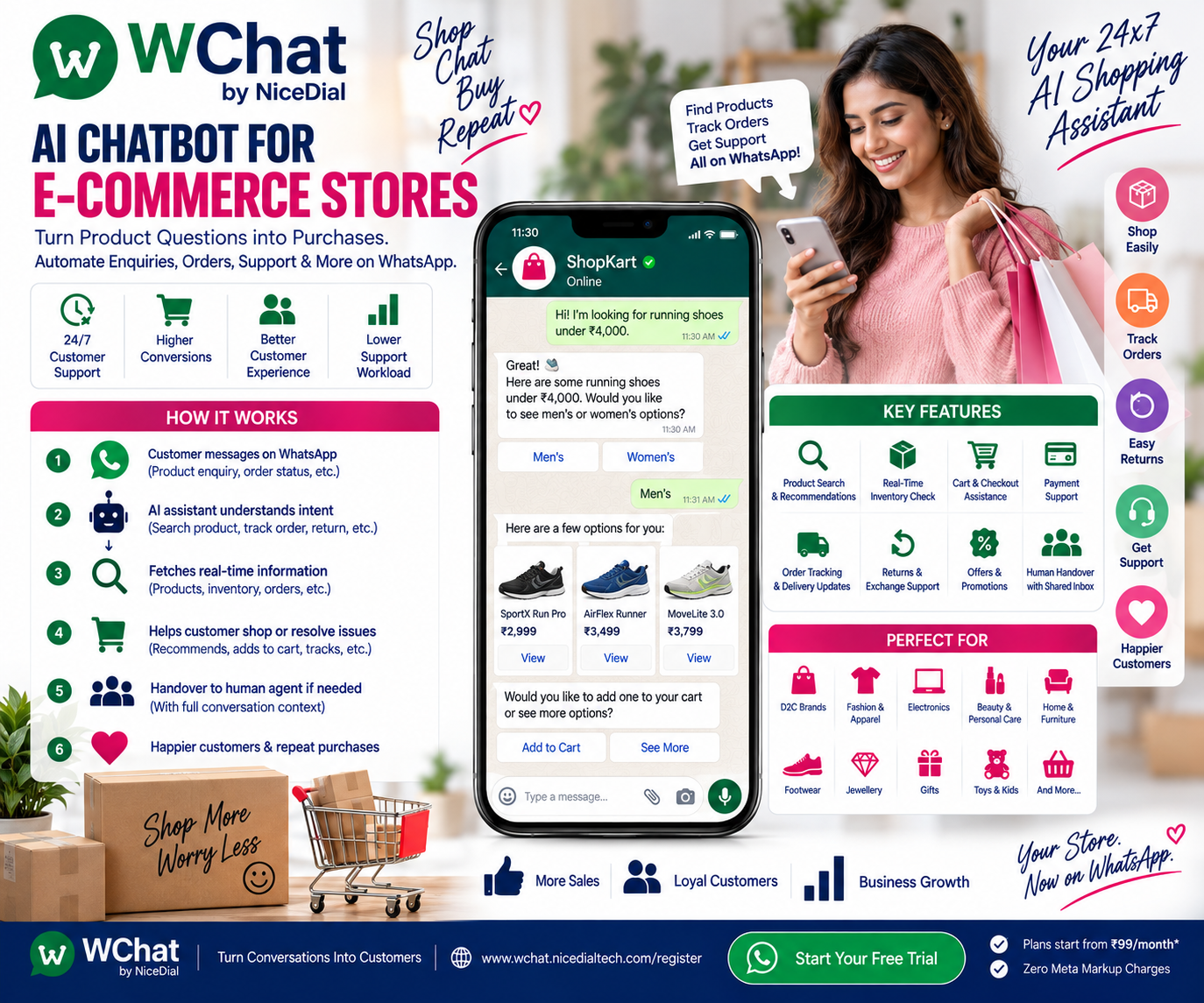
Customer:
“I need shoes for running.”
WChat:
Sure. Are you looking for men’s or women’s running shoes?
Customer:
Men’s.
WChat:
Do you have a preferred budget?
Customer:
Under ₹4,000.
Now the chatbot can use those preferences to search the connected product catalog.
That’s much closer to speaking with a sales assistant than navigating a traditional menu.
3. AI-Powered Product Discovery
Imagine a fashion store with 10,000 products.
A customer doesn’t necessarily want to browse 200 shirts.
They might say:
“Need a white formal shirt for office, size XL, under ₹2,000.”
The AI can interpret:
Category: Shirt
Style: Formal
Color: White
Size: XL
Budget: Below ₹2,000
The connected commerce/catalog system can then return matching products.
This turns natural-language conversations into product discovery.
4. Conversational Product Recommendations
Customers often don’t know the exact product they need.
For example:
“Need a gift for my wife under ₹5,000.”
The AI can ask:
What type of gift are you considering?
🎁 Fashion
💍 Jewellery
👜 Accessories
💄 Beauty
🏠 Home
✨ Surprise Me
The customer chooses a category.
The chatbot can then narrow the search using available catalog attributes.
5. Personalized Recommendations
Where appropriate customer data and consent are available, recommendations can potentially use information such as:
🛍️ Previous Purchases
❤️ Saved Preferences
🛒 Shopping Context
📦 Relevant Order History
💬 Current Conversation
For example:
“Would you like to see accessories compatible with the product you’re considering?”
Personalization should be based on appropriate customer information—not assumptions about sensitive personal characteristics.
6. Product Comparison Through Conversation
Suppose the customer asks:
“What’s the difference between these two headphones?”
The AI can retrieve approved product information and explain differences such as:
🎧 Features
🔋 Battery Life
🎙️ Microphone
📶 Connectivity
⚖️ Weight
🛡️ Warranty
💰 Current Price
This can help customers make purchasing decisions without manually comparing multiple product pages.
7. Product FAQs
E-commerce teams repeatedly answer questions such as:
“Is it waterproof?”
“Does it come with a warranty?”
“Is installation included?”
“What material is this?”
“Will this work with my phone?”
“Is this machine washable?”
An AI chatbot can answer based on approved product data, FAQs and knowledge sources.
If the answer isn’t available, it should escalate rather than invent information.
8. AI Shouldn’t Invent Product Information
This is critical for e-commerce.
If a customer asks:
“Is the blue XL version available?”
the chatbot shouldn’t say yes because the product exists.
Availability should come from the connected inventory system.
Similarly:
Product Price → Commerce System
Stock → Inventory System
Discount → Promotion/Pricing System
Payment Status → Payment Gateway
Order Status → OMS
Shipment Status → Logistics/Courier System
Return Status → Returns System
The principle is:
AI understands the customer. Your commerce systems provide the transactional truth.
9. Real-Time Inventory Checks
Customer:
“Do you have size 9 in black?”
WChat understands:
Product + Variant + Size + Color
↓
Inventory system checked
↓
Available stock status returned
If unavailable, the assistant can potentially offer:
Other Sizes
Other Colors
Similar Products
Notify Me When Available
depending on the store’s configured capabilities.
10. Back-in-Stock Notifications
Out-of-stock doesn’t always have to mean a lost customer.
Customer:
“This is sold out. When will it come back?”
Where supported, WChat can offer:
Would you like us to notify you when this item becomes available again?
Customer opts in.
↓
Product restocked.
↓
Inventory event triggers workflow.
↓
Customer receives an appropriate notification.
This gives the store another opportunity to convert the demand.
11. Product Recommendations When an Item Is Unavailable
Suppose the customer’s preferred product is unavailable.
Instead of ending with:
“Out of stock.”
the AI can potentially search for suitable alternatives.
For example:
The selected item isn’t currently available in XL.
Would you like to see:
Similar Style | Same Brand | Same Price Range | Other Colors
The actual alternatives should come from the connected catalog.
12. Size & Variant Selection
Fashion, footwear, beauty and many other categories have variants.
The chatbot can help customers navigate:
👕 Size
🎨 Color
📦 Pack Size
👟 Shoe Size
💾 Storage
📱 Device Variant
🧴 Quantity
The selected variant can then be checked against inventory before checkout.
13. Conversational Cart Building
Imagine:
Customer:
“Add the black one in size XL.”
The integrated workflow can identify the correct variant and, where the commerce platform supports it, help create or update the customer’s cart.
Then:
Added to your cart.
Would you like to:
🛍️ Continue Shopping | 🛒 View Cart | 💳 Checkout
Shopping becomes conversational.
14. WhatsApp Checkout Journey
Depending on the e-commerce integration, the customer journey can move from conversation to checkout:
Product Selected
↓
Variant Confirmed
↓
Cart
↓
Delivery Details
↓
Checkout
↓
Payment
↓
Order Created
↓
Confirmation
For stores that require checkout on their website or app, WChat can send the customer to the appropriate secure checkout page.
15. Payment Links
When supported by the payment and commerce systems:
Your order is ready for checkout.
💳 Complete Payment
The customer follows a secure payment flow.
After payment:
Payment Gateway → Commerce System → Order Confirmation → WhatsApp
The AI should never assume payment succeeded merely because a payment link was opened.
16. Order Confirmation
Once the order is successfully created:
🎉 Order Confirmed
Order: #ORD12345
Items: 2
Payment: Confirmed
Delivery: According to your order detailsWe’ll keep you updated on your order.
This provides immediate reassurance.
17. “Where Is My Order?”
This may be one of the most valuable e-commerce chatbot use cases.
Customers repeatedly ask:
“Where is my order?”
Instead of involving a support agent every time:
Customer
↓
Order Verification
↓
Order Management System
↓
Courier / Logistics Integration
↓
Latest Available Status
↓
For example:
📦 Order #ORD12345
Current Status: Out for Delivery
Use the available tracking option for the latest shipment details.
The logistics system provides the shipment truth.
The AI explains it conversationally.
18. Proactive Shipping Notifications
Customers don’t necessarily need to ask.
Appropriate transactional notifications can be triggered when an order changes status:
Order Confirmed
↓
Packed
↓
Shipped
↓
Out for Delivery
↓
Delivered
WhatsApp becomes part of the post-purchase experience.
19. Delivery Exception Communication
Sometimes deliveries don’t go as planned.
Examples:
📍 Address Issue
📞 Customer Unreachable
🚚 Delivery Attempt Failed
📦 Shipment Delayed
↩️ Returning to Origin
When these statuses are available from logistics systems, WChat can help communicate the issue and offer appropriate next actions.
For example:
We need your attention regarding your delivery.
Update Details | Contact Support
This can help resolve problems earlier.
20. Reduce RTO With WhatsApp Automation
Return-to-origin can be costly for e-commerce businesses.
WhatsApp workflows can support appropriate order communication such as:
✔ Order Confirmation
✔ Address Confirmation
✔ Dispatch Notification
✔ Delivery Reminder
✔ Delivery Exception Resolution
For COD orders, businesses can also use approved verification workflows where appropriate.
The objective is to keep customers informed and identify issues before the shipment returns.
21. Abandoned Cart Recovery
A customer:
Browses products.
Adds something to cart.
Leaves.
That doesn’t necessarily mean the customer lost interest.
They may have:
Forgotten.
Been interrupted.
Had a payment problem.
Wanted more information.
With appropriate consent and messaging rules, a cart-recovery message can continue the journey.
You left something in your cart. 🛒
Would you like to:
View Cart | Continue Shopping | Need Help
The objective isn’t to bombard customers with reminders.
It’s to remove friction when a customer genuinely intended to buy.
22. AI-Assisted Cart Recovery
AI can make cart recovery more useful than a generic reminder.
Customer:
“I wasn’t sure about the size.”
The chatbot can continue:
I can help with the available sizing information for that product.
Customer:
“Is there an XL?”
↓
Inventory checked.
↓
Relevant information returned.
Now cart recovery becomes a sales conversation.
23. Customer Support on WhatsApp
Post-purchase questions may include:
“I received the wrong item.”
“Product arrived damaged.”
“How do I return it?”
“I need an invoice.”
“Can I exchange the size?”
WChat can classify the request and guide customers through company-approved workflows.
24. Returns & Exchanges
Instead of:
“Please email support.”
the customer can start a structured workflow.
Order Identified
↓
Item Selected
↓
Return / Exchange Reason
↓
Eligibility Checked Against Store Policy
↓
Required Information Collected
↓
Return Process Started or Human Support
The commerce/returns system—not AI—should determine actual eligibility.
25. Exchange Requests
Customer:
“Need one size larger.”
WChat can identify:
Current Item
↓
Requested Size
↓
Inventory Availability
↓
Exchange Eligibility
↓
Next Step
If the requested variant isn’t available, the customer can be shown configured alternatives or transferred to support.
26. Damaged or Incorrect Product Reporting
Customer:
“I received a damaged product.”
The workflow can collect:
📦 Order Number
🛍️ Product
📝 Issue Type
📷 Photos, where appropriate
💬 Customer Description
Then create a support request or route the case to a human agent.
AI can organize the issue.
Authorized teams make the resolution decision.
27. Refund Status
Customer:
“Where is my refund?”
Instead of providing a generic answer, WChat can retrieve the available status from the appropriate commerce/payment/returns system.
For example:
Return Received → Refund Initiated → Payment Provider Processing
The assistant should not invent refund dates or statuses.
28. Invoice Requests
Customer:
“Can you send my invoice?”
After appropriate order/customer verification, the system can provide access to the relevant invoice or route the request according to the store’s process.
This is another repetitive support request that can often be automated.
29. AI + Human Customer Support
Not every conversation belongs with AI.
🤖 AI Can Handle
✔ Product Discovery
✔ Product FAQs
✔ Product Comparison
✔ Inventory Queries
✔ Variant Selection
✔ Order Status
✔ Shipment Tracking
✔ Return Instructions
✔ Basic Exchange Workflow
✔ Invoice Requests
✔ Cart Recovery
✔ Support Classification
✔ Routine FAQs
👨💼 Human Agents Handle
✔ Complex Complaints
✔ Exceptional Refunds
✔ Product Disputes
✔ Fraud Concerns
✔ High-Value Orders
✔ Complicated Returns
✔ Sensitive Customer Issues
✔ Policy Exceptions
A strong model is:
AI handles volume. Humans handle judgment and exceptions.
30. Human Handover With Conversation Context
Suppose a customer says:
“This is the second time I’ve received the wrong item. I want to speak to someone.”
The AI shouldn’t continue forcing the customer through a bot.
It can hand over the conversation with context:
Support Handover
Customer: Existing Customer
Order: #ORD12345
Issue: Incorrect Product
Previous Issue: Customer reports repeated problem
Intent: Speak to Human
Priority: Support Review
The agent starts with context rather than asking the customer to repeat everything.
31. Shared WhatsApp Inbox for E-commerce Teams
An e-commerce business may have:
💼 Pre-Sales
📦 Orders
🚚 Logistics
💳 Payments
↩️ Returns
🎧 Support
⭐ Customer Experience
With WChat Shared Inbox, conversations can be routed:
Product Enquiry → Sales
Order Tracking → Automated / Logistics
Payment Issue → Payments
Return → Returns Team
Complaint → Customer Support
Complex Case → Senior Agent
This helps teams collaborate without relying on one employee’s WhatsApp account.
32. Multilingual Shopping Conversations
India’s e-commerce customers don’t all shop in one language.
Customers may prefer to communicate in:
English.
Hindi.
Or other supported languages depending on the configured AI capabilities.
A customer might ask:
“Mujhe black running shoes chahiye ₹3000 ke under.”
The AI can understand the shopping intent and continue the configured product-discovery workflow.
This can make conversational commerce more accessible.
33. WhatsApp for D2C Brands
D2C brands can use conversational AI across:
🛍️ Product Discovery
🎯 Lead Conversion
🛒 Cart Recovery
📦 Order Updates
↩️ Returns
⭐ Feedback
🔄 Repeat Purchases
Instead of treating WhatsApp only as a support channel, brands can use it throughout the customer lifecycle.
34. AI Chatbot for Fashion E-commerce
Fashion stores can automate:
👗 Product Discovery
👕 Size Questions
🎨 Color Availability
📏 Approved Sizing Information
🛒 Cart Assistance
📦 Order Tracking
🔄 Exchanges
⭐ Reviews
Example:
“Show me black dresses under ₹3,000 for a party.”
Natural-language product discovery can reduce the friction of navigating complex catalogs.
35. AI Chatbot for Electronics Stores
Electronics customers often have detailed questions.
For example:
“Need a phone with 256GB storage under ₹30,000.”
or:
“Which laptop is better for office work?”
AI can search approved catalog data and help compare matching products based on attributes such as:
💾 Storage
🧠 RAM
🔋 Battery
🖥️ Display
⚙️ Processor
🛡️ Warranty
💰 Price
The product catalog remains the factual source.
36. AI Chatbot for Beauty & Personal Care Stores
Customers might ask:
“Show me your moisturizers under ₹1,000.”
or:
“Do you have this product in a larger pack?”
The chatbot can help customers navigate products and variants using approved catalog information.
For health-related or personalized medical claims, the chatbot should avoid making unsupported diagnoses or treatment recommendations and should stay within the retailer’s approved product information.
37. AI Chatbot for Home & Furniture Stores
Customers may ask:
“Need a study table under ₹10,000.”
The chatbot can refine:
📐 Dimensions
🎨 Color
🪵 Material
💰 Budget
📍 Delivery Location
Then query matching catalog products.
38. Lead Generation for High-Value Products
Some e-commerce categories involve longer sales cycles.
Examples:
🛋️ Premium Furniture
💻 Enterprise Electronics
🏋️ Commercial Equipment
💎 Luxury Products
Instead of forcing immediate checkout:
Product Enquiry → AI Qualification → Requirement → Human Product Specialist
The chatbot becomes a lead-generation assistant.
39. Product Launch Campaigns
When launching a new collection or product, opted-in customers can potentially receive an appropriate WhatsApp campaign.
For example:
✨ Our New Collection Is Here
Explore the latest arrivals.
Shop Collection | Ask AI Assistant
Customers can move directly from campaign to conversation.
40. Offers & Promotional Campaigns
E-commerce stores can use WhatsApp for appropriate promotional communication such as:
🎉 Festival Sales
🏷️ Product Offers
🛍️ New Arrivals
🎁 Loyalty Benefits
📦 Back-in-Stock Alerts
Promotional messaging should follow customer consent, opt-out preferences and applicable WhatsApp template/messaging requirements.
41. Post-Purchase Cross-Sell
After a relevant purchase, the store may offer complementary products where appropriate.
For example:
Customer purchases a phone.
Later, the shopping assistant may offer compatible:
📱 Case
🛡️ Screen Protection
🔌 Charger
The recommendation should be based on actual compatibility information from the product catalog.
42. Repeat Purchase Reminders
Some categories naturally involve repeat purchases.
Examples:
☕ Coffee
🐶 Pet Supplies
🧴 Personal Care
🏠 Household Products
Where customers have appropriately opted in, WChat can support configured replenishment reminders.
This should be based on business rules or customer preferences—not an assumption that a customer has run out.
43. Customer Feedback & Reviews
After successful delivery:
How was your experience with your recent order?
⭐
⭐⭐
⭐⭐⭐
⭐⭐⭐⭐
⭐⭐⭐⭐⭐
Negative feedback can be routed to support.
Positive customers can be invited to leave an appropriate review.
This turns post-purchase communication into customer-experience improvement.
44. CRM & Customer Data Integration
A customer conversation can provide valuable commercial context.
For example:
Customer
↓
Interested in Running Shoes
↓
Budget ₹3,000–₹4,000
↓
Prefers Size 9
↓
Product Viewed
↓
Cart Created
↓
Order Completed
Where appropriate and permitted, this context can flow into CRM or customer systems.
The business can then provide better continuity across future conversations.
45. E-commerce Platform Integration
The real power of an AI chatbot comes from integration.
WChat can potentially work with compatible:
🛒 E-commerce Platforms
📦 Order Management Systems
🏷️ Product Catalogs
📊 CRM
💳 Payment Gateways
🚚 Logistics / Courier APIs
↩️ Return Management Systems
🧾 Billing Systems
📈 Analytics
⚙️ Custom APIs & Webhooks
Instead of building another isolated chatbot, connect the conversation with the systems already running the business.
46. Website + WhatsApp Conversational Commerce
The customer journey doesn’t need to start on WhatsApp.
A shopper might begin on your website.
They ask the website AI:
“Which running shoe is best under ₹4,000?”
They explore options.
Then they want to continue later.
The conversation can potentially move into WhatsApp through an appropriate handoff.
This creates:
Website → AI Conversation → WhatsApp → Purchase → Order Updates → Support
For businesses using NiceDial’s website conversational AI capabilities alongside WChat, this can create a broader conversational commerce journey.
47. AI Voice Agent for E-commerce
Some customers still prefer calling.
NiceDial can combine:
AI Voice Agent + WChat + E-commerce Systems + Human Support
For example:
Customer calls:
“Where is my order?”
↓
AI Voice Agent verifies the request
↓
Order system queried
↓
Status communicated
Or:
Customer asks about a product.
↓
Product enquiry captured
↓
WhatsApp continuation
↓
Product options shared
↓
Checkout
This creates a connected Voice + WhatsApp + E-commerce experience.
Example: Complete AI Shopping Journey
Customer sends:
“Need black running shoes under ₹4,000.”
Step 1 — AI Understands the Requirement
Category: Running Shoes
Color: Black
Budget: Below ₹4,000
Step 2 — Ask for Missing Information
Men’s or women’s?
Customer:
Men’s.
Step 3 — Ask Size
What size do you need?
Customer:
UK 9.
Step 4 — Query Product Catalog
WChat searches the connected catalog.
Step 5 — Present Matching Products
Customer receives available options.
Step 6 — Customer Selects Product
I like option 2.
Step 7 — Check Variant Availability
Black + UK 9 → Inventory Check
Step 8 — Checkout
Customer proceeds through the configured checkout flow.
Step 9 — Payment Confirmation
Payment status comes from the payment/commerce system.
Step 10 — Order Confirmation
WhatsApp confirms the successful order.
Step 11 — Shipping Updates
Packed → Shipped → Out for Delivery → Delivered
Step 12 — Post-Purchase Support
Returns, exchanges, invoices and feedback can continue through the same conversational channel.
One conversation can potentially support the entire customer lifecycle.
Benefits of an AI Chatbot for E-commerce Stores
⚡ 24×7 Shopping Assistance
Customers can ask questions whenever they shop.
🔎 Faster Product Discovery
Turn natural-language requests into catalog searches.
🛍️ Better Shopping Experience
Help customers narrow thousands of products into relevant options.
📈 More Conversion Opportunities
Reduce friction between enquiry and checkout.
🛒 Recover Abandoned Carts
Re-engage appropriately opted-in shoppers and help resolve buying questions.
📦 Reduce “Where Is My Order?” Tickets
Automate common order-status enquiries through OMS/logistics integrations.
↩️ Simplify Returns
Guide customers through structured return and exchange workflows.
👥 Reduce Agent Workload
Let AI handle repetitive questions while agents focus on complex cases.
💬 Keep the Customer Journey Connected
Use the same conversational channel before and after purchase.
Who Can Use an AI E-commerce Chatbot?
WChat can support:
👗 Fashion Stores
👟 Footwear Brands
📱 Electronics Stores
💄 Beauty Brands
🏠 Home & Furniture Stores
🎁 Gift Stores
🧸 Kids & Toy Stores
🐶 Pet Stores
📚 Book Stores
⌚ Accessories Brands
💎 Jewellery Stores
🛍️ D2C Brands
🏪 Online Retailers
📦 Multi-Category E-commerce Stores
🏭 Manufacturers Selling Directly Online
Why WChat by NiceDial for E-commerce?
WChat combines conversational AI, WhatsApp Business automation, human collaboration and business-system integrations.
E-commerce Automation Capabilities
✔ AI Shopping Assistant
✔ 24×7 Product Enquiries
✔ Product Discovery
✔ Product Recommendations
✔ Product FAQs
✔ Product Comparison
✔ Inventory Checks
✔ Variant Selection
✔ Back-in-Stock Workflows
✔ Cart Assistance
✔ Abandoned Cart Recovery
✔ Checkout Workflows
✔ Payment Communication
✔ Order Confirmation
✔ Shipment Tracking
✔ Delivery Notifications
✔ Returns & Exchanges
✔ Customer Support
✔ Human Handover
✔ Shared Team Inbox
✔ CRM Integration
✔ E-commerce Integrations
✔ APIs & Webhooks
✔ AI Voice Agent Integration
✔ Official WhatsApp Business API
Turn Product Searches Into Conversations
Your next customer might not search:
“Men > Footwear > Running > Black > Size 9 > ₹2,000–₹4,000”
They may simply ask:
“Show me black running shoes in size 9 under ₹4,000.”
That’s the opportunity with conversational commerce.
Customer Question
↓
AI Understands Intent
↓
Commerce System Finds Products
↓
Customer Chooses
↓
Checkout
↓
Order
↓
Delivery Updates
↓
Support
↓
Repeat Purchase
AI handles the conversation.
Your commerce systems provide the facts.
Your human team handles the exceptions.
That’s where WChat by NiceDial can fit into the modern e-commerce customer journey.
💰 Plans start from ₹99/month
✅ Zero Meta Markup Charges
📖 Read more NiceDial automation articles
Frequently Asked Questions
What is an AI chatbot for e-commerce?
An AI e-commerce chatbot is a conversational assistant that can help customers discover products, ask questions, navigate shopping workflows, track orders and access support using information from connected commerce systems and approved knowledge sources.
Can an AI chatbot recommend products?
Yes. It can interpret customer requirements and search connected catalog information to identify relevant options. Recommendations should be grounded in actual product data.
Can customers check product availability through WhatsApp?
Yes, when WChat is integrated with the relevant inventory or e-commerce system.
Can customers track orders on WhatsApp?
Yes. Order and shipment status can be retrieved from connected order-management and logistics systems.
Can WChat recover abandoned carts?
WChat can support cart-recovery workflows for appropriately opted-in customers, subject to applicable WhatsApp messaging requirements.
Can WChat handle returns and exchanges?
It can collect the required information and connect with configured return workflows. Actual eligibility should be determined by the retailer’s policies and commerce systems.
Can AI answer product questions?
Yes, using approved product data, FAQs and connected knowledge sources. When reliable information isn’t available, the conversation should be escalated rather than generating an unsupported answer.
Can human support agents take over?
Yes. Complex conversations can be handed over to authorized human agents through the Shared Team Inbox.
Can WChat integrate with an existing e-commerce platform?
WChat can integrate with compatible commerce platforms, product catalogs, CRM, payment, logistics and other systems through available APIs and webhooks.
Can WChat support both sales and customer service?
Yes. The same conversational layer can support pre-purchase product enquiries, shopping assistance and post-purchase customer support.