Turn WhatsApp Enquiries into Confirmed Home Service Bookings
A customer discovers that their air conditioner has stopped cooling at 9:30 PM.
They search online for an AC repair company and send a WhatsApp message:
“Do you provide AC repair in Gurgaon?”
“Can someone visit tomorrow morning?”
“What is your inspection charge?”
“How quickly can you send a technician?”
Your office may already be closed.
But the customer needs help now—and they may contact the next service provider if they don’t receive a response.
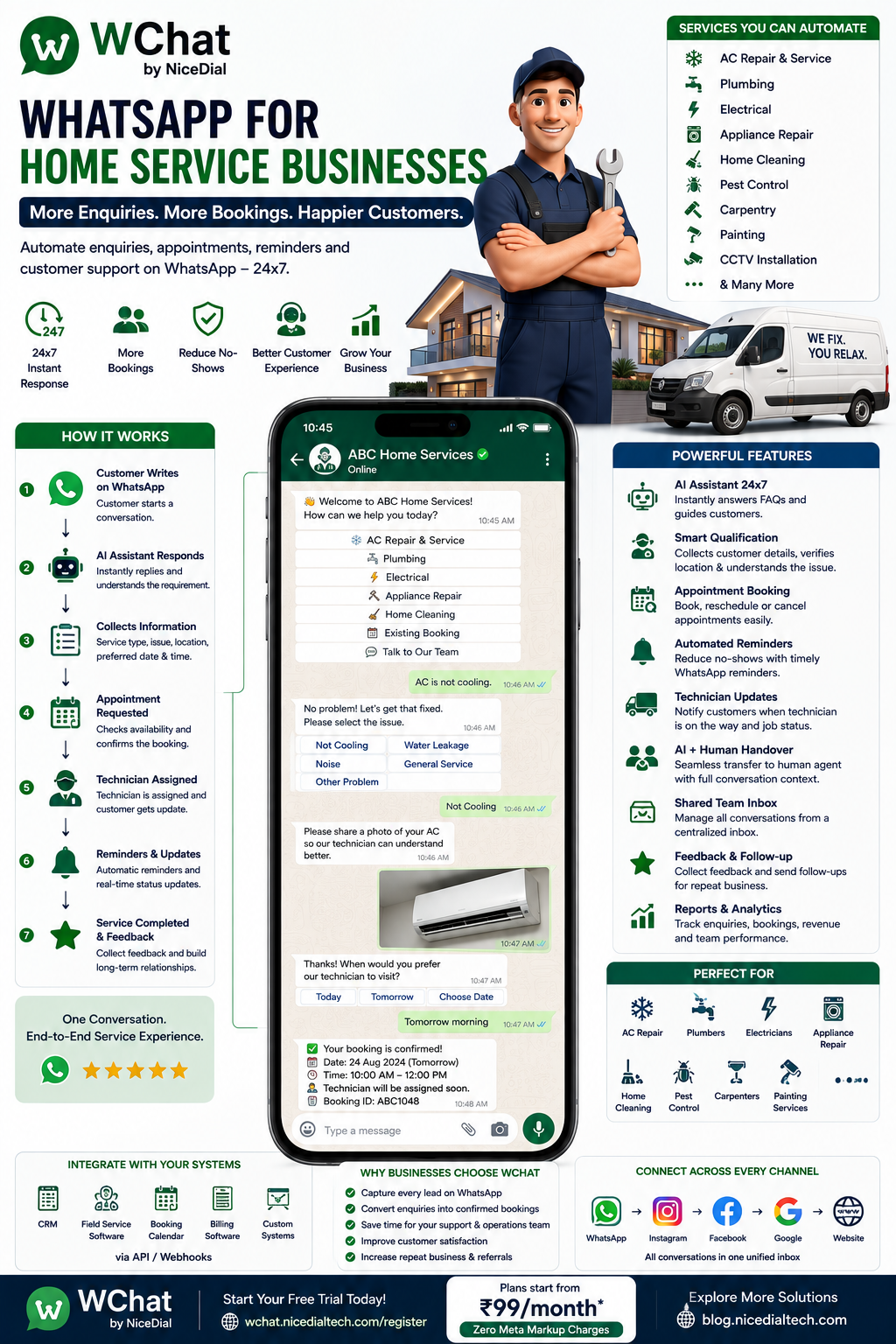
With WChat by NiceDial, home service businesses can automate customer enquiries, service selection, lead qualification, appointment requests, technician coordination, reminders, status updates, feedback, and human-agent support through WhatsApp.
Why Home Service Businesses Need WhatsApp Automation
Home service customers usually aren’t browsing casually.
When someone has:
❄️ A broken AC
🚰 A leaking pipe
⚡ An electrical problem
🧹 A cleaning requirement
🔧 An appliance that isn’t working
they often want a quick response.
But service businesses may receive enquiries from:
- Google Search
- Google Business Profile
- Websites
- Referrals
- Existing Customers
- Advertising Campaigns
Managing all these enquiries manually can become difficult as the business grows.
WhatsApp automation provides a structured way to turn an enquiry into a service request.
Home Service Businesses That Can Use WChat
The same basic workflow can be adapted for many service businesses, including:
- AC Repair & Service
- Electricians
- Plumbers
- Home Cleaning
- Appliance Repair
- RO/Water Purifier Service
- Pest Control
- Carpenter Services
- Painting Services
- CCTV Installation
- Computer & Laptop Repair
- Washing Machine Repair
- Refrigerator Repair
- Geyser Repair
- Solar Maintenance
- Home Security Services
- Deep Cleaning
- Sofa & Carpet Cleaning
- Property Maintenance Companies
Common Challenges for Home Service Companies
Home service businesses frequently struggle with:
- Missed customer calls
- WhatsApp enquiries outside office hours
- Repetitive service questions
- Customers not providing complete information
- Manual appointment scheduling
- Technician assignment
- Customers asking for technician status
- Forgotten appointments
- Manual service reminders
- Managing multiple locations
- Tracking customer conversation history
- Following up after service completion
WChat can help automate many of these interactions.
How WChat Works for Home Service Businesses
A typical customer journey could be:
Google / Instagram / Website
↓
Customer Opens WhatsApp
↓
WChat AI Assistant
↓
Service Selected
↓
Problem Identified
↓
Customer Details Collected
↓
Location / PIN Code Checked
↓
Appointment Requested
↓
Technician / Team Assigned
↓
Booking Confirmation
↓
Service Reminder
↓
Technician Visit
↓
Service Completed
↓
Feedback & Follow-Up
Let’s look at each stage.
1. Instant WhatsApp Response — 24×7
When a customer messages your business, WChat can respond immediately.
For example:
👋 Welcome to ABC Home Services!
How can we help you today?
Options:
❄️ AC Service & Repair
🚰 Plumbing
⚡ Electrical
🧹 Home Cleaning
🔧 Appliance Repair
🐜 Pest Control
📅 Existing Booking
💬 Talk to Our Team
The customer doesn’t need to wait for someone to answer the phone.
2. Automatically Identify the Required Service
Suppose the customer selects:
❄️ AC Service & Repair
WChat can then ask:
What service do you need?
Options:
🧼 AC General Service
❄️ AC Not Cooling
💧 Water Leakage
🔧 AC Repair
📦 AC Installation
🔄 AC Uninstallation
💬 Other Problem
This immediately gives your service team useful context.
3. AI-Powered Customer Enquiries
Customers frequently ask:
“Do you provide service in my area?”
“How much is AC servicing?”
“Are technicians available tomorrow?”
“Do you repair washing machines?”
“What are your working hours?”
“Do you provide emergency plumbing?”
WChat’s AI assistant can answer configured routine questions instantly.
If the enquiry requires a personalized answer, it can be transferred to a human agent.
4. Collect Customer Details Automatically
Before assigning the request, WChat can collect the required information.
For example:
Customer Name: Rahul Sharma
Service: AC Repair
Issue: AC Not Cooling
AC Type: Split AC
Location: Gurgaon
PIN Code: 122001
Preferred Date: Tomorrow
Preferred Time: Morning
You can customize these questions for different services.
A plumber may need different information from an AC technician.
5. Ask Customers to Share Photos
Some service problems are easier to understand visually.
WChat can ask customers to share a photo where appropriate.
For example:
Please share a photo of the appliance or issue, if possible.
Customers could send:
📷 Damaged Appliance
📷 Leaking Pipe
📷 AC Unit
📷 Electrical Panel
📷 Furniture Damage
📷 Area Requiring Cleaning
The service team gets more context before the technician arrives.
Customers should not be encouraged to inspect dangerous electrical, gas, structural, or other hazardous problems themselves.
6. Service Area & PIN Code Qualification
One common problem for home service businesses is receiving leads outside their service area.
WChat can ask:
Please enter your PIN code.
The workflow can then use your configured service coverage or connected system.
Service Available
✅ Great! We provide service in your area.
The booking workflow continues.
Service Not Available
We’re currently unable to provide service in this location.
This can prevent your team from manually checking every enquiry.
7. Appointment Booking on WhatsApp
Once the requirement is understood, customers can request a service appointment.
For example:
When would you prefer the technician visit?
📅 Today
📅 Tomorrow
📅 Choose Another Date
Then:
🌅 Morning
☀️ Afternoon
🌆 Evening
When integrated with a scheduling or field-service system, WChat can use available appointment slots rather than simply collecting a preference.
8. Booking Confirmation
Once the appointment is successfully scheduled, WChat can automatically send:
🔧 Service Appointment Confirmed
👤 Rahul Sharma
❄️ Service: AC Repair
📅 Date: 26 August
🕙 Time: 10:00 AM – 12:00 PM
📍 GurgaonBooking ID: HS1048
Our service team will contact you if additional information is required.
Customers now have their booking information directly in WhatsApp.
9. Automated Service Reminders
Before the technician visit, WChat can send a reminder.
🔔 Service Reminder
Your AC repair appointment is scheduled tomorrow between 10 AM and 12 PM.
Options could include:
✅ Confirm | 📅 Request Reschedule | 💬 Need Help
This helps keep customers informed and can reduce missed visits.
10. Technician Assignment Notification
Once a technician is assigned, the customer can receive an update according to your business workflow.
For example:
👨🔧 Technician Assigned
Your technician has been assigned for today’s AC service.
Expected visit window: 10 AM – 12 PM
Businesses should be thoughtful about what employee information is exposed to customers and share only what is operationally necessary.
11. “Technician Is on the Way” Updates
One of the biggest frustrations with home services is waiting without knowing when someone will arrive.
When integrated with your field-service workflow, WChat can send status updates such as:
Booking Confirmed
↓
Technician Assigned
↓
Technician On The Way
↓
Technician Arrived
↓
Service In Progress
↓
Service Completed
This can reduce repetitive:
“Where is the technician?”
calls and messages.
12. Easy Appointment Rescheduling
Customers’ schedules change.
Instead of requiring a phone call, WChat can provide:
📅 Reschedule Appointment
↓
Existing Booking Retrieved
↓
New Date Selected
↓
Available Slot Selected
↓
Booking Updated
↓
New Confirmation Sent
The exact functionality depends on integration with your scheduling system.
13. Human Agent Handover
Not every service enquiry can or should be handled by AI.
Suppose a customer says:
“My entire office needs 25 AC units serviced and we need an annual maintenance contract.”
That’s potentially a larger commercial opportunity.
WChat can collect:
- Number of Units
- Location
- Service Requirement
- Preferred Date
- Business Name
- Contact Information
and then transfer the conversation to your sales team.
Similarly, complaints or unusual service problems can be escalated to a human agent.
14. AI + Human Agent Collaboration
A practical home-service workflow is:
AI Handles
✔ First Response
✔ Service Selection
✔ Routine FAQs
✔ Customer Information
✔ PIN Code Qualification
✔ Appointment Workflow
✔ Booking Confirmation
✔ Reminders
✔ Status Information
Human Team Handles
✔ Complex Technical Questions
✔ Complaints
✔ Price Negotiation
✔ Commercial Requirements
✔ Exceptions
✔ High-Value Opportunities
The customer gets automation where it’s useful and human assistance where it matters.
15. Shared Team Inbox
Home service businesses may have:
👩💼 Customer Support
👨🔧 Service Coordinators
📅 Scheduling Team
💰 Sales Team
👨💼 Supervisors
🏢 Multiple Branches
With WChat Shared Inbox, authorized employees can manage WhatsApp conversations from one centralized system.
Features can include:
✔ Role-Based Access
✔ Conversation Assignment
✔ Department Routing
✔ Complete Conversation History
✔ Customer Context
✔ AI + Human Handover
✔ Employee Access Management
Your business doesn’t need to rely on multiple employees sharing direct access to the Business WhatsApp account.
16. Route Enquiries to the Right Team
WChat can help route conversations according to service type.
For example:
AC Repair
→ AC Service Team
Plumbing
→ Plumbing Team
Home Cleaning
→ Cleaning Team
Commercial AMC
→ Sales Team
Complaint
→ Customer Support
This can reduce manual forwarding between departments.
17. Multi-City & Multi-Branch Home Services
For larger home service companies, the workflow can begin with:
Where do you need service?
📍 Delhi
📍 Gurgaon
📍 Noida
📍 Faridabad
📍 Ghaziabad
or simply ask for the PIN code.
Based on the location, WChat can route the enquiry to the appropriate branch or service team.
18. Service Completion Confirmation
After the job is completed, WChat can send:
✅ Service Completed
Your AC repair request HS1048 has been marked as completed.
Thank you for choosing ABC Home Services.
Customers can then be invited to:
⭐ Give Feedback
💬 Report an Issue
🔄 Book Another Service
This keeps the entire service journey connected.
19. Customer Feedback Automation
After the service visit:
How was your service experience?
⭐⭐⭐⭐⭐ Excellent
⭐⭐⭐⭐ Good
⭐⭐⭐ Average
⭐⭐ Needs Improvement
Negative feedback can be routed internally for follow-up.
Satisfied customers can also be invited to leave an appropriate public review.
20. Repeat Service & Maintenance Reminders
Many home services naturally require repeat visits.
For example:
❄️ AC Servicing
💧 RO Filter Replacement
🐜 Pest Control
🧹 Deep Cleaning
☀️ Solar Maintenance
📹 CCTV Maintenance
With appropriate customer consent and accurate service records, WChat can help automate relevant maintenance reminders.
For example:
It’s time for your scheduled AC maintenance. ❄️
Would you like to book a service?
📅 Book Service | 💬 Talk to Team
This can create repeat business from existing customers.
21. Annual Maintenance Contract (AMC) Automation
AMCs are especially valuable for appliance and property-maintenance businesses.
WChat can help with:
📄 AMC Enquiries
🔔 Renewal Reminders
📅 Service Scheduling
🛠️ Maintenance Requests
💬 Support
For example:
Your AC maintenance plan is due for renewal next month.
Would you like to view your renewal options?
This makes ongoing customer relationships easier to manage.
22. Emergency Service Enquiries
For certain categories, customers may need urgent assistance.
WChat can identify messages such as:
“Urgent plumber required.”
and route them according to your emergency-service policy.
However, automation should not imply emergency availability unless your business genuinely provides it.
For dangerous situations involving gas leaks, electrical hazards, fire, flooding, or similar risks, the workflow should prioritize appropriate safety instructions rather than encouraging customers to troubleshoot hazardous equipment.
23. CRM & Field-Service Integration
WChat becomes even more useful when connected to your existing systems.
Possible integrations include:
- CRM
- Field Service Management Software
- Technician Scheduling
- Ticketing System
- ERP
- Billing Software
- Customer Database
- Custom Applications
Through APIs, the WhatsApp journey can become part of your operational workflow.
Example: AC Repair Booking on WhatsApp
Customer
Hi, my AC isn’t cooling.
WChat
👋 We’d be happy to help.
What type of AC do you have?
❄️ Split AC | Window AC | Other
Customer
Split AC
WChat
Please select the issue.
Not Cooling | Water Leakage | Noise | General Service | Other
Customer
Not Cooling
WChat
Please enter your PIN code.
Customer
122001
WChat
✅ Service is available in your area.
When would you prefer a technician visit?
Today | Tomorrow | Choose Date
Customer
Tomorrow
↓
Available appointment options can be retrieved from the connected scheduling system.
↓
Customer chooses a slot.
↓
Booking Confirmed 🔧
A structured workflow turns a vague enquiry into an actionable service request.
From Google Search to Technician Visit
Imagine a customer searches:
“AC repair near me”
↓
Finds your business
↓
Clicks WhatsApp
↓
WChat responds instantly
↓
Customer selects AC Repair
↓
Issue identified
↓
PIN code verified
↓
Appointment booked
↓
Reminder sent
↓
Technician assigned
↓
Service completed
↓
Feedback collected
This connects marketing directly with service operations.
WhatsApp + AI Voice Agent for Home Services
Some customers prefer messaging.
Others prefer calling.
Home service businesses can combine WChat with NiceDial AI Voice Agents.
For example:
Customer Calls
↓
↓
Service Requirement Collected
↓
Appointment Requested
↓
WhatsApp Confirmation via WChat
↓
Technician Updates
↓
Service Completed
↓
Feedback
This creates a connected Voice + WhatsApp + Human Service Team experience.
Benefits of WhatsApp Automation for Home Services
⚡ Faster Response
Customers receive immediate first-level assistance.
📅 More Service Booking Opportunities
Allow customers to initiate booking even outside office hours.
👨🔧 Better Technician Coordination
Connect service requests with scheduling and field-service workflows.
📞 Reduce Repetitive Calls
Automate routine questions and status updates.
🔔 Fewer Forgotten Appointments
Send automated booking reminders.
📍 Better Lead Qualification
Check service type and location before assigning staff.
⭐ Improve Customer Experience
Keep customers informed throughout the service journey.
🔄 Increase Repeat Business
Use service and maintenance workflows to reconnect with existing customers when appropriate.
Why Choose WChat by NiceDial?
WChat combines WhatsApp automation, AI-powered conversations, appointment workflows, human-agent collaboration, and business-system integration.
Key Features for Home Service Businesses
✔ 24×7 AI WhatsApp Assistant
✔ Service Enquiry Automation
✔ Customer Qualification
✔ PIN Code / Location Workflows
✔ Appointment Booking
✔ Service Reminders
✔ Technician Status Updates
✔ Rescheduling
✔ AI + Human Handover
✔ Shared Team Inbox
✔ Department Routing
✔ Role-Based Access
✔ CRM Integration
✔ Field-Service Integration
✔ Multi-Branch Workflows
✔ Customer Feedback
✔ Reports & Analytics
✔ Official WhatsApp Business API
Start Automating Your Home Service Business
When something breaks at home, customers don’t want to wait.
They want to know:
Can you fix it?
Do you serve my location?
How much will it cost?
When can someone come?
WChat can help answer those questions and move the customer toward the next step.
Enquiry → Qualification → Booking → Technician → Service → Feedback → Repeat Service
with WChat by NiceDial.
Plans start from ₹99/month with Zero Meta Markup Charges.
🌐 Start your free trial:
WChat Free Trial
🤖 Explore NiceDial AI Agents:
NiceDial AI Agent
📖 Explore more automation solutions:
NiceDial Technology Blog
Frequently Asked Questions
Can customers book home services through WhatsApp?
Yes. WChat can collect the service requirement, customer details, location, preferred date, and appointment information through a structured WhatsApp workflow.
Can WChat check whether we serve a customer’s area?
Yes. Businesses can configure location or PIN-code workflows, or integrate WChat with systems containing their service coverage information.
Can customers send photos of the problem?
Yes. Customers can provide images where appropriate, giving your team additional context before the service visit.
Can WChat assign technicians automatically?
Technician assignment can be connected to compatible scheduling or field-service systems through integrations. The exact automation depends on the business’s existing system and assignment rules.
Can WChat send technician status updates?
Yes. When integrated with the operational system providing those statuses, customers can receive updates such as technician assigned, on the way, service started, and completed.
Can customers reschedule their appointment?
Yes. Rescheduling workflows can be provided and synchronized with a compatible scheduling system.
Can multiple employees handle customer conversations?
Yes. WChat Shared Inbox allows authorized employees to manage customer conversations with role-based access and assignment.
Can WChat integrate with our CRM?
WChat can integrate with compatible CRM, ticketing, field-service, ERP, and other business systems through available APIs and custom integrations.