Turn Pest Control Enquiries into Confirmed Service Appointments
A customer discovers termites in their home at 9:30 PM.
Another notices cockroaches in the kitchen.
A business owner needs pest control for an office before the weekend.
They search online and message a pest control company:
“Do you provide termite treatment in Gurgaon?”
“How much does cockroach treatment cost?”
“Can someone inspect my property tomorrow?”
“Do you provide annual pest-control contracts?”
Customers dealing with pest problems often want a quick response.
But your office team may be unavailable, technicians may be on-site, or several enquiries may arrive at the same time.
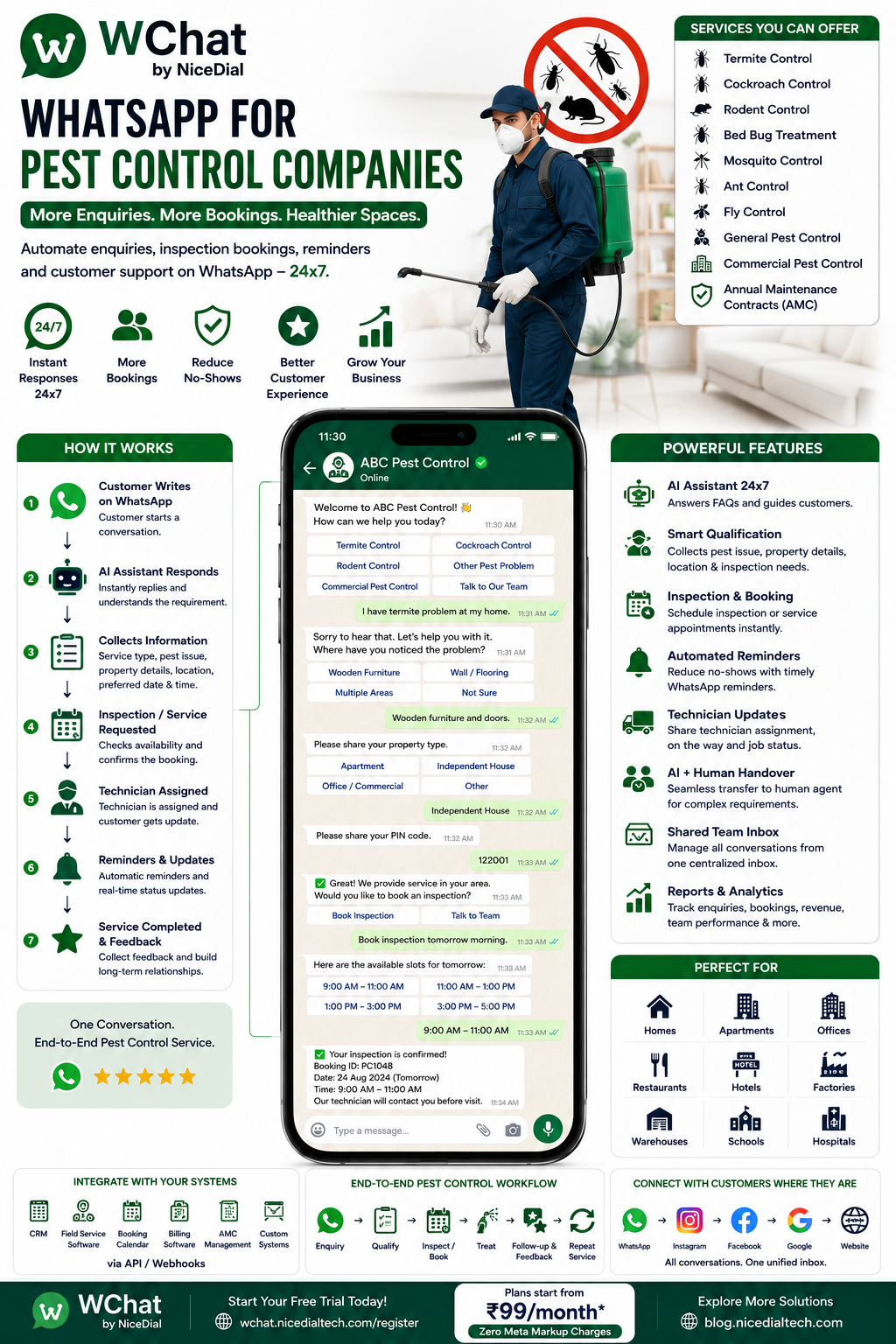
With WChat by NiceDial, pest control companies can automate WhatsApp enquiries, identify the required service, qualify leads, collect property information, schedule inspections or service appointments, send reminders, provide service-status updates, and transfer complex enquiries to human agents.
Why Pest Control Companies Need WhatsApp Automation
Pest-control enquiries are different from many ordinary service enquiries.
Customers frequently want to know:
- Whether you treat a particular pest
- Whether you serve their location
- How soon someone can visit
- Whether an inspection is required
- What information is needed for a quote
- Whether follow-up visits are included
- Whether AMC or recurring service is available
If every enquiry requires a manual phone conversation, your team can spend considerable time asking the same initial questions.
WhatsApp automation can collect those details before a service coordinator becomes involved.
Common Challenges for Pest Control Businesses
Pest control companies may deal with:
- Missed calls while technicians are working
- Enquiries outside office hours
- Incomplete customer information
- Repetitive pricing and service questions
- Customers sending only “pest control price?”
- Manual inspection scheduling
- Service-area verification
- Appointment reminders
- Technician coordination
- Follow-up service scheduling
- AMC renewal reminders
- Commercial pest-control enquiries
- Multiple branches or service teams
- Customer feedback and complaints
WChat can help organize these interactions into structured workflows.
Pest Control Services You Can Manage Through WhatsApp
A WChat workflow can be configured around services such as:
🐜 Termite Control
🪳 Cockroach Control
🐀 Rodent Control
🦟 Mosquito Control
🛏️ Bed Bug Treatment
🐜 Ant Control
🪰 Fly Control
🕷️ General Pest Control
🏠 Residential Pest Control
🏢 Commercial Pest Control
🍽️ Restaurant Pest Management
🏭 Industrial Pest Management
📋 Annual Maintenance Contracts
The exact services displayed should match those your company actually provides.
How WChat Works for Pest Control Companies
A typical customer journey can look like:
Google / Facebook / Instagram / Website
↓
Customer Opens WhatsApp
↓
WChat AI Assistant
↓
Pest Problem Selected
↓
Property Details Collected
↓
Location / PIN Code Checked
↓
Photo Shared, if useful
↓
Inspection or Treatment Requested
↓
Appointment Scheduled
↓
Confirmation & Reminder
↓
Technician Visit
↓
Treatment Completed
↓
Follow-Up
↓
Feedback / Repeat Service
Let’s look at this journey in more detail.
1. Instant WhatsApp Response
When someone contacts your pest control company, WChat can respond immediately.
For example:
👋 Welcome to ABC Pest Control!
How can we help you?
Options:
🐜 Termites
🪳 Cockroaches
🐀 Rodents
🛏️ Bed Bugs
🦟 Mosquitoes
🕷️ Other Pest Problem
🏢 Commercial Pest Control
📅 Existing Booking
💬 Talk to Our Team
Instead of waiting for a callback, customers can immediately provide useful information.
2. Identify the Pest Problem
Suppose the customer chooses:
🐜 Termites
WChat can ask:
Where have you noticed the problem?
Possible options:
🚪 Door / Wooden Furniture
🧱 Wall or Flooring
🏠 Multiple Areas
🏗️ Under-Construction Property
❓ Not Sure
The objective isn’t for AI to diagnose the infestation.
It is to collect basic information that helps your pest-control team understand the enquiry.
3. Collect Property Information
Different properties can require different service approaches.
WChat can collect information such as:
Property Type
🏠 Apartment
🏡 Independent House
🏢 Office
🍽️ Restaurant
🏨 Hotel
🏭 Factory / Warehouse
🏪 Shop
Then:
Approximate Property Size
For example:
- Under 1,000 sq. ft.
- 1,000–2,000 sq. ft.
- 2,000–5,000 sq. ft.
- Above 5,000 sq. ft.
- Not Sure
This gives your team more context before discussing the service.
4. Allow Customers to Share Photos
Customers can optionally send photos of visible pest activity or affected areas when appropriate.
For example:
📷 Visible Termite Damage
📷 Affected Furniture
📷 Pest Activity
📷 Area Requiring Inspection
WChat can attach those images to the customer conversation for review by your team.
Customers should not be encouraged to disturb nests, handle pests, enter unsafe spaces, or interact with chemicals merely to take a photograph.
5. Check Service Availability by Location
A customer might ask:
“Do you provide pest control in Sector 57?”
WChat can ask for:
📍 City
or
📮 PIN Code
For example:
Please enter your service PIN code.
Customer:
122001
If your configured coverage information or connected system shows that the area is serviced:
✅ Service is available in your area.
The customer can continue to booking.
If not, the workflow can clearly inform them rather than creating an unusable lead.
6. AI Assistant for Pest Control FAQs
Customers often ask repetitive questions such as:
“Do you provide termite treatment?”
“Do you service apartments?”
“Do you provide commercial pest control?”
“Can someone visit tomorrow?”
“Do you provide AMC?”
“How do I book an inspection?”
WChat can answer routine questions using information approved by your business.
Questions involving pesticide safety, exposure, health concerns, or treatment-specific precautions should use accurate company-approved information and be escalated to qualified staff where appropriate.
7. Pest Control Inspection Booking on WhatsApp
Some jobs may require an inspection before pricing or treatment can be confirmed.
WChat can offer:
🔍 Book Inspection
The customer selects:
📅 Preferred Date
↓
🕒 Available or Preferred Time
↓
📍 Property Location
↓
🏠 Property Type
↓
🐜 Pest Problem
↓
Inspection Scheduled
When connected to your scheduling system, available appointment slots can be used instead of simply collecting a preference.
8. Direct Service Booking
For standardized services, your business may allow customers to request or book treatment directly.
For example:
When would you like the service?
📅 Today
📅 Tomorrow
📅 Choose Another Date
Then, depending on your scheduling integration:
10 AM–12 PM | 12 PM–2 PM | 2 PM–4 PM | 4 PM–6 PM
Only genuine available slots should be presented as confirmed availability.
9. Appointment Confirmation
After an appointment is successfully created, WChat can send:
🐜 Pest Control Appointment Confirmed
Service: Termite Inspection
Date: 28 August
Time: 10:00 AM–12:00 PM
Location: Gurgaon
Booking ID: PC1048Our team will contact you if any additional information is required.
This gives the customer a written record of the appointment.
10. Automated Appointment Reminders
Customers can receive a reminder before the scheduled visit.
For example:
🔔 Pest Control Service Reminder
Your termite inspection is scheduled tomorrow between 10 AM and 12 PM.
Options:
✅ Confirm | 📅 Reschedule | 💬 Need Help
This can help reduce missed appointments and last-minute coordination.
11. Share Pre-Service Instructions
Depending on the treatment, your company may need customers to prepare the property before technicians arrive.
WChat can automatically send company-approved preparation instructions associated with the booked service.
For example, the message might direct customers to review preparation requirements provided by your trained pest-control team.
Avoid having AI invent chemical handling, re-entry times, food-safety precautions, or other treatment-specific safety instructions. Those should come from the product label, applicable regulations, and qualified pest-control professionals.
12. Technician Assignment & Service Updates
When connected with your operational system, WChat can keep customers informed.
For example:
Appointment Confirmed
↓
Technician Assigned
↓
Technician On the Way
↓
Inspection Started
↓
Treatment / Service Completed
This can reduce calls asking:
“When will your technician arrive?”
13. Reschedule Through WhatsApp
Customers’ plans can change.
Instead of calling your office:
📅 Reschedule Service
↓
Existing Booking Retrieved
↓
New Date Selected
↓
Available Slot Selected
↓
Appointment Updated
↓
New Confirmation Sent
The exact functionality depends on your scheduling integration.
14. AI + Human Agent Handover
Some enquiries need human expertise.
For example:
“We manage 20 restaurants across Delhi NCR and need pest-control services for all locations.”
This shouldn’t remain a basic chatbot conversation.
WChat can collect:
- Company Name
- Number of Locations
- Cities
- Property Types
- Pest-Control Requirement
- Current Service Arrangement
- Contact Person
Then route the enquiry to your commercial sales team.
AI Handles
✔ Initial Response
✔ Routine FAQs
✔ Service Identification
✔ Customer Information
✔ Location Qualification
✔ Appointment Workflow
✔ Reminders
Humans Handle
✔ Complex Inspections
✔ Customized Quotations
✔ Commercial Contracts
✔ Safety-Specific Questions
✔ Complaints
✔ Negotiations
✔ High-Value Opportunities
15. Commercial Pest Control Lead Qualification
Commercial pest control can be a valuable B2B opportunity.
WChat can create a dedicated workflow:
What type of property requires pest management?
🍽️ Restaurant
🏨 Hotel
🏢 Office
🏭 Factory
📦 Warehouse
🏪 Retail Store
🏥 Facility
🏫 Institution
Then collect:
- Number of Locations
- Approximate Area
- Pest Issue
- Service Frequency
- Inspection Requirement
- AMC Interest
The qualified lead can then be assigned to a B2B sales representative.
16. Restaurant Pest-Control Enquiries
Restaurants may require recurring pest-management services and documentation according to their operational requirements.
A WhatsApp workflow can capture:
🍽️ Restaurant Type
📍 Location
📐 Approximate Area
🐜 Pest Issue
📅 Inspection Requirement
📋 Recurring Service Interest
A qualified team member can then handle the technical assessment and proposal.
17. Annual Maintenance Contract Automation
Pest-control companies can also use WhatsApp for AMC enquiries and customer servicing.
WChat can support workflows for:
📋 New AMC Enquiries
📅 Scheduled Service Reminders
🔔 Upcoming Visit Notifications
💬 Service Requests
⭐ Feedback
🔄 Renewal Reminders
For example:
Your pest-control maintenance plan is approaching renewal.
Would you like to review your renewal options?
📋 View Options | 💬 Talk to Team
Marketing and renewal communications should follow applicable consent and WhatsApp messaging requirements.
18. Scheduled Follow-Up Treatments
Some pest-management programs involve multiple visits or scheduled follow-ups.
Where your service records indicate that another visit is required, WChat can automatically send:
Your next scheduled pest-control visit is approaching.
The customer can confirm or request a reschedule.
This can reduce manual follow-up by your service team.
19. Shared Inbox for Pest Control Teams
A growing pest-control business may have:
👩💼 Customer Support
📅 Scheduling Team
👨🔧 Service Coordinators
💰 Sales Team
🏢 Commercial Accounts Team
👨💼 Supervisors
With WChat Shared Inbox, authorized employees can handle conversations centrally.
Features can include:
✔ Role-Based Access
✔ Agent Assignment
✔ Department Routing
✔ Conversation History
✔ Customer Context
✔ AI + Human Handover
✔ Access Management
This avoids relying on multiple employees sharing direct access to the Business WhatsApp account.
20. Multi-City Pest Control Operations
For businesses operating across several locations, WChat can route customers based on their city or PIN code.
For example:
📍 Delhi
📍 Gurgaon
📍 Noida
📍 Faridabad
📍 Ghaziabad
The enquiry can automatically move to the appropriate branch or service team.
21. Post-Service Feedback
After a completed service:
Thank you for choosing ABC Pest Control. 🏠
How was your service experience?
⭐⭐⭐⭐⭐ Excellent
⭐⭐⭐⭐ Good
⭐⭐⭐ Average
⭐⭐ Needs Improvement
Negative feedback can be routed to customer support for follow-up.
Satisfied customers can be invited to leave a review where appropriate.
22. CRM & Field-Service Integration
WChat can integrate with compatible business systems through APIs.
Possible integrations include:
- CRM
- Field Service Management
- Technician Scheduling
- Booking Calendar
- Ticketing System
- Billing Software
- Customer Database
- AMC Management
- Custom Applications
This allows WhatsApp to become part of the operational process rather than an isolated messaging channel.
Example: Termite Inspection Booking on WhatsApp
Customer
Hi, I think we have termites.
WChat
👋 We can help you with your pest-control enquiry.
Where have you noticed the issue?
Furniture | Door/Woodwork | Wall/Floor | Multiple Areas | Not Sure
Customer
Furniture
WChat
What type of property is this?
Apartment | Independent House | Office | Other
Customer
Apartment
WChat
Please enter your PIN code.
Customer
122001
WChat
✅ We provide service in your area.
Would you like to request an inspection?
🔍 Book Inspection | 💬 Talk to Team
Customer chooses the inspection.
↓
Available appointment options are retrieved from the connected scheduling system.
↓
Customer chooses a slot.
↓
Inspection Confirmed ✅
The service team now receives a structured enquiry rather than only:
“Termite price?”
From Google Search to Pest Control Visit
A customer searches:
“Pest control near me”
↓
Finds your company
↓
Clicks WhatsApp
↓
WChat responds
↓
Pest type selected
↓
Property details collected
↓
PIN code checked
↓
Inspection/service booked
↓
Reminder sent
↓
Technician assigned
↓
Service completed
↓
Follow-up scheduled
↓
Feedback collected
That’s a much more organized customer journey.
WhatsApp + AI Voice Agent for Pest Control Companies
Not every customer wants to type.
Some will still call.
Pest-control companies can combine WChat with NiceDial AI Voice Agents.
For example:
Customer Calls
↓
↓
Pest-Control Requirement Collected
↓
Location Identified
↓
Inspection Requested
↓
WhatsApp Confirmation via WChat
↓
Appointment Reminder
↓
Technician Visit
↓
Follow-Up
This creates a connected Voice + WhatsApp + Human Agent workflow.
Benefits of WhatsApp Automation for Pest Control Companies
⚡ Respond 24×7
Capture enquiries even when your office is closed.
🎯 Better Lead Qualification
Know the pest problem, property type and location before your team responds.
📅 More Organized Bookings
Turn conversations into structured inspection and service appointments.
🔔 Automate Reminders
Keep customers informed about upcoming visits.
👨🔧 Reduce Status Calls
Provide technician and service updates when connected to your operational system.
🏢 Capture Commercial Leads
Separate larger B2B opportunities from ordinary residential enquiries.
🔄 Support Repeat Business
Automate appropriate scheduled-service and AMC workflows.
⭐ Improve Customer Experience
Keep the customer informed throughout the service journey.
Why Choose WChat by NiceDial?
WChat combines AI-powered WhatsApp conversations with booking workflows, human-agent collaboration, and business-system integrations.
Key Features for Pest Control Businesses
✔ 24×7 WhatsApp AI Assistant
✔ Pest-Control Enquiry Automation
✔ Service Qualification
✔ Property Information Collection
✔ Photo Sharing
✔ PIN Code / Location Qualification
✔ Inspection Booking
✔ Service Appointment Booking
✔ Automated Reminders
✔ Technician Updates
✔ Rescheduling Workflows
✔ Commercial Lead Qualification
✔ AMC & Follow-Up Workflows
✔ AI + Human Handover
✔ Shared Team Inbox
✔ Role-Based Access
✔ CRM Integration
✔ Field-Service Integration
✔ Multi-Branch Routing
✔ Reports & Analytics
✔ Official WhatsApp Business API
Start Automating Pest Control Enquiries
When customers discover a pest problem, they want answers quickly:
Do you treat this problem?
Do you service my location?
When can someone visit?
Can I book an inspection?
WChat can help turn those questions into an organized service journey:
Enquiry → Pest Identification → Qualification → Inspection → Booking → Technician → Follow-Up → Feedback
with WChat by NiceDial.
Plans start from ₹99/month with Zero Meta Markup Charges.
📖 Explore more NiceDial automation solutions
Frequently Asked Questions
Can customers book pest-control services through WhatsApp?
Yes. WChat can collect the pest type, property details, location and appointment requirements and connect the request with your scheduling workflow.
Can customers book an inspection before treatment?
Yes. Inspection booking can be offered for services where your business requires an assessment before treatment or quotation.
Can customers send photos through WhatsApp?
Yes. Customers can share relevant photos when safe and appropriate, allowing your service team to review additional context.
Can WChat automatically quote pest-control prices?
Fixed prices can be presented where your business has defined standardized pricing. Services requiring an inspection or assessment should be routed accordingly rather than having AI invent a quote.
Can WChat check service availability by PIN code?
Yes. Service-area information can be configured or retrieved from a connected business system.
Can WChat send pest-control preparation instructions?
Yes, but treatment-specific safety and preparation instructions should come from accurate, company-approved sources and qualified professionals.
Can WChat manage recurring pest-control services?
Yes. Scheduled visits, appropriate reminders and AMC workflows can be connected to customer and service records.
Can WChat handle commercial pest-control enquiries?
Yes. Businesses can create separate qualification workflows for restaurants, offices, hotels, warehouses, factories and multi-location customers.
Can multiple employees handle WhatsApp enquiries?
Yes. WChat Shared Inbox can provide controlled access for authorized customer-service, scheduling, sales and operations teams.