Make Restaurant Reservations as Simple as Sending a WhatsApp Message
A customer is planning dinner with friends.
They find your restaurant on Google or Instagram and want to reserve a table.
They call.
The line is busy.
They call again.
Nobody answers because your team is handling the dinner rush.
The customer searches for another restaurant.
This is a common challenge for busy restaurants: the time when customers are most likely to make reservations is often the same time your staff are busiest serving guests.
With WChat by NiceDial, restaurants can automate table reservation enquiries through WhatsApp, helping customers check booking options, request a table, receive confirmation, get reminders, and manage their reservation from a familiar messaging channel.
Why Restaurant Table Booking Needs Automation
Customers increasingly expect convenience.
When someone decides where to eat, they usually want quick answers:
“Do you have a table for 4 tonight?”
“Can I reserve for 8 PM?”
“Is outdoor seating available?”
“Can I book a table for tomorrow?”
“We are 10 people. Can you accommodate us?”
Making customers wait for a callback creates unnecessary friction.
A WhatsApp reservation workflow can make the process much easier.
Common Restaurant Reservation Challenges
Restaurants frequently struggle with:
- Missed reservation calls
- Customers calling during peak hours
- Unanswered WhatsApp messages
- Manual reservation management
- Double-booking risks
- Last-minute cancellations
- Reservation no-shows
- Large-party enquiries
- Customers repeatedly asking about availability
- Multiple employees handling reservations
- Managing reservations across multiple branches
Automation can help organize this process.
How Restaurant Table Booking on WhatsApp Works
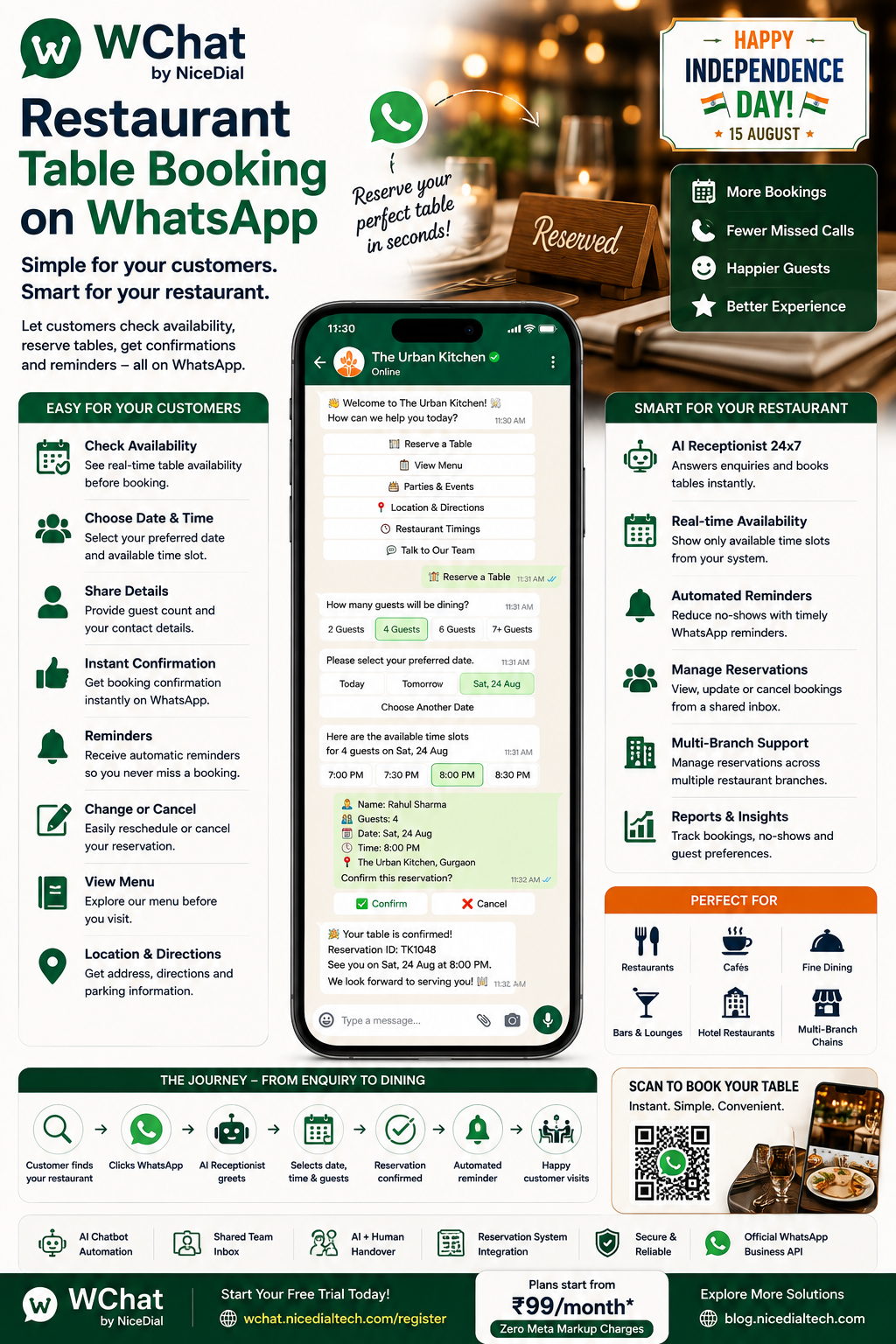
A typical WChat reservation journey can look like this:
Customer
↓
↓
WChat AI Receptionist
↓
Select Restaurant / Branch
↓
Number of Guests
↓
Select Date
↓
Check Availability
↓
Choose Available Time
↓
Customer Details
↓
Reservation Created
↓
Confirmation
↓
Automatic Reminder
↓
Restaurant Visit
The exact workflow can be customized according to the restaurant’s reservation policies and software.
1. Instant Reservation Response
When a customer messages your restaurant, WChat can respond immediately.
For example:
👋 Welcome to The Urban Kitchen!
How can we help you?
Options:
🍽️ Reserve a Table
📋 View Menu
🎂 Parties & Events
📍 Location
🕒 Restaurant Timings
💬 Talk to Our Team
The customer selects:
🍽️ Reserve a Table
and the reservation journey begins.
2. Ask for Number of Guests
The first question can be:
How many guests will be dining?
Options:
👤 1 Guest
👥 2 Guests
👥 3 Guests
👥 4 Guests
👥 5–6 Guests
🎉 7+ Guests
Large groups can automatically be routed into a separate booking workflow if required.
3. Select the Reservation Date
Next, the customer selects their preferred date.
For example:
📅 Today
📅 Tomorrow
📅 Friday
📅 Saturday
📅 Choose Another Date
This is much easier than exchanging multiple messages with restaurant staff.
4. Show Available Reservation Times
This is where integration becomes important.
When WChat is connected to a compatible restaurant reservation or table-management system, the workflow can retrieve booking availability.
For example:
Available tables for 4 guests on Saturday:
🕖 7:00 PM
🕢 7:30 PM
🕗 8:00 PM
🕣 8:30 PM
🕘 9:00 PM
The customer simply chooses an available slot.
This helps avoid presenting times that aren’t actually available.
5. Collect Customer Details
Before completing the reservation, WChat can collect basic information such as:
- Customer Name
- Mobile Number
- Number of Guests
- Reservation Date
- Reservation Time
- Branch
- Special Request
For example:
Your reservation request
👤 Rahul Sharma
👥 4 Guests
📅 Saturday, 22 August
🕗 8:00 PM
The customer confirms the information before the reservation is submitted.
6. Instant Reservation Confirmation
Once the connected booking system successfully creates the reservation, WChat can send confirmation immediately.
🍽️ Your Table is Reserved!
👤 Rahul Sharma
👥 Guests: 4
📅 Saturday, 22 August
🕗 8:00 PM
📍 The Urban Kitchen – GurgaonReservation ID: TK1048
We look forward to welcoming you! 😊
Customers now have their booking information directly in WhatsApp.
7. Automated Reservation Reminders
No-shows can be expensive for restaurants, particularly during busy dinner periods.
WChat can automatically send reservation reminders.
One Day Before
🍽️ Reservation Reminder
Your table for 4 is reserved tomorrow at 8:00 PM.
Please confirm your reservation.
Options:
✅ Confirm | 📅 Change | ❌ Cancel
Another reminder can be sent closer to the booking time according to the restaurant’s policy.
8. Allow Customers to Change Their Reservation
Plans change.
Instead of requiring customers to call the restaurant, provide:
📅 Change Reservation
The workflow can retrieve the existing booking and ask for a new preference.
Existing Booking
Saturday — 8:00 PM
↓
Select New Time
↓
Availability checked
↓
New available slot selected
↓
Reservation updated
↓
New Confirmation Sent
This reduces manual coordination for restaurant staff.
9. Easy Reservation Cancellation
Customers who know they can’t attend should have an easy way to cancel.
For example:
Would you like to cancel your reservation for Saturday at 8 PM?
Yes, Cancel | Keep Reservation
Once cancellation is successfully processed in the connected system:
Reservation Cancelled
We hope to welcome you another time.
Making cancellation easier can help restaurants release tables for other guests.
10. Waitlist Automation
What happens when Saturday at 8 PM is fully booked?
Instead of simply saying:
“No tables available.”
WChat can provide alternatives.
For example:
8:00 PM is currently unavailable.
Available options:
🕢 7:30 PM
🕘 9:00 PM
📋 Join Waitlist
📅 Choose Another Date
If the restaurant’s reservation platform supports waitlists, WChat can integrate that functionality into the workflow.
This helps retain customers who might otherwise leave.
11. Seating Preference
Restaurants may optionally collect seating preferences such as:
🌳 Outdoor
❄️ Indoor
🪟 Window
🤫 Quiet Area
♿ Accessible Seating
These should generally be treated as requests rather than guaranteed assignments unless the restaurant’s table-management system explicitly confirms them.
For example:
“Outdoor seating requested. Final seating is subject to availability.”
12. Large Group Reservation Automation
A table for 20 guests requires a different workflow from a table for two.
If the customer selects:
7+ Guests
WChat can ask:
- Number of Guests
- Event Type
- Date
- Time
- Budget Range
- Food Preference
- Private Area Requirement
- Special Arrangement
The enquiry can then be transferred to the restaurant manager or events team.
13. Birthday & Anniversary Reservations
Customers often choose restaurants for celebrations.
WChat can provide:
🎂 Birthday Dinner
💍 Anniversary
🎉 Family Celebration
🏢 Corporate Dinner
The workflow can collect:
- Occasion
- Number of Guests
- Preferred Date
- Decoration Requirement
- Cake Requirement
- Package Interest
High-value enquiries can then be routed to the appropriate staff member.
14. Share the Restaurant Menu Before Booking
Some customers want to check the menu before making a reservation.
WChat can provide:
📋 Full Menu
🥗 Vegetarian Options
🌱 Vegan Options
🍰 Desserts
👶 Kids Menu
⭐ Chef Specials
The customer can then return to:
🍽️ Reserve a Table
without leaving the WhatsApp journey.
15. Restaurant Location & Directions
After confirmation, WChat can automatically provide:
📍 Restaurant Address
🗺️ Directions
🚗 Parking Information
☎️ Restaurant Contact
🏢 Nearby Landmark
This reduces last-minute calls asking:
“Where exactly are you located?”
16. AI Receptionist for Restaurant FAQs
Alongside reservations, WChat’s AI assistant can handle configured questions such as:
“What time do you close?”
“Do you have parking?”
“Do you have vegetarian options?”
“Is outdoor seating available?”
“Do you accept walk-ins?”
“Can we bring children?”
“Do you host birthday parties?”
Questions that require staff confirmation can be handed over to a human agent.
17. AI + Human Agent Handover
Not every restaurant conversation should be automated.
Suppose a customer says:
“We’re arranging a corporate dinner for 40 people and need a customized menu.”
WChat can collect the basic requirements and transfer the conversation to the events team.
↓
Understands Requirement
↓
Collects Details
↓
Qualifies Enquiry
↓
Human Restaurant Manager
The manager receives context instead of starting the conversation from scratch.
18. Shared Team Inbox for Restaurant Reservations
Reservations may be handled by:
- Reception
- Restaurant Manager
- Reservation Desk
- Events Team
- Customer Service
- Branch Managers
With WChat Shared Inbox, authorized employees can manage conversations centrally rather than relying on shared direct access to the Business WhatsApp account.
Features can include:
✔ Role-Based Access
✔ Conversation Assignment
✔ Complete Conversation History
✔ Department Routing
✔ Agent Activity
✔ AI + Human Collaboration
✔ Employee Access Management
Customer conversations stay associated with the business even when team members change.
19. Multi-Branch Restaurant Booking
Restaurant chains can create a simple branch-selection workflow.
Which restaurant would you like to visit?
📍 Connaught Place
📍 Gurgaon
📍 Noida
📍 Greater Kailash
After the customer selects a location, WChat can use branch-specific:
- Opening Hours
- Menu
- Reservation Availability
- Address
- Contact Details
- Offers
This allows one WhatsApp experience to support multiple locations.
20. Post-Dining Feedback
The reservation journey shouldn’t necessarily end when the customer leaves.
After the visit, WChat can send:
Thank you for dining with us! 🍽️
How was your experience?
⭐ Excellent
🙂 Good
😐 Average
🙁 Needs Improvement
Feedback can be stored or routed to the appropriate team.
Satisfied customers can also be invited to leave a public review.
Example Restaurant Table Booking Conversation
Customer
Hi, I want to reserve a table.
WChat
👋 Welcome to The Urban Kitchen!
I’d be happy to help with your reservation.
How many guests?
2 | 3 | 4 | 5 | 6 | Larger Group
Customer
4
WChat
Please select your preferred date.
Today | Tomorrow | Saturday | Sunday
Customer
Saturday
WChat
Here are the available reservation times for 4 guests:
7:00 PM | 7:30 PM | 8:00 PM | 8:30 PM | 9:00 PM
Customer
8:00 PM
WChat
Great! Please confirm:
👥 4 Guests
📅 Saturday
🕗 8:00 PM
Confirm Reservation
Customer
Confirm
WChat
Reservation Confirmed! 🍽️
We look forward to welcoming you.
A reservation can be completed without a phone call.
From Google Search to Restaurant Table
A customer searches:
“Italian restaurant near me”
↓
Finds your restaurant
↓
Clicks WhatsApp
↓
WChat AI Receptionist
↓
Reserve Table
↓
Selects 4 Guests
↓
Chooses Saturday
↓
Selects an available 8 PM slot
↓
Reservation Confirmed
↓
Reminder sent
↓
Customer arrives
↓
Feedback collected
This turns restaurant discovery into a structured reservation journey.
Benefits of Restaurant Table Booking on WhatsApp
🍽️ More Reservation Opportunities
Make it easier for customers to initiate reservations.
⚡ Faster Response
Customers don’t have to wait for restaurant staff to answer routine reservation questions.
📞 Reduce Reservation Calls
Move suitable booking interactions into a structured WhatsApp workflow.
🔔 Help Reduce No-Shows
Use confirmations and reminders to keep customers engaged.
🔄 Easier Changes & Cancellations
Give customers a convenient way to manage reservations.
👨💼 Save Staff Time
Reduce repetitive reservation coordination.
🎂 Capture Group & Event Leads
Identify high-value bookings and route them to the right team.
⭐ Improve Customer Experience
Provide a convenient journey from discovery to dining.
Restaurant Booking + AI Voice Agent
WhatsApp doesn’t need to be the only channel.
Restaurants can combine WChat with NiceDial AI Voice Agent.
For example:
Customer Calls Restaurant
↓
AI Voice Receptionist
↓
“Table for four tomorrow at 8 PM”
↓
Availability checked through connected system
↓
Reservation created
↓
WhatsApp Confirmation via WChat
↓
Automatic reminder
↓
Customer visits restaurant
This creates a connected Voice + WhatsApp customer experience.
Integrate WChat with Your Restaurant Systems
WChat can integrate with compatible systems through APIs, including:
- Restaurant Reservation Software
- Table Management Systems
- CRM
- POS
- Customer Loyalty Systems
- Ordering Platforms
- Custom Restaurant Applications
The reservation system should remain the source of truth for table availability and confirmed bookings.
Perfect For
Restaurant table booking automation can support:
- Fine Dining Restaurants
- Casual Dining Restaurants
- Cafés
- Hotel Restaurants
- Bars & Lounges
- Restaurant Chains
- Multi-Branch Restaurants
- Rooftop Restaurants
- Family Restaurants
- Resort Restaurants
- Banquet & Event Venues
Why Choose WChat by NiceDial?
WChat brings AI-powered conversations, WhatsApp automation, reservation workflows, team collaboration, and business integrations into one platform.
Restaurant Features
✔ WhatsApp Table Reservation
✔ AI Restaurant Receptionist
✔ Availability-Based Booking Workflows
✔ Reservation Confirmation
✔ Automated Reminders
✔ Rescheduling & Cancellation
✔ Waitlist Workflows
✔ Menu Sharing
✔ Restaurant FAQs
✔ Event Lead Qualification
✔ AI + Human Handover
✔ Shared Team Inbox
✔ Role-Based Access
✔ Multi-Branch Routing
✔ CRM & Reservation Integration
✔ Reports & Analytics
✔ Official WhatsApp Business API
Start Taking Restaurant Reservations on WhatsApp
Your customers already use WhatsApp every day.
Make reserving a restaurant table just as easy.
Discover → WhatsApp → Check → Reserve → Confirm → Visit
with WChat by NiceDial.
Plans start from ₹99/month with Zero Meta Markup Charges.
🌐 Start your free trial:
WChat Free Trial
🤖 Explore AI Voice Agents:
NiceDial AI Agent
📖 Explore more automation solutions:
NiceDial Technology Blog
Frequently Asked Questions
Can customers book restaurant tables through WhatsApp?
Yes. WChat can provide a structured reservation workflow through WhatsApp. Confirmed bookings should be synchronized with the restaurant’s reservation or table-management system.
Can WChat show available table times?
Yes, when integrated with a compatible reservation system that provides current availability.
Can customers change their reservation through WhatsApp?
Yes. WChat can provide workflows for requesting or processing reservation changes according to the restaurant’s booking system and policies.
Can customers cancel their reservation?
Yes. A cancellation workflow can be provided and synchronized with the connected reservation system.
Can WChat manage a restaurant waitlist?
If the connected reservation platform supports waitlists, WChat can be integrated with that process.
Can customers choose a specific table?
Seating preferences can be collected. Whether a specific table can be guaranteed depends on the restaurant’s table-management system and policies.
Can WChat handle large group bookings?
Yes. Large groups can be routed into a separate qualification workflow and transferred to the restaurant’s events or reservations team.
Can multiple employees manage reservations?
Yes. WChat Shared Inbox allows authorized employees to manage customer conversations centrally.
Can WChat support multiple restaurant branches?
Yes. Customers can select their preferred branch before entering the reservation workflow.
Conclusion
Restaurant reservations shouldn’t depend entirely on whether someone is available to answer the phone.
By connecting WhatsApp with your reservation system, WChat by NiceDial can help customers initiate bookings, select available times, receive confirmations, manage changes, and get reminders through a channel they already use.
For restaurant teams, that means fewer repetitive reservation conversations and a more organized booking process.
For customers, it means something even simpler:
Find the restaurant. Open WhatsApp. Reserve a table. 🍽️