AI Shouldn’t Replace Your Customer Support Team — It Should Make Them More Effective
A customer sends your business a WhatsApp message at 11:30 PM:
“Hi, I want to know your pricing.”
An AI agent can answer instantly.
The customer then asks:
“Which plan would be best for our company? We have 50 users and need CRM integration.”
Now the conversation requires understanding, negotiation, and possibly a customized commercial proposal.
This is where a human agent should take over.
The most effective WhatsApp automation strategy isn’t:
AI vs Human
It is:
AI + Human
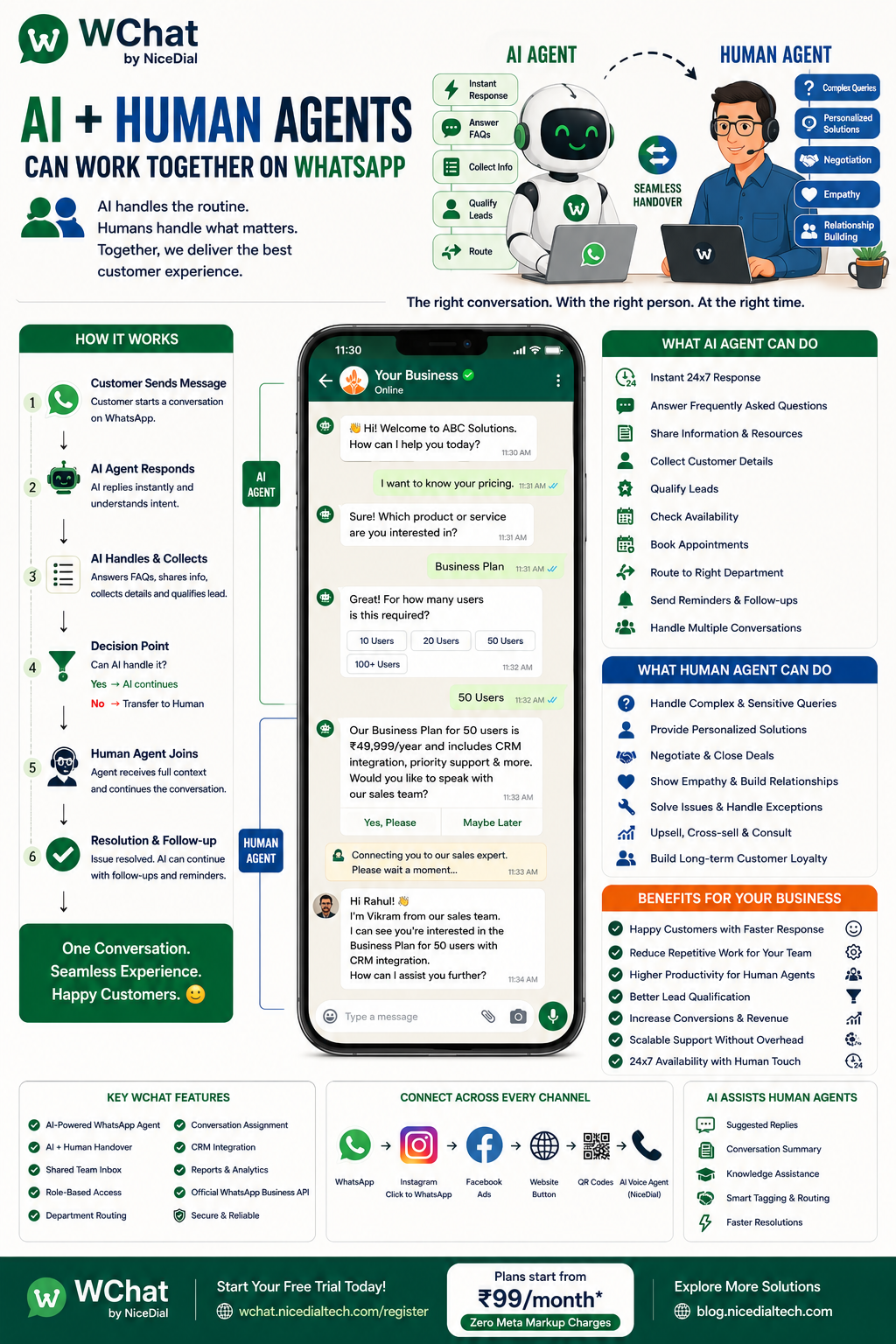
With WChat by NiceDial, businesses can combine AI-powered automation with human customer service in the same WhatsApp conversation.
AI handles repetitive interactions, collects information, and identifies customer intent.
Human agents step in when customers need expertise, negotiation, empathy, or personalized assistance.
What Is AI + Human Agent Collaboration?
AI + Human Agent collaboration means using automation for conversations that can be handled efficiently by AI while giving customers access to a real person whenever necessary.
A typical workflow looks like:
Customer Messages Business
↓
AI Agent Responds
↓
Understands Customer Intent
↓
Answers Routine Questions
↓
Collects Required Information
↓
Qualifies Customer
↓
Can AI Handle It?
YES → AI Continues
NO → Transfer to Human Agent
↓
Human Agent Receives Conversation + Context
↓
Agent Resolves / Converts Customer
↓
Automation Continues After Conversation
This creates a balance between speed and human interaction.
Why Businesses Shouldn’t Choose Between AI and Humans
AI and humans have different strengths.
AI Agents Are Good At:
✔ Responding instantly
✔ Working 24×7
✔ Answering repetitive questions
✔ Collecting customer information
✔ Identifying customer intent
✔ Lead qualification
✔ Appointment workflows
✔ Routing conversations
✔ Handling large conversation volumes
Human Agents Are Better At:
✔ Complex enquiries
✔ Negotiation
✔ Personalized recommendations
✔ Exceptions
✔ Sensitive customer situations
✔ Relationship building
✔ High-value sales opportunities
✔ Complex problem solving
The goal isn’t to make AI do everything.
The goal is to let each handle the part of the customer journey where it performs best.
The Problem with Traditional WhatsApp Customer Support
Imagine a company receiving 1,000 WhatsApp conversations every day.
Many messages are simple:
“What are your timings?”
“Where are you located?”
“What is your pricing?”
“Can I book an appointment?”
“What is my order status?”
“Can someone call me?”
If human agents answer every repetitive question manually, a significant part of their day is spent on conversations that could be automated.
Meanwhile, customers with complex requirements may wait longer.
AI can become the first layer of customer service.
How WChat AI + Human Agent Workflow Works
1. Customer Sends a WhatsApp Message
A customer contacts your business.
For example:
“Hi, I need information about your services.”
WChat can immediately respond:
👋 Welcome! How can we help you today?
Options might include:
🛍️ Products & Services
💰 Pricing
📅 Book Appointment
🛠️ Support
📦 Order Status
💬 Talk to an Agent
The customer gets an immediate response.
2. AI Identifies Customer Intent
Suppose the customer selects:
💰 Pricing
The AI agent can ask:
“Which product or service are you interested in?”
Instead of transferring every enquiry immediately to a salesperson, AI can first understand what the customer actually needs.
3. AI Answers Routine Questions
If the customer asks:
“What are your business hours?”
AI can answer using the information configured for the business.
If they ask:
“Where is your Gurgaon office?”
AI can provide the appropriate location.
If they ask:
“How can I book a demo?”
AI can start the demo-booking workflow.
No human intervention is required for these routine interactions.
4. AI Collects Customer Information
Before transferring a lead to your team, AI can collect relevant details.
For example:
B2B Sales Lead
- Customer Name
- Company Name
- Number of Users
- Product Interest
- Business Requirement
- Preferred Demo Time
Appointment Lead
- Customer Name
- Service Required
- Location
- Preferred Date
- Preferred Time
Support Request
- Customer Name
- Product
- Issue Category
- Account/Reference Number
- Description of Problem
The human agent receives a much more structured conversation.
5. AI Qualifies the Lead
Consider two customers.
Customer A
“Just checking your pricing.”
Customer B
“We need a solution for 100 agents and want to implement it this month.”
Both are enquiries.
But they don’t have the same sales intent.
AI can collect qualifying information and use business-defined rules to help identify higher-priority conversations.
For example:
🔥 High Priority
Ready to purchase soon
Large requirement
Requests demo
Asks to speak with sales
🟡 Medium Priority
Comparing options
Needs more information
Longer purchase timeline
⚪ Early Stage
General enquiry
Researching options
No immediate requirement
Human sales teams can then focus attention where it matters most.
6. When Should AI Transfer to a Human?
Businesses can define handover rules.
For example, transfer when:
Customer Requests an Agent
“I want to talk to someone.”
AI Cannot Confidently Answer
Instead of inventing an answer, the AI should escalate.
Customer Has a Complex Requirement
“We need API integration with our existing CRM and custom reporting.”
Customer Wants to Negotiate
“Can you offer a better price for 200 users?”
Customer Is Upset
“I’ve contacted support three times and my issue still isn’t resolved.”
High-Value Lead Identified
A qualified enterprise lead can be routed directly to sales.
This makes human intervention intentional rather than random.
7. Seamless AI-to-Human Handover
This is one of the most important parts of the experience.
A bad handover looks like:
Customer → AI → Agent
Agent:
“Hello. How can I help you?”
Customer:
“I already explained everything!”
A better handover preserves the conversation context.
When the human agent joins, they should be able to see:
- Customer’s previous messages
- AI responses
- Customer intent
- Information collected
- Product or service selected
- Qualification details
- Reason for escalation
The agent can then start with:
“Hi Rahul, I can see you’re looking for a 50-user plan with CRM integration. Let me help you with the integration and pricing options.”
That’s a much better customer experience.
8. Human Agent Takes Control
Once the conversation is assigned, the human agent can continue directly with the customer.
Depending on the business, this might be:
👨💼 Sales Executive
👩💻 Support Agent
🏥 Receptionist
👨⚕️ Appropriate Staff Member
🏡 Property Advisor
🚗 Service Advisor
🎓 Admission Counsellor
🍽️ Restaurant Manager
The AI can temporarily stop responding while the human owns the conversation.
This prevents the customer from receiving conflicting responses from both AI and staff.
9. Human-to-AI Handover
Handover shouldn’t work only in one direction.
After the human agent finishes the complex part of the conversation, automation can resume.
For example:
AI
↓
Qualifies Lead
↓
Human Sales Agent
↓
Conducts Conversation
↓
Demo Booked
↓
AI Automation
↓
Sends Demo Confirmation
↓
Reminder Before Demo
↓
Follow-Up After Demo
This creates a continuous customer journey.
10. AI Can Assist Human Agents Too
AI doesn’t only have to talk directly to customers.
It can also help agents work faster.
Depending on the implementation, AI-assisted features can include:
Suggested Replies
AI can propose a response for the agent to review.
Conversation Summary
Instead of reading a long conversation, an agent can receive a short summary.
For example:
Customer wants a 50-agent contact-center solution. Needs CRM integration, inbound + outbound calling, and wants a demo this week.
Knowledge Assistance
AI can help surface relevant business information from approved knowledge sources.
Conversation Classification
AI can categorize the conversation as:
Sales | Support | Billing | Appointment | Complaint | Other
The human remains in control while AI reduces repetitive work.
11. Route Customers to the Right Department
Not every customer should go to the same team.
AI can understand the request and route accordingly.
Example
Customer:
“I want a product demo.”
→ Sales
Customer:
“My invoice is incorrect.”
→ Billing
Customer:
“The application isn’t working.”
→ Technical Support
Customer:
“I want to change my appointment.”
→ Appointment Team
Customer:
“I want to complain about my experience.”
→ Customer Service
Intelligent routing can reduce unnecessary transfers between departments.
12. Shared Inbox for Human Agents
Once conversations require human assistance, they can be managed through the WChat Shared Inbox.
Instead of giving multiple employees direct access to the Business WhatsApp account, authorized employees can work through controlled user accounts.
Businesses can manage:
✔ Agent Access
✔ Role-Based Permissions
✔ Conversation Assignment
✔ Departments
✔ Conversation History
✔ Customer Context
✔ Agent Activity
✔ Access Revocation
When an employee leaves, their WChat access can be removed while the customer conversation remains with the business.
13. Example: AI + Human Sales Conversation
Customer
Hi, I want WhatsApp automation for my company.
AI Agent
👋 Welcome!
I’d be happy to help.
Approximately how many people will use the solution?
Customer:
50 users.
AI:
Great. What are you primarily looking to automate?
Sales Leads | Customer Support | Appointments | Other
Customer:
Sales leads.
AI:
Do you currently use a CRM?
Customer:
Yes. We use our own CRM and need API integration.
At this stage, WChat can identify that this may require technical discussion.
AI
Thanks. I’ll connect you with our team to discuss the CRM integration.
↓
Human Agent Assigned
The salesperson can see:
50 Users | Sales Automation | Custom CRM | API Integration Required
They can continue from there instead of repeating the qualification process.
14. Example: AI + Human Customer Support
Customer:
“My order hasn’t arrived.”
AI asks:
“Please provide your order number.”
Customer provides it.
AI retrieves the available order information from the connected system.
If the issue can be resolved automatically, the customer gets an immediate answer.
If something unusual has happened:
AI → Human Support Agent
The support agent receives the order reference and conversation history.
This reduces repeated questions.
15. Example: Appointment Booking
A customer messages a clinic, salon, spa, gym, or service business.
AI can:
Understand Service
↓
Collect Location
↓
Check Connected Scheduling System
↓
Show Available Options
↓
Book Appointment
↓
Send Confirmation
No human assistance may be needed.
But if the customer asks:
“I have a special requirement. Which service should I choose?”
the conversation can be escalated to the appropriate person.
16. Example: Restaurant Reservation
Customer:
“Table for 4 tomorrow evening.”
AI can guide the customer through:
👥 Guest Count
📅 Date
🕒 Available Time
📍 Branch
If connected to the reservation system, the booking can be completed automatically.
But:
“We need a private dinner for 40 people.”
can be routed to the restaurant’s events manager.
Again:
Routine → AI
Complex / High Value → Human
17. Example: Real Estate Lead
Customer:
“I’m looking for a 3BHK in Gurgaon.”
AI can collect:
🏡 Property Type
📍 Preferred Location
💰 Budget
📅 Purchase Timeline
If the prospect wants:
“I’d like to visit the property this weekend.”
WChat can start the site-visit workflow or transfer the qualified prospect to a property advisor.
The salesperson receives context before speaking with the lead.
18. AI After Business Hours, Humans During Business Hours
Another useful strategy is time-based automation.
During Business Hours
AI handles first response and qualification.
Human agents are available for immediate escalation.
After Business Hours
AI continues answering routine questions, collecting requirements, and scheduling eligible appointments or demos.
The next morning, agents can see qualified conversations waiting for them.
This helps businesses remain responsive without requiring the entire team to work 24×7.
19. AI for Conversation Overflow
Imagine a marketing campaign suddenly generates 500 WhatsApp conversations.
A human-only team may struggle to respond quickly.
AI can handle the initial volume:
500 Conversations
↓
AI First Response
↓
FAQs Answered
↓
Leads Qualified
↓
Routine Conversations Resolved
↓
High-Intent / Complex Conversations
↓
Human Agents
This lets businesses handle larger spikes without requiring every conversation to start manually.
20. Important Principle: Give Customers an Escape Route
Automation becomes frustrating when customers feel trapped.
A well-designed WhatsApp AI experience should make human assistance available when appropriate.
Options such as:
💬 Talk to Agent
or natural requests such as:
“Can I speak to someone?”
should trigger the appropriate handover workflow.
The goal is not to prevent customers from reaching humans.
The goal is to make sure humans spend their time on conversations where they add the most value.
AI vs Human vs AI + Human
| Capability | AI Agent | Human Agent | AI + Human |
|---|---|---|---|
| 24×7 First Response | ✅ | Limited | ✅ |
| Repetitive FAQs | ✅ | ✅ | ✅ |
| High Conversation Volume | ✅ | Limited | ✅ |
| Lead Qualification | ✅ | ✅ | ✅ |
| Complex Negotiation | Limited | ✅ | ✅ |
| Personalized Discussion | Limited | ✅ | ✅ |
| Relationship Building | Limited | ✅ | ✅ |
| Instant Routing | ✅ | Manual | ✅ |
| Contextual Handover | — | — | ✅ |
| Appointment Automation | ✅ | ✅ | ✅ |
| Complex Problem Solving | Limited | ✅ | ✅ |
For many businesses, the strongest model isn’t full automation.
It’s collaborative automation.
Industries That Can Use AI + Human WhatsApp Workflows
This approach can work across:
🏥 Hospitals & Clinics
🏡 Real Estate
🚗 Automobile Dealerships
🏦 Financial Services
🎓 Schools & Universities
✈️ Travel Agencies
🍽️ Restaurants
💇 Salons & Spas
💪 Gyms & Fitness Centres
🛠️ Service Centres
🛍️ Retail Businesses
💻 SaaS Companies
🏢 B2B Sales Teams
🎧 Customer Support Centres
The exact balance between AI and humans can be customized for each industry.
Benefits of AI + Human Collaboration
⚡ Faster Customer Response
AI can respond immediately while human agents focus on active conversations.
🕐 24×7 Availability
Routine enquiries don’t have to wait until the next business day.
👨💼 Better Agent Productivity
Employees spend less time answering repetitive questions.
🎯 Better Lead Qualification
Sales teams receive more context before contacting prospects.
🔄 Smoother Customer Journey
Customers don’t have to restart the conversation after escalation.
📈 Easier Scaling
Automation can absorb part of the increase in conversation volume.
💬 Human Assistance When It Matters
Complex conversations remain in human hands.
Why WChat by NiceDial?
WChat is designed to combine WhatsApp automation with human customer service.
Businesses can create workflows where AI handles the first conversation and human agents step in whenever necessary.
Key Capabilities
✔ AI-Powered WhatsApp Agent
✔ 24×7 Automated Responses
✔ Intent Identification
✔ FAQ Automation
✔ Lead Qualification
✔ Appointment Workflows
✔ AI-to-Human Handover
✔ Human-to-Automation Workflow
✔ Shared Team Inbox
✔ Role-Based Access
✔ Conversation Assignment
✔ Department Routing
✔ Conversation History
✔ CRM Integration
✔ Reports & Analytics
✔ Official WhatsApp Business API
Combine WChat with NiceDial AI Voice Agents
The same AI + Human strategy can extend beyond WhatsApp.
Businesses can combine:
Customer Calls
↓
NiceDial AI Voice Agent
↓
Intent Identified
↓
Routine Request Handled
or
↓
Human Call-Centre Agent
and then use WhatsApp for:
- Confirmations
- Appointment details
- Documents
- Follow-ups
- Reminders
This creates a broader Voice + WhatsApp + Human Agent customer journey.
Start Building an AI + Human WhatsApp Team
The future of customer service isn’t necessarily:
AI replacing humans.
A more practical model is:
AI handles speed and repetition. Humans handle judgment and relationships.
Together, they can create a customer experience that is faster, more scalable, and still human when it matters.
With WChat by NiceDial, you can build WhatsApp workflows that move customers smoothly between automation and your team.
AI when possible. Human when needed. One continuous conversation.
🌐 Start your free trial:
WChat Free Trial
🤖 Explore NiceDial AI Agents:
NiceDial AI Agent
📖 Explore more automation solutions:
NiceDial Technology Blog
Frequently Asked Questions
Can AI automatically transfer a WhatsApp conversation to a human agent?
Yes. Businesses can define handover conditions such as a customer requesting an agent, a complex enquiry, specific intent, or business-defined qualification rules.
Does the customer need to start the conversation again after transfer?
A well-designed shared-inbox workflow retains the conversation context so the human agent can review what happened before the handover.
Can customers directly request a human agent?
Yes. Businesses can provide a Talk to Agent option and configure appropriate natural-language escalation requests.
Can AI continue after the human agent finishes?
Yes. Automation can resume for suitable tasks such as confirmations, reminders, follow-ups, or other configured workflows.
Can AI qualify leads before transferring them?
Yes. The AI can collect business-defined qualification information before routing a conversation to sales.
Can different conversations go to different departments?
Yes. Conversations can be routed according to customer intent or workflow—for example, Sales, Support, Billing, Appointments, or another team.
Can multiple human agents use the same WhatsApp number?
With a shared-inbox solution such as WChat, authorized agents can handle conversations through controlled user access rather than relying on everyone sharing the Business WhatsApp login.
Will AI replace our customer-support agents?
That doesn’t need to be the objective. AI can handle repetitive tasks and first-level interactions while human agents focus on conversations requiring judgment, expertise, negotiation, or relationship building.