AI Agents are quickly moving from experiments to practical business tools.
Companies are exploring AI Agents for:
- Customer support
- Sales conversations
- Lead qualification
- Appointment booking
- Lead follow-up
- Voice calls
- Customer verification
- CRM updates
- Service requests
- Internal workflows
But as more AI Agent platforms enter the market, businesses face a new question:
How do you choose the right AI Agent for your business?
The answer isn’t simply:
“Choose the AI with the smartest model.”
A powerful AI model is only one part of the solution.
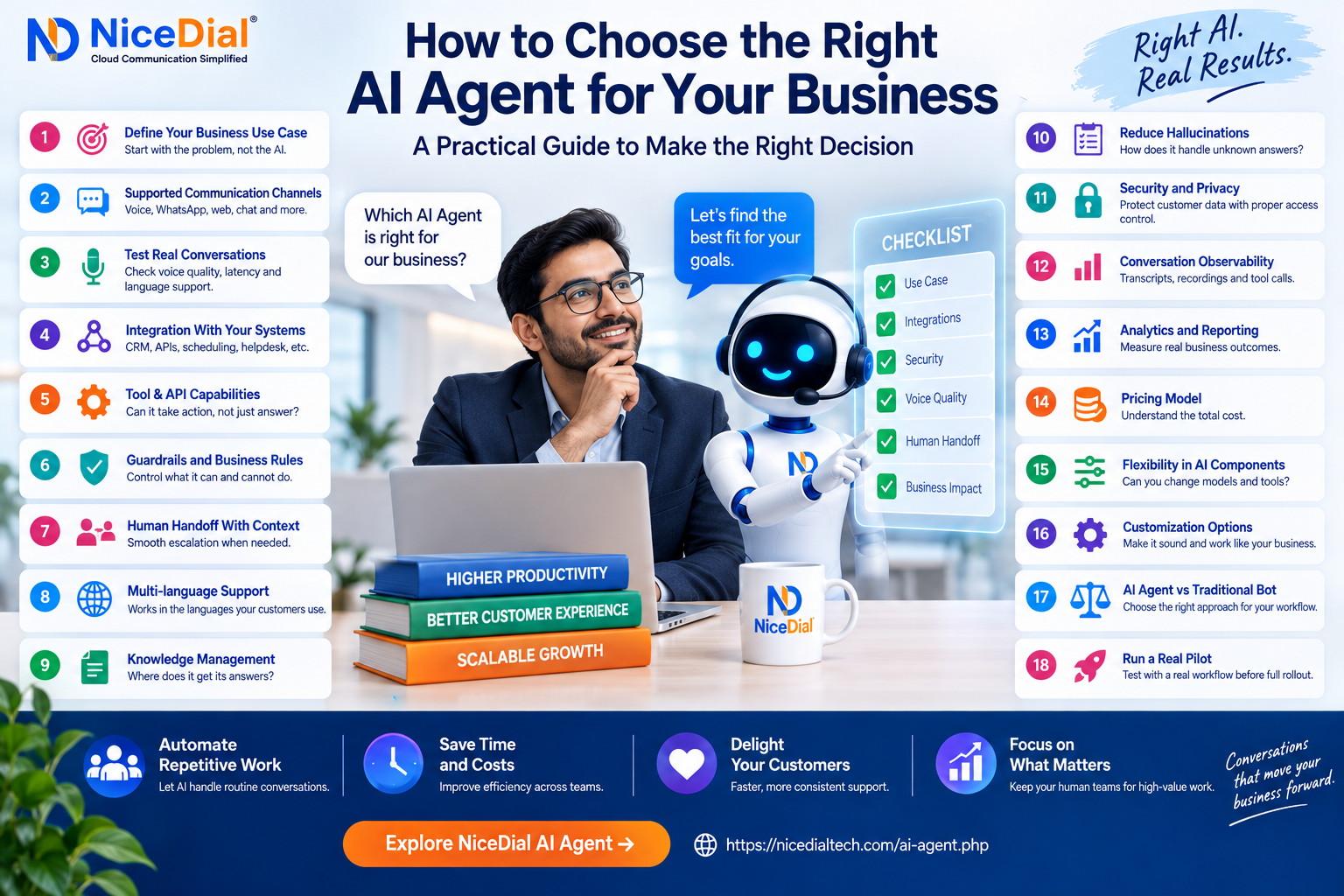
For business use, the AI Agent also needs to understand your workflow, connect with your systems, follow business rules, communicate naturally, escalate appropriately, protect customer information, and produce measurable results.
Here are the most important factors to consider before choosing an AI Agent platform.
1. Start With the Business Problem, Not the AI
The first mistake companies make is starting with technology.
They ask:
“How can we use AI?”
Instead, start with:
“Which business problem are we trying to solve?”
For example:
Sales
Do you want AI to:
- Respond to new leads?
- Qualify prospects?
- Schedule demos?
- Follow up automatically?
- Re-engage old leads?
Customer Support
Do you want AI to:
- Answer FAQs?
- Check customer status?
- Create support tickets?
- Retrieve account information?
- Route customers?
Healthcare
Do you want AI to:
- Handle appointment enquiries?
- Check doctor availability?
- Reschedule appointments?
- Send reminders?
- Handle routine patient FAQs?
Contact Center
Do you want AI to:
- Answer incoming calls?
- Run outbound campaigns?
- Identify caller intent?
- Collect customer information?
- Transfer calls to agents?
Define the workflow before evaluating platforms.
A clearly defined use case makes almost every other technology decision easier.
2. Decide Which Communication Channels You Need
Not every AI Agent operates on the same channels.
Your customers may communicate through:
📞 Phone calls
💬 WhatsApp
🌐 Website chat
🎙️ Website voice
📱 Messaging
💻 Internal applications
A company primarily handling phone enquiries may need an AI Voice Agent.
An e-commerce company may prioritize chat and messaging.
A hospital may need a combination of:
Voice + WhatsApp + Website + Human Contact Center
Before selecting a platform, ask:
Can this AI Agent work where our customers already communicate?
Don’t force customers onto a new channel simply because that’s where the AI works.
3. For Voice AI, Test the Conversation — Don’t Just Watch a Demo
Voice AI is significantly different from text chat.
A customer calling your company expects a conversation to feel responsive.
Test the AI Agent yourself.
Ask unusual questions.
Interrupt it.
Change your mind halfway through a sentence.
Use different accents.
Mix languages if that’s common among your customers.
For example:
Customer:
“I need an appointment tomorrow morning… actually, can you check Saturday instead?”
A good conversational system should be able to handle the change naturally within the configured workflow.
Evaluate:
- Response latency
- Speech recognition
- Voice clarity
- Interruption handling
- Turn-taking
- Background-noise performance
- Numbers and names
- Regional accents
- Mixed-language conversations
A polished prerecorded demo doesn’t tell you enough.
Always test a live conversation.
4. Check Whether the AI Agent Can Integrate With Your Existing Systems
This may be one of the most important factors.
An AI Agent that only answers questions is useful.
An AI Agent that can securely interact with your business systems can become much more valuable.
Your AI may need to connect with:
- CRM
- ERP
- Helpdesk
- Appointment system
- Customer database
- Order-management system
- Hospital Management System
- Billing platform
- Lead-management system
- Custom applications
- Internal APIs
Consider a customer asking:
“What’s the status of my application?”
Without integration, the AI may only explain how to check the status.
With an approved integration, the workflow could become:
Customer
↓
AI Agent
↓
Customer Verification
↓
CRM/API Lookup
↓
Retrieve Status
↓
Provide Approved Response
That’s the difference between an AI that talks and an AI that can participate in a business workflow.
5. Look for Tool and API Capabilities
Modern AI Agents can use tools to perform specific actions.
For example, an AI Agent might call an API to:
- Search customer records
- Check appointment availability
- Create appointments
- Update CRM records
- Create support tickets
- Retrieve order status
- Schedule callbacks
- Check account information
But API access should be controlled.
The AI shouldn’t have unrestricted access to everything.
A good implementation defines:
What the AI can read
What the AI can update
Which actions require verification
Which actions require human approval
Which actions are prohibited
This creates a controlled automation layer between conversational AI and your business systems.
6. Evaluate Guardrails and Business Rules
Businesses cannot rely on an AI Agent simply “doing its best.”
You need rules.
Imagine an AI Agent working for a financial-services company.
It may be allowed to:
✅ Explain approved product information
✅ Collect lead details
✅ Check application status
✅ Schedule a callback
But it may not be allowed to:
❌ Make unauthorized financial commitments
❌ Change sensitive account information without verification
❌ Invent pricing
❌ Reveal another customer’s information
Similarly, a hospital AI Agent may handle administrative appointment workflows but should not be treated as a replacement for emergency or clinical care.
Ask vendors:
“How do we control what the AI is allowed to do?”
Guardrails are just as important as intelligence.
7. Check Human Handoff Capabilities
One of the most important capabilities of a business AI Agent is knowing when not to continue.
Some conversations require a person.
Examples include:
- Complex complaints
- Negotiations
- Exceptions
- Sensitive conversations
- High-value sales opportunities
- Specialized technical problems
- Clinical matters
- Situations requiring judgment
The AI should be able to escalate appropriately.
But there’s another important question:
Does the human agent receive the conversation context?
Consider this lead:
Name: Rahul Sharma
Requirement: Cloud Contact Center
Users: 75
CRM: Existing CRM integration required
Timeline: 30 days
Demo: Requested
When AI transfers Rahul to sales, the salesperson should ideally receive this information.
Instead of asking:
“How can I help you?”
the salesperson can say:
“Rahul, I understand you’re evaluating a cloud contact center for around 75 users and need CRM integration.”
That’s a much better handoff.
8. Evaluate Multi-Language Capabilities
If your customers communicate in multiple languages, language support becomes critical.
This is especially important in markets such as India.
Customers may speak:
Hindi
English
Tamil
Telugu
Kannada
Marathi
or switch between languages during the same conversation.
For example:
“Mujhe appointment reschedule karni hai for Saturday morning.”
Don’t evaluate language support by looking at a checkbox that says:
Hindi Supported ✓
Test real conversations.
Evaluate:
- Regional pronunciation
- Code-switching
- Names
- Addresses
- Product terminology
- Numbers
- Dates
- Industry-specific words
Supporting a language and delivering a good business conversation in that language are not necessarily the same thing.
9. Understand How the AI Gets Its Knowledge
Ask:
“Where does the AI get its answers?”
Depending on the implementation, knowledge may come from:
- Website content
- FAQs
- Product documentation
- CRM
- Knowledge bases
- Internal documents
- Databases
- APIs
- Approved scripts
Businesses should also understand how that information is maintained.
If your pricing changes tomorrow, how quickly can the AI be updated?
If a policy is discontinued, how do you prevent the AI from giving outdated information?
If different customers have different plans, can the AI retrieve customer-specific information after appropriate verification?
Knowledge management is an ongoing operational requirement—not just a one-time setup task.
10. Ask How the Platform Reduces Hallucinations
Generative AI can sometimes produce incorrect information.
For business applications, this risk must be managed carefully.
The right architecture may use combinations of:
- Approved knowledge sources
- Retrieval
- Structured API responses
- Business rules
- Prompt controls
- Tool restrictions
- Validation
- Confidence handling
- Human escalation
For sensitive workflows, don’t simply ask:
“How accurate is your AI?”
Ask:
“What happens when the AI doesn’t know the answer?”
Sometimes the best response from an AI Agent is:
“I don’t have enough information to confirm that. Let me connect you with our team.”
Knowing when not to answer is an important capability.
11. Evaluate Security, Privacy and Access Control
AI Agents may interact with customer information.
Security therefore needs to be part of the architecture from the beginning.
Evaluate areas such as:
🔐 Authentication
🔐 Role-based access
🔐 API permissions
🔐 Encryption
🔐 Audit logs
🔐 Data retention
🔐 Customer verification
🔐 Recording policies
🔐 Consent requirements
Ask:
- What customer information can the AI access?
- Where is conversation data stored?
- Who can view transcripts?
- How long are recordings retained?
- Can sensitive information be masked?
- Are actions logged?
- Can permissions be restricted by workflow?
Requirements will vary by industry, geography and use case, so businesses should also evaluate their applicable legal and compliance obligations.
12. Look for Conversation Observability
You should be able to understand what your AI Agent is doing.
Useful operational information can include:
- Conversation transcripts
- Call recordings where appropriate
- Customer intent
- AI responses
- Tool/API calls
- Transfer reasons
- Response latency
- Failed interactions
- Automation outcomes
Without visibility, improving the AI becomes difficult.
For example, if customers repeatedly ask something the AI cannot answer, your team should be able to identify that pattern and improve the workflow.
AI Agents should improve through observed business interactions, not guesswork.
13. Check Analytics and Reporting
Don’t evaluate an AI Agent only by how impressive the conversation sounds.
Measure business outcomes.
Depending on your use case, track:
Sales AI
- Leads engaged
- Leads qualified
- Follow-ups completed
- Meetings booked
- Human transfers
Customer Support AI
- Conversations handled
- Resolution rate
- Escalation rate
- Common intents
- Average response time
Voice AI
- Calls answered
- Call duration
- Successful outcomes
- Transfers
- Failed conversations
- Abandonment
Appointment AI
- Appointments booked
- Appointments rescheduled
- Confirmations
- Cancellations
- Reminder outcomes
The goal isn’t:
“Our AI handled 20,000 conversations.”
The better question is:
“What business outcome did those conversations produce?”
14. Understand the Pricing Model
AI Agent pricing can vary significantly.
Platforms may charge by:
- Conversation
- Minute
- Token usage
- AI model usage
- Agent
- User
- Workflow
- API calls
- Telephony usage
- Monthly subscription
For Voice AI, costs can potentially include several components:
Telephony + Speech Recognition + AI Model + Text-to-Speech + Platform
Don’t compare providers based only on the headline price.
Calculate the likely total cost per completed business outcome.
For example:
If Platform A costs less per minute but requires significantly longer calls or more human intervention, it may not actually be cheaper.
15. Check Whether You Can Change the Underlying AI Components
AI technology is evolving rapidly.
The best model today may not be the best option for every use case tomorrow.
Depending on your requirements, it can be useful to understand whether the platform is tightly locked to one AI provider or supports flexibility across components.
This could include:
- Large Language Models
- Speech-to-Text
- Text-to-Speech
- Knowledge sources
- Telephony
- Business APIs
The objective isn’t necessarily to switch providers constantly.
It’s to avoid making your entire business workflow unnecessarily dependent on one technology component.
16. Evaluate Customization
Your AI Agent represents your business.
It shouldn’t sound like the same generic assistant used by hundreds of other companies.
Look for customization around:
- Greeting
- Tone
- Business terminology
- Workflow
- Qualification questions
- Escalation rules
- Voice
- Language
- Tools
- Knowledge
- Compliance statements
A hospital AI receptionist and a fintech sales agent should not behave the same way.
Your AI should reflect the purpose, policies and communication style of the workflow.
17. Choose AI Agent, Voice Bot or Hybrid Carefully
Not every workflow requires generative conversational AI.
Sometimes a deterministic Voice Bot or traditional automation is the better option.
Use Scripted Automation When:
- The workflow is highly predictable.
- Exact wording is required.
- The journey has limited branches.
- Deterministic behavior is important.
Use an AI Agent When:
- Customers ask questions naturally.
- Conversations vary significantly.
- Follow-up questions are required.
- Multiple systems need to be queried.
- Intent cannot easily be represented by menus.
Use a Hybrid Approach When:
You need both.
For example:
Incoming Call
↓
AI Understands Requirement
↓
Structured Workflow
↓
API/CRM
↓
AI Continues Conversation
↓
Human Agent if Required
The goal should be to use the right automation for each part of the customer journey.
18. Run a Real Pilot Before a Full Rollout
Don’t deploy an AI Agent across your entire operation on day one.
Choose one workflow.
For example:
AI Agent for Appointment Rescheduling
or
AI Agent for Lead Qualification
or
AI Agent for After-Hours Enquiries
Run a controlled pilot.
Use real-world scenarios.
Identify where the AI succeeds.
Identify where it fails.
Improve prompts, integrations, knowledge and escalation rules.
Then expand.
A practical rollout could look like:
One Use Case → Pilot → Measure → Improve → Expand
AI Agent Evaluation Checklist
Before selecting a platform, ask these questions:
| Area | Question |
|---|---|
| Business Use Case | What exact task are we automating? |
| Channels | Voice, WhatsApp, web or multiple channels? |
| Conversation | Does it handle natural dialogue well? |
| Voice | Is latency acceptable? |
| Languages | Does it work with our customers’ real speech? |
| Integration | Can it connect with our CRM/APIs? |
| Actions | Can it perform approved business actions? |
| Knowledge | Where does it get its answers? |
| Guardrails | How do we restrict its behavior? |
| Verification | Can sensitive actions require authentication? |
| Human Handoff | Can it transfer with context? |
| Security | How is customer data protected? |
| Observability | Can we inspect conversations and tool calls? |
| Analytics | Can we measure business outcomes? |
| Customization | Can we configure workflows and behavior? |
| Scalability | Can it support increasing conversation volume? |
| Pricing | What is the total cost of operation? |
| Pilot | Can we test it with a real workflow first? |
Don’t choose your AI Agent until you can answer these questions.
Don’t Choose an AI Agent Based Only on the LLM
Businesses frequently focus on questions such as:
“Which model are you using?”
That’s useful to know.
But your customer doesn’t care which model produced the answer.
They care whether:
The call was answered quickly.
The AI understood them.
Their information was correct.
Their appointment was booked.
Their problem was resolved.
They reached a human when necessary.
The complete system matters more than a single model.
Think about:
AI Model + Voice + Telephony + Knowledge + APIs + Business Rules + Security + Human Handoff
That’s the actual AI Agent architecture.
Where NiceDial AI Agent Fits
NiceDial AI Agent is designed for businesses that want conversational AI connected with real communication and business workflows.
Depending on the use case, organizations can build workflows around:
- AI Voice conversations
- Customer enquiries
- Lead qualification
- Lead follow-up
- Appointment automation
- CRM/API lookups
- Business-tool integrations
- Intelligent call routing
- Human-agent escalation
For voice use cases, the architecture can combine conversational AI with NiceDial Cloud Telephony and existing business systems.
A typical workflow could look like:
Customer
↓
↓
NiceDial AI Agent
↓
CRM / API / Business System
↓
Approved Action
↓
Resolution or Human Agent
The objective isn’t to make every conversation AI-only.
It’s to use AI where it improves the workflow and bring people in where human judgment adds value.
The Right AI Agent Is the One That Solves Your Business Problem
There’s no universal “best AI Agent.”
The right platform depends on:
- Your customers
- Your industry
- Your communication channels
- Your existing systems
- Your languages
- Your security requirements
- Your workflow complexity
- Your automation goals
Don’t begin with:
“Which AI model is best?”
Begin with:
“What customer or business workflow do we want to improve?”
Then evaluate whether the AI Agent can reliably complete that workflow.
Start With One Real Business Workflow
If you’re considering AI Agents, select one repetitive process from your business.
For example:
Lead Qualification
Appointment Booking
After-Hours Calls
Customer Support
Lead Follow-Up
Customer Verification + CRM Lookup
Build the workflow.
Test it with real conversations.
Measure the outcome.
Then decide whether to expand.
That’s a much stronger AI strategy than implementing AI everywhere simply because it’s available.
🚀 Explore NiceDial AI Agent
Discover how conversational AI can work with Voice, Cloud Telephony, CRM, APIs and Human Agents to automate suitable business conversations and workflows.
NiceDial AI Agent — Conversational AI connected to real business workflows.
Frequently Asked Questions
How do I choose the right AI Agent for my business?
Start by defining the specific business workflow you want to automate. Then evaluate conversation quality, channels, integrations, API capabilities, guardrails, security, human handoff, reporting, language support and total operating cost.
What should I look for in an AI Voice Agent?
Evaluate real-world speech recognition, response latency, interruption handling, voice quality, telephony integration, multilingual performance, API connectivity and human transfer.
Does an AI Agent need CRM integration?
Not every use case requires CRM integration. However, integration becomes important when the AI needs to retrieve customer-specific information, update records or trigger business workflows.
Can AI Agents replace customer-service agents?
AI Agents are better viewed as an automation layer for suitable repetitive conversations. Complex problems, sensitive interactions, exceptions, negotiations and judgment-heavy situations may still require human employees.
Can AI Agents make phone calls?
Voice-enabled AI Agents can support inbound and outbound phone workflows when connected with suitable telephony infrastructure.
Should I choose an AI Agent or a traditional chatbot?
A traditional chatbot may be sufficient for simple FAQ and menu-based interactions. AI Agents become more useful when conversations require natural language, multiple steps, external tools, APIs or contextual actions.
How should businesses test an AI Agent?
Start with a controlled pilot around one real workflow. Test normal conversations, interruptions, unexpected questions, incorrect information, system failures, escalation cases and real customer language before expanding deployment.